
Superb quality and spec AB-Com PULSe 4K SE. Crazy offer! Only £129! FREE UK DELIVERY! 4K UHD, Enigma 2, Multiboot 4 images & more!...
Superb quality and spec AB-Com PULSe 4K Rev II Twin Satellite tuner only £179! FREE UK DELIVERY! 4K UHD, Enigma 2, SATA HDD facility, Multiboot 4 images & more!...
You are using an out of date browser. It may not display this or other websites correctly.
You should upgrade or use an alternative browser.
You should upgrade or use an alternative browser.
Technomate Twin 4K help Please
- Thread starter redman1
- Start date


abu baniaz
Moderator
The same as you were using in esetting+
root
no password unless you set one
root
no password unless you set one

abu baniaz
Moderator
You are logged in. Please paste the command I posted.
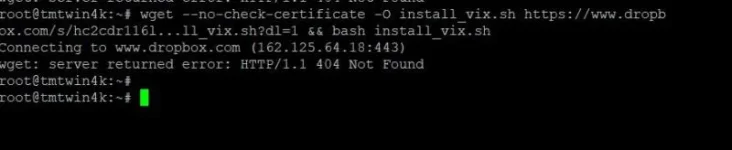
abu baniaz
Moderator
One sec, I have Grog to check his script.

abu baniaz
Moderator
While we await grog's script, unzip the image file and transfer to the USB/HDD. Then issue the following command
As an example:
As an example:
Code:
ofgwrite -r -k /media/hdd/update/tmtwin4kabu baniaz
Moderator
This should work
Code:
wget --no-check-certificate -O installvix.sh https://dl.dropboxusercontent.com/s/hc2cdr116lvx3dj/install_vix.sh && bash installvix.shabu baniaz
Moderator
I'm probably way off mark
But in webif what happens if I press factory reset?
I thought we were trying to flash an image
You can use the remote on OWIF to control box to perform a factory reset. But that version of factory reset does not do much. You will still have an image that is 4+ years old. I know old is gold and all that. But we have been this for a while now, might as well as see it through.
If your remote is broken and not controlling the box, you will have to use the OWIF remote to set it up/control it. There are apps on phone to duplicate remote too.
Hello
Thanks for all of your never ending help
It does not look like we can fix today so maybe we should leave it.
Im also getting a security message from putty.
So shall we leave until another time?
Thanks for bearing with me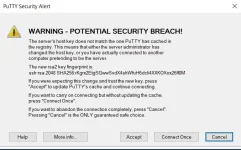
Thanks for all of your never ending help
It does not look like we can fix today so maybe we should leave it.
Im also getting a security message from putty.
So shall we leave until another time?
Thanks for bearing with me
abu baniaz
Moderator
Not sure why you are getting that. Did you get it from the link in my guide?
Altrenatively, enable telnet client in windows and use that if you want. You would then issue following command at prompt
Anyway, here is another option
Menu > Setup > Vix > Scriptrunner > exit (This is so it creates the required folder)
Unzip this file. Transfer this file to "usr/script" might be "usr/scripts"
chmod 755, (right click and properties)
Menu > Setup > Vix > Scriptrunner
Then select the script
We have a few options on the go. Not really what I like to do as I prefer exhausting one at a time.
Code:
https://www.chiark.greenend.org.uk/~sgtatham/putty/latest.htmlAltrenatively, enable telnet client in windows and use that if you want. You would then issue following command at prompt
Code:
telnet 192.xxx.xx.x.Anyway, here is another option
Menu > Setup > Vix > Scriptrunner > exit (This is so it creates the required folder)
Unzip this file. Transfer this file to "usr/script" might be "usr/scripts"
chmod 755, (right click and properties)
Menu > Setup > Vix > Scriptrunner
Then select the script
We have a few options on the go. Not really what I like to do as I prefer exhausting one at a time.
Attachments
B
BrokenUnusableAccount
Guest
Hello
Thanks for all of your never ending help
It does not look like we can fix today so maybe we should leave it.
Im also getting a security message from putty.
So shall we leave until another time?
Thanks for bearing with meView attachment 63391
That message is fairly normal, just click [Accept]
Hello
Thanks to all the support I received yesterday. I learned so many things I did not know before. OpenWebif , Angryip and Started to be shown Putty.
It just shows what a great support this Forum has, and the patience with those who helped .
Can We continue if someone is there again.
I have issues again, even though my tv has a satellite picture and the Remote control is working now.
Thanks one and all
Thanks to all the support I received yesterday. I learned so many things I did not know before. OpenWebif , Angryip and Started to be shown Putty.
It just shows what a great support this Forum has, and the patience with those who helped .
Can We continue if someone is there again.
I have issues again, even though my tv has a satellite picture and the Remote control is working now.
Thanks one and all
I cannot get Openwebif to run on my PC I typed http://tmtwin4k.local into the address bar and it fails every time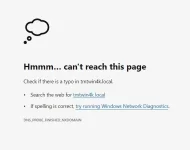
abu baniaz
Moderator
Maybe your router is not resolving the hostname. Just enter the IP address of receiver.
What problem are you having?
Have you flashed 6.0 007 yet?
What problem are you having?
Have you flashed 6.0 007 yet?
Hello again . You have been amazing with your help.
I cannot thank you enough.
I have a big problem
As I mentioned, the box is working on the tv and I get a picture. BUT now it has OpenPLI installed.!!! How did that happen?
I cannot thank you enough.
I have a big problem
As I mentioned, the box is working on the tv and I get a picture. BUT now it has OpenPLI installed.!!! How did that happen?
abu baniaz
Moderator
I don't know. They don't flash themselves. Did you have a USB stick in the receiver with the 4D/pli image?
Can you press select Menu > Information > About and take a screenshot/clear picture and uplaod it.
Do you want to flash Vix on it?
Can you press select Menu > Information > About and take a screenshot/clear picture and uplaod it.
Do you want to flash Vix on it?
Similar threads

- Replies
- 10
- Views
- 520
- Replies
- 1
- Views
- 2K

[Mut@nt HD2400]
feeds and status-message.php for self built 6.8.007 ?
- Replies
- 6
- Views
- 630