
Superb quality and spec AB-Com PULSe 4K SE. Crazy offer! Only £129! FREE UK DELIVERY! 4K UHD, Enigma 2, Multiboot 4 images & more!...
Superb quality and spec AB-Com PULSe 4K Rev II Twin Satellite tuner only £179! FREE UK DELIVERY! 4K UHD, Enigma 2, SATA HDD facility, Multiboot 4 images & more!...
You are using an out of date browser. It may not display this or other websites correctly.
You should upgrade or use an alternative browser.
You should upgrade or use an alternative browser.
Technomate Twin 4K help Please
- Thread starter redman1
- Start date



abu baniaz
Moderator
Best you check the USB sticks for any images on them to be safe.
Ftp the vix image (still zipped) to the root of the hdd. i.e not in a folder. Then
Menu > Setup > Flash image > Downloaded image
The vix image should be there and you can flash it.
Ftp the vix image (still zipped) to the root of the hdd. i.e not in a folder. Then
Menu > Setup > Flash image > Downloaded image
The vix image should be there and you can flash it.
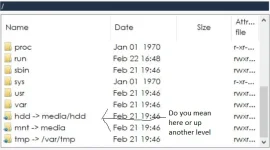
abu baniaz
Moderator
Yes, that is correct location.
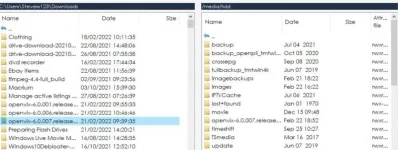
abu baniaz
Moderator
Pleas flash it as per rest of instructions in post 82. Please post a screenshot/clear picture if there is a problem
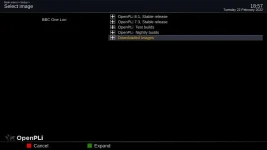
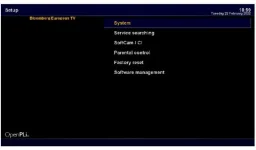
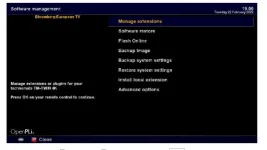
Menu > Setup > Flash image > Downloaded image
It should look similar to the attached screenshot. You will have to account for ~3 years of changes and the fact you are not using an official PLi image
Menu > Setup > Flash image > Downloaded image
It should look similar to the attached screenshot. You will have to account for ~3 years of changes and the fact you are not using an official PLi image
Attachments
Last edited:
abu baniaz
Moderator
Flash online

abu baniaz
Moderator
It is just an invocation of ofgwrite. He also has Dimitrij's automatic full backup installed which can be used to flash as well as the command line method we suggested yesterday.Hopefully, I might learn something here.
I am going out until about 20:00, so hopefully he will be done by then.
Hello
First I could not find the file So I FTP the unzipped file into the Images directory. As you can see, there is the OpenPLI image there.
I flashed and now there is Openvix on the box.
There is another message. See picture.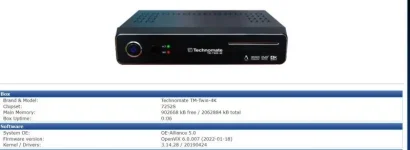
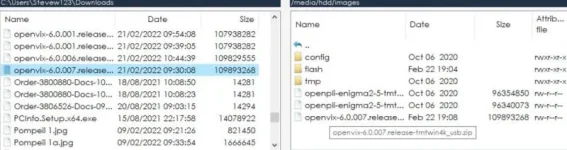
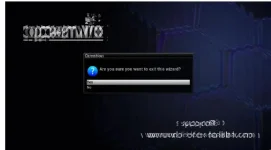
First I could not find the file So I FTP the unzipped file into the Images directory. As you can see, there is the OpenPLI image there.
I flashed and now there is Openvix on the box.
There is another message. See picture.
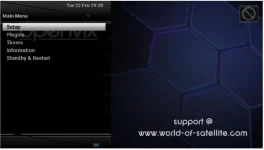
abu baniaz
Moderator
For a motorised satellite dish aligned for USALS, you configure the tuner as:
https://www.world-of-satellite.com/...r-moving-house&p=522439&viewfull=1#post522439
Make sure you set a password on your receiver, otherwise you won't be able to FTP:
https://www.world-of-satellite.com/showthread.php?62552-FTP-Password-now-required
Install your softcam from the plugin menu
Transfer/edit your softcam config, start the softcam to decrypt the card in your box. That is as much as we are allowed to assist with that topic
https://www.world-of-satellite.com/...r-moving-house&p=522439&viewfull=1#post522439
Make sure you set a password on your receiver, otherwise you won't be able to FTP:
https://www.world-of-satellite.com/showthread.php?62552-FTP-Password-now-required
Install your softcam from the plugin menu
Transfer/edit your softcam config, start the softcam to decrypt the card in your box. That is as much as we are allowed to assist with that topic
Hello, It's me again with yet more issues.
I feel like my box is never going to get sorted as to how it used to be before the storms. That's when I lost the access to the box I'm guessing.
I cannot FTP to the box. It is saying the password of "root" is incorrect. How can this have changed??
Any help on top of the amazing previous help will be appreciated.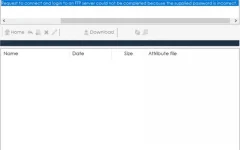
I feel like my box is never going to get sorted as to how it used to be before the storms. That's when I lost the access to the box I'm guessing.
I cannot FTP to the box. It is saying the password of "root" is incorrect. How can this have changed??
Any help on top of the amazing previous help will be appreciated.
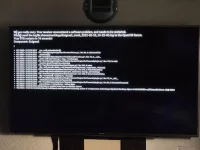
abu baniaz
Moderator
Info: You don't need to insert your pictures inline.
Did you install a plugin to set the password? Was anything wrong with the guide that I posted a link to in post 95? I shall paste it below again.
https://www.world-of-satellite.com/showthread.php?62552-FTP-Password-now-required
Did you install a plugin to set the password? Was anything wrong with the guide that I posted a link to in post 95? I shall paste it below again.
https://www.world-of-satellite.com/showthread.php?62552-FTP-Password-now-required
abu baniaz
Moderator
Yes, there is a plugin installed. Please uninstall it, there is no need for it.
Edit:
Fixed here for next image:
https://github.com/oe-alliance/enigma2-plugins/commit/8c45e12b8918f700b6c1c2f46797f0c3fa29cbcf
Code:
https://github.com/oe-alliance/enigma2-plugins/blob/master/setpasswd/src/plugin.py#L82
Code:
<   173.2605> 00:51:31.2379 [ActionMap] Keymap 'OkCancelActions' -> Action = 'ok'.
<   173.2674> 00:51:31.2448 Traceback (most recent call last):
<   173.2675> 00:51:31.2449   File "/usr/lib/enigma2/python/Components/ActionMap.py", line 60, in action
<   173.2686> 00:51:31.2460     res = self.actions[action]()
<   173.2687> 00:51:31.2461   File "/usr/lib/enigma2/python/Screens/Menu.py", line 86, in okbuttonClick
<   173.2697> 00:51:31.2471     selection[1]()
<   173.2698> 00:51:31.2471   File "/usr/lib/enigma2/python/Tools/BoundFunction.py", line 10, in __call__
<   173.2703> 00:51:31.2477     return self.fnc(*self.args + args, **newkwargs)
<   173.2704> 00:51:31.2478   File "/usr/lib/enigma2/python/Plugins/SystemPlugins/SetPasswd/plugin.py", line 138, in main
<   173.2708> 00:51:31.2482     session.open(ChangePasswdScreen)
<   173.2708> 00:51:31.2482   File "/usr/lib/enigma2/python/StartEnigma.py", line 342, in open
<   173.2715> 00:51:31.2489     dlg = self.current_dialog = self.instantiateDialog(screen, *arguments, **kwargs)
<   173.2715> 00:51:31.2489   File "/usr/lib/enigma2/python/StartEnigma.py", line 279, in instantiateDialog
<   173.2721> 00:51:31.2495     return self.doInstantiateDialog(screen, arguments, kwargs, self.desktop)
<   173.2722> 00:51:31.2496   File "/usr/lib/enigma2/python/StartEnigma.py", line 302, in doInstantiateDialog
<   173.2729> 00:51:31.2502     dlg = screen(self, *arguments, **kwargs)
<   173.2729> 00:51:31.2503   File "/usr/lib/enigma2/python/Plugins/SystemPlugins/SetPasswd/plugin.py", line 70, in __init__
<   173.2734> 00:51:31.2508     self.buildList(self.GeneratePassword())
<   173.2735> 00:51:31.2508   File "/usr/lib/enigma2/python/Plugins/SystemPlugins/SetPasswd/plugin.py", line 82, in GeneratePassword
<   173.2738> 00:51:31.2512     passwdChars = string.letters + string.digits
<   173.2739> 00:51:31.2513 AttributeError: module 'string' has no attribute 'letters'
<   173.2740> 00:51:31.2514 [ePyObject] (CallObject(<bound method ActionMap.action of <Components.ActionMap.HelpableActionMap object at 0xb09d5988>>,('OkCancelActions', 'ok')) failed)
Edit:
Fixed here for next image:
https://github.com/oe-alliance/enigma2-plugins/commit/8c45e12b8918f700b6c1c2f46797f0c3fa29cbcf
Last edited:
Similar threads

- Replies
- 10
- Views
- 520
- Replies
- 1
- Views
- 2K

[Mut@nt HD2400]
feeds and status-message.php for self built 6.8.007 ?
- Replies
- 6
- Views
- 630