
Superb quality and spec AB-Com PULSe 4K SE. Crazy offer! Only £99! FREE UK DELIVERY! 4K UHD, Enigma 2, Multiboot 4 images & more!...
Superb quality and spec AB-Com PULSe 4K Rev II Twin Satellite tuner only £149! FREE UK DELIVERY! 4K UHD, Enigma 2, SATA HDD facility, Multiboot 4 images & more!...
You are using an out of date browser. It may not display this or other websites correctly.
You should upgrade or use an alternative browser.
You should upgrade or use an alternative browser.
‘Time out error’
- Thread starter imzy82
- Start date


abu baniaz
Moderator
One way to find issue is by issuing the following command using Putty or similar (Telnet protocol) and uploading the output here.
opkg update
opkg update
abu baniaz
Moderator
Hmm, does not show the issue.
Code:
Welcome to OpenViX for zgemmah9sse
openvix 6.8 zgemmah9sse

zgemmah9sse login: root
Password:
root@zgemmah9sse:~# opkg update
Downloading http://www.openvix.co.uk/feeds/openvix/release/6.8/h9se/all/Packages.gz.
Updated source 'openvix-all'.
Downloading http://www.openvix.co.uk/feeds/openvix/release/6.8/h9se/cortexa15hf-neon-vfpv4/Packages.gz.
Updated source 'openvix-cortexa15hf-neon-vfpv4'.
Downloading https://raw.githubusercontent.com/oe-alliance/enigma2-settings-feed/gh-pages/Packages.gz.
Updated source 'enigma2-settings-feed'.
Downloading http://www.openvix.co.uk/feeds/openvix/release/6.8/h9se/h9se/Packages.gz.
Updated source 'openvix-h9se'.
Downloading https://raw.githubusercontent.com/oe-alliance/3rdparty-feed/gh-pages/Packages.gz.
Updated source 'oe-alliance-3rdparty-feed'.
Downloading https://raw.githubusercontent.com/oe-alliance/picons-feed/gh-pages/Packages.gz.
Updated source 'oe-alliance-picon-feed'.
Downloading http://www.openvix.co.uk/feeds/openvix-static/6.8/static-all/Packages.gz.
Updated source 'openvix-static-all'.
Downloading http://www.openvix.co.uk/feeds/openvix-static/6.8/static-cortexa15hf-neon-vfpv4/Packages.gz.
Updated source 'openvix-static-cortexa15hf-neon-vfpv4'.
Downloading http://www.openvix.co.uk/feeds/openvix-static/6.8/static-h9se/Packages.gz.
Updated source 'openvix-static-h9se'.
Downloading http://www.openvix.co.uk/feeds/openvix/release/6.8/h9se/zgemmah9sse/Packages.gz.
Updated source 'openvix-zgemmah9sse'.
root@zgemmah9sse:~#Will do this now and get back to you.One way to find issue is by issuing the following command using Putty or similar (Telnet protocol) and uploading the output here.
opkg update
zgemmah7 login: root
Password:
root@zgemmah7:~# opkg update
Downloading http://www.openvix.co.uk/feeds/openvix/release/6.8/h7/all/Packages.g z.
Updated source 'openvix-all'.
Downloading http://www.openvix.co.uk/feeds/openvix/release/6.8/h7/cortexa15hf-ne on-vfpv4/Packages.gz.
Updated source 'openvix-cortexa15hf-neon-vfpv4'.
Downloading https://raw.githubusercontent.com/oe-alliance/enigma2-settings-feed/ gh-pages/Packages.gz.
Updated source 'enigma2-settings-feed'.
Downloading http://www.openvix.co.uk/feeds/openvix/release/6.8/h7/h7/Packages.gz .
Updated source 'openvix-h7'.
Downloading https://raw.githubusercontent.com/oe-alliance/3rdparty-feed/gh-pages /Packages.gz.
Updated source 'oe-alliance-3rdparty-feed'.
Downloading https://raw.githubusercontent.com/oe-alliance/picons-feed/gh-pages/P ackages.gz.
Updated source 'oe-alliance-picon-feed'.
Downloading http://www.openvix.co.uk/feeds/openvix-static/6.8/static-all/Package s.gz.
Updated source 'openvix-static-all'.
Downloading http://www.openvix.co.uk/feeds/openvix-static/6.8/static-cortexa15hf -neon-vfpv4/Packages.gz.
Updated source 'openvix-static-cortexa15hf-neon-vfpv4'.
Downloading http://www.openvix.co.uk/feeds/openvix-static/6.8/static-h7/Packages .gz.
Updated source 'openvix-static-h7'.
Downloading http://www.openvix.co.uk/feeds/openvix/release/6.8/h7/zgemmah7/Packa ges.gz.
Updated source 'openvix-zgemmah7'.
Password:
root@zgemmah7:~# opkg update
Downloading http://www.openvix.co.uk/feeds/openvix/release/6.8/h7/all/Packages.g z.
Updated source 'openvix-all'.
Downloading http://www.openvix.co.uk/feeds/openvix/release/6.8/h7/cortexa15hf-ne on-vfpv4/Packages.gz.
Updated source 'openvix-cortexa15hf-neon-vfpv4'.
Downloading https://raw.githubusercontent.com/oe-alliance/enigma2-settings-feed/ gh-pages/Packages.gz.
Updated source 'enigma2-settings-feed'.
Downloading http://www.openvix.co.uk/feeds/openvix/release/6.8/h7/h7/Packages.gz .
Updated source 'openvix-h7'.
Downloading https://raw.githubusercontent.com/oe-alliance/3rdparty-feed/gh-pages /Packages.gz.
Updated source 'oe-alliance-3rdparty-feed'.
Downloading https://raw.githubusercontent.com/oe-alliance/picons-feed/gh-pages/P ackages.gz.
Updated source 'oe-alliance-picon-feed'.
Downloading http://www.openvix.co.uk/feeds/openvix-static/6.8/static-all/Package s.gz.
Updated source 'openvix-static-all'.
Downloading http://www.openvix.co.uk/feeds/openvix-static/6.8/static-cortexa15hf -neon-vfpv4/Packages.gz.
Updated source 'openvix-static-cortexa15hf-neon-vfpv4'.
Downloading http://www.openvix.co.uk/feeds/openvix-static/6.8/static-h7/Packages .gz.
Updated source 'openvix-static-h7'.
Downloading http://www.openvix.co.uk/feeds/openvix/release/6.8/h7/zgemmah7/Packa ges.gz.
Updated source 'openvix-zgemmah7'.

Well it isn't for me, I'm on 6.8.009 build, message pops up each time I try to access plugins or check for software.So it works...
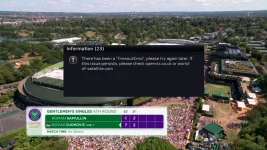
There has been a 'Timeouterror' please try again later. If the this issue persists
Please check openvix.co.uk or world-of-satellite.com

menu/setup/system/logs ---> settings then enable logs, save to HDD/usb, local time take restart and post debug log when you have this problem.Well it isn't for me, I'm on 6.8.009 build, message pops up each time I try to access plugins or check for software.
There has been a 'Timeouterror' please try again later. If the this issue persists
Please check openvix.co.uk or world-of-satellite.com
you are using WiFi connection? Its looks like its trying to download via Lan interface.debug log
so Menu/Setup/Network - ensure LAN connection is disabled (X) and WiFi is enabled.
Restart and check again.
Then backup settings using BackupManager.
Following from log shows only response and ping on Wlan3I have always used LAN connection, don't have wifi.
11:07:54.5376 [About] ifreq:{'ifname': 'eth0', 'addr': '192.168.1.60', 'brdaddr': '192.168.1.255', 'hwaddr': '00:17:9A:25:42:9E', 'netmask': '255.255.255.0'}
11:07:54.5473 [About] getIfConfig Ex: [Errno 19] No such device
11:07:54.5481 [About] ifreq:{'ifname': 'eth1'}
11:07:54.5567 [About] getIfConfig Ex: [Errno 19] No such device
11:07:54.5574 [About] ifreq:{'ifname': 'ra0'}
11:07:54.5664 [About] getIfConfig Ex: [Errno 19] No such device
11:07:54.5672 [About] ifreq:{'ifname': 'wlan0'}
11:07:54.5762 [About] getIfConfig Ex: [Errno 19] No such device
11:07:54.5770 [About] ifreq:{'ifname': 'wlan3'}
11:07:54.6392 [Skin] Processing screen 'SystemNetworkInfo' from list 'SystemNetworkInfo, WlanStatus', position=(0, 0), size=(1920 x 1080) for module 'SystemNetworkInfo'.
11:07:54.6596 [Console] command: ('/usr/sbin/ethtool', '/usr/sbin/ethtool', 'eth0')
11:07:54.6602 [eConsoleAppContainer] Starting /usr/sbin/ethtool
11:07:54.6644 [Skin] Parsing embedded skin '<embedded-in-AboutSummary>'.
11:07:54.6658 [Skin] Processing screen '<embedded-in-AboutSummary>', position=(0, 0), size=(132 x 64) for module 'AboutSummary'.
11:07:54.6929 [Console] finished: /usr/sbin/ethtool
11:07:54.6949 [Console] command: ('/bin/ping', '/bin/ping', '-c', '1', 'www.microsoft.com')
11:07:54.6958 [eConsoleAppContainer] Starting /bin/ping
11:07:54.7015 [Console] command: ('/bin/ping', '/bin/ping', '-c', '1', 'www.google.com')
11:07:54.7025 [eConsoleAppContainer] Starting /bin/ping
11:07:54.7166 [Console] finished: ('/bin/ping', '/bin/ping', '-c', '1', 'www.google.com')@0xaf3b1c10
11:07:54.7195 [Console] finished: /bin/ping
So what does it say here …Menu/Setup/Network?That is weird, never had wlan on the box, been using wired connection from day one. What to do?
Also check lan cable and connection
Network: Lan connection
I have restarted network and done a network test all seems to be working fine. Channels are running fine, xstreamity running good. Only thing is not working is accessing plugins, checking software updates. However image manager is okay downloaded 6.8.009 on another slot with out restore settings but still showing time out error.
I have restarted network and done a network test all seems to be working fine. Channels are running fine, xstreamity running good. Only thing is not working is accessing plugins, checking software updates. However image manager is okay downloaded 6.8.009 on another slot with out restore settings but still showing time out error.

Manno
Member
#
Last edited:


Willo3092
ViX Beta Tester
I had this error when checking for a software update earlier.
It worked fine after a full reboot of the box.
It worked fine after a full reboot of the box.
I did the reboot still comes up with that message. So it’s just not me then.I had this error when checking for a software update earlier.
It worked fine after a full reboot of the box.
View attachment 68911
Willo3092
ViX Beta Tester
I actually ran 'opkg update' from putty and then did a full reboot.
Don't know if that made a difference
Don't know if that made a difference


