Superb quality and spec AB-Com PULSe 4K SE. Crazy offer! Only £129! FREE UK DELIVERY! 4K UHD, Enigma 2, Multiboot 4 images & more!...
Superb quality and spec AB-Com PULSe 4K Rev II Twin Satellite tuner only £179! FREE UK DELIVERY! 4K UHD, Enigma 2, SATA HDD facility, Multiboot 4 images & more!...

[TM-TWIN 4K] TM Twin 4K - Overhang

Asrampd

New member
Joined
Sep 18, 2017
Messages
34
Reaction score
0
Points
0
Newbie - When the reciever was on the as supplied TM software there were no screen related issues. Now that I have put the VIX on , it alol looks to be in good order but the display is clipped on the left side ...

So the first letter in all menus is off screen. i have found the "Position setup" feature but this appears to relate to menus not the entire display.

All other boxes (e.g Sky box) display correctly.

Can you help please ?

Asrampd
 
I don't know what "Overscan" is. I did of course look all through the menus on the TV (an 7yo "LG")

The screen settings make no reference to Overscan, I have tried changing it from "Just scan" to 16:9 and that makes no difference.
 
Andy - BTW thanks for you reply - I'll try it on another TV Tomorrow.

Asrampd (Dave)
 
Openvix displays "full pixel" ie 1920 x 1080 which is the correct resolution to get the best picture quality. Most TV sets use overscan which appears to enlarge the image cutting off the edges (about 15% of the picture is lost). The feature is called different things on different sets - tell us the exact model number and we may be able to help. If it is only "HD ready" set you many not be able to turn it off.
 
I don't know what "Overscan" is. I did of course look all through the menus on the TV (an 7yo "LG")

The screen settings make no reference to Overscan, I have tried changing it from "Just scan" to 16:9 and that makes no difference.

“Just Scan” should do the trick.


Sent from my iPhone using Tapatalk
 
Openvix displays "full pixel" ie 1920 x 1080 which is the correct resolution to get the best picture quality.

What video resolution was set-up on the TM software?

If the TV is 7 years old it has to rescan to a lower resolution if the box is set to a higher resolution than the pixel count of the TV and perhaps the TV cannot manage this too well. 4K was a twinkle in the designers eyes 7 years ago and maybe no provision for re-scalling that format properly was designed into the TV. Perhaps the problem can be resolved by selecting the "just scan" on the TV and setting the box AV output resolution to match what the TV is capable of without having to re-scale the image.

The sky box, which works, may be outputting 1080i/p rather than 1920 and the TV has no problem with scaling that resolution.
 
Last edited:
If it can't be sorted via the tv (which is the better solution), you can try

Menu/Setup/User Interface/Skin Setup/OSD position.

(I need to use it. :))
 
@adm

Sorry I didn't notice the 4k bit but I doubt the OP is using a 4k tv so it's all still relevant. Factory images assume overscan is turned on. But it's silly on modern sets to have it enabled. Yes I am sure there are thousands of people watching blurays with some of the picture dropped but as they say ignorance is bliss.
 
Hello there,

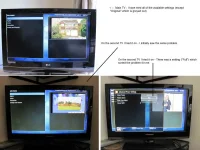
I Have this morning tried the reciever on another tv (See the attached photo).

The upshot of which is that I still have the problem on my main TV.

I was asked about video resolution - where would i find that setting ?

Ta.
 

Attachments

  • overview.webp
    overview.webp
    52.4 KB · Views: 14
TV Model LG "32LF7700" - I have the instructions (attached) I have read them as well as I can (I am Dyslexic) and didn't find anything that I hadn't already tried.

Asrampd (dave)
 

Attachments

See post 8 by ccs. It’s your osd position.
 
TV Model LG "32LF7700" - I have the instructions (attached) I have read them as well as I can (I am Dyslexic) and didn't find anything that I hadn't already tried.

Asrampd (dave)

The setting you want on your TV is "just scan"

On you box go to Menu -> Setup -> Audio and video -> Settings ->

Video Output = HDMI
Automatic Resolution = Disabled
Mode = 1080i
Refresh rate = 50 Hz
Display 4:3 content s = just scale
Display >196:9 content as = just scale

Do these settings cure the problem
 
@adm .... "just scale" or just "scan"?
 
I have typed out a fully reply (and i t said "Auto saved" on screen) but the post did not apper in the list - whaere is it autosaved - drafts or something like that ?
 
..... At the bottom of the Quick Reply box you should see "Restore Auto-Saved Content".
 
please ignor this message - retrieved message wil follow
 
Ok - It is resolved - Thankyou to all that Contributed.

Overscan - i never saw a setting named "Overscan" but I imagine "Just scan" on the LG, and the "Full" on the Poraroid do indeed do that.

What was it ? - well......
The TV has spent at least the last two years already on "Just scan" - and I tried almost all options before putting it back on "Just scan" to no avail.
I did ,as I said , try all of the options in "Picture" - "Aspectratio" which includes the "Just scan" option. Only one option was not tried - "Cinema Zoom settings 1 to 7".

This morming I tried that (Cinema Zoom) - zoming in & out before putting it back on "Just scan" AND BINGO !. I can now see all of the picture and all menus.

I have been a software tester by trade for seven years and Im pretty sure that this is a bug in the TV software.

Guy goes into a bar with a giraffe, the giraffe falls asleep on the floor, next guy comes in and says, "Hey, what's that lyin' on the floor?" bartender says, "It's not a lion, it's a giraffe."

Da\/e..
 

OpenViX Feeds Status

Back
Top