Hold the Phone ...! I've done it ..! Now asking the question why did I want too lol .!
NOTES:- My config for windows 7
1st
Ensure that your "workgroup" name is the same on you sat box as it is on your PC. From build 797 I believe Andy has set it too WORKGROUP mine is set up as VIX, you can make this anything you like as long as they are the same. To test using windows 7 Just go into my computer and click on network on the left hand side and you sound be able to a list of computers on the network. Your box should be there.
2nd
You must ensure you know your computer name Go to Computer and system properties and scroll to the bottom. Mines called "Craig" ignore computers description, just full name is important Case sensitive.
3rd
Sharing your files on windows 7 is essential. I did share several files but the only one that appeared to work was "Users" If you have another pc add it the network and make sure you can access the files on the other pc . As you access them you will be able to see how far you can go down through the folders. If you don't have full access you will have to go back a share the folders individually. Its a pain. Once you happy your can access the desired folders from your other pc then you Might be able to get it to work on your box LOL
4th
On your box Menu/setup / system/network/.. Now I do have samba enabled u share,ftp,nfs and telnet setup. Whether I need them all or not I don't know. In network/Mounts setup/ network browser and hit yellow button, your pc should be listed. If not your you've got something wrong. Pay close attention to you computer name E.g mines says "CRAIG" but my computer name is "Craig" If you click ok on it you'd expect to see your drive but YOU WON'T even when configured you WON'T see it .
5th
In mounts setup got to Mount Manager, add network.
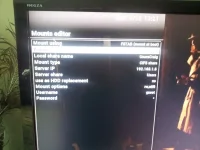
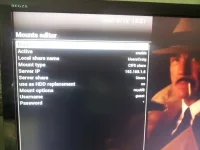
Mount using FSTAB(mount as boot)
Active enable
Local share..........UsersCraig .... This is mine Be very careful here case sensitive This is shared folder and computer name
Mount type..........CIFS share
Server IP.............0.0.0.0....... This is the IP of your PC
Share server.........Users........ This is mine Be very careful here case sensitive This is shared folder name
Use as HDD..........No..........Don't change to yes or your HDD dissappears
Mount options......rw,utf8......... I've never changed this
User name...........guest.......system created this its self
password............... *........system created this its self
Press green to safe and yes to over write
If your user name isn't guest change mount type to NFS and save then go back and change to CIFS and then save Should populate then
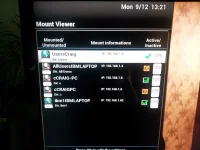
Exit back to network browser and do a rescan you still WON'T see the drive in browse Now click on mount manager and Mount points . Hopefully you will see a drive list. If its green on the left its worked. if its got a little red circle with a cross in it, It hasn't
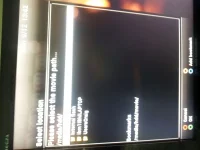
If successful back out to normal tv Press Hdd button to view your recordings then press yellow for locations THEN press menu then switch to file list then to Parent then to list of list of storage devices and hey presto it should be shown.
Hope someone else manages to get this to work, I think the main problem is defo the sharing of folders in windows 7 and user names and folders
Oh P.s if you shut down your pc while still browsing in locations your box will lock. You also have to turn on SETUP UP MOUNT which is in Mount manager You may also have to rescan when you first switch on your PC . Not got that far yet but can see issues arising
Thanks for all you guys help on my issues over the past few months ,hopefully my help here is helpful to you
P.s Why did i want to do this again lol :lifting::thumbsup:

P.P.s When you go to record something you can change the target directory by location and then menu button to allow saving to PC'S