Superb quality and spec AB-Com PULSe 4K SE. Crazy offer! Only £99! FREE UK DELIVERY! 4K UHD, Enigma 2, Multiboot 4 images & more!...
Superb quality and spec AB-Com PULSe 4K Rev II Twin Satellite tuner only £149! FREE UK DELIVERY! 4K UHD, Enigma 2, SATA HDD facility, Multiboot 4 images & more!...

UKCvS AutoBouquets E2 by LraiZer BETA.

Not sure how ch4ni and iceman325 have installed the plugin. Perhaps there has been some corruption. ipks are in the first post as well as manual method should you wish to try. If problem still exists, then disable script check would be the first thing to do.

If auto picon is being used, please note the following from readme file.
Code:
 added AutoPicon support, creates symlinks to static picons.
 first run autobouqets without autopicon option turned on to
 create an updated autobouquets.cvs database reference file.
 install normal picons, set picon location will auto convert.
 create autopicon links option on ext formated location only!

I have disabled script check but same problem.

Can i also double check to which IPK to install as there are three versions, sh4, mipsel & mips32el? I have a vu+ duo running OpenPLI 4.0 image.

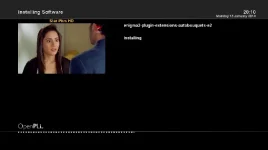
Here is the screenshot of the problem. 1_0_1_2760_7_FC_2_11_A0000_0_0_0.webp
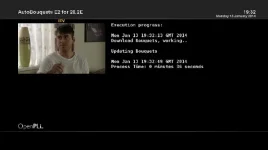
 
Mipsel or mips32el should work. Pay close attention to whether it tries to install from the pli feeds.
 
Mipsel or mips32el should work. Pay close attention to whether it tries to install from the pli feeds.

When doing an install it just says installing and then complete, its not downloading anything. Should it be downloading?

3_0_19_FC9_808_2_11A0000_0_0_0.webp

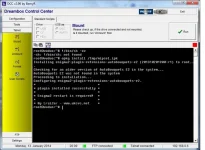
I have done a manual install but no luck.

manual.webp

An old that i used to use did work, it is enigma2-plugin-extensions-autobouquets-e2_201210091615_all.ipk. This works fine.

Also, i have noticed when i remove the plugin and reinstall it, my previous settings are still there. I would of thought the settings will go back to default after a clean install?
 
Anyone else have this...
This was a response from a query, not sure if it answers your question ... I always set mine to yes as I want latest stream data.
Code:
Q. When prompted for Nit Scan, are we meant to be able to abort by pressing EXIT?
A. yes, you are able to abort by pressing EXIT! i have set yes as the default option, so pressing EXIT will run the yes option. if you select no and press EXIT, it will abort with the no option. this is how the enigma2 selection chooser works.
 
Just wondering if its me or not.
Im missing lots of channels (greyed out) Channel 4HD, 4Seven, Good Food +1, Home +1 and more.
I did a full NIT scan and a bouquets download and no difference.

Are others having this issue.
 
From previous experience I've had with Greyed Out means that you Satellite box has not found these channels. It's not the bouquet maker, it's the fact that they are not tuned in frequencies.

You should try a full rescan after clearing the existing channels.
 
All today my UKCvS AutoBouquets E2 by LraiZer started acting funny on my fresh build on ZEUS.
I use the same settings on DUO2 and TM NANO (Rep of Ireland HD) but the csv file is being populated with different data.

Was fine yesterday but today.
This is what I get on DUO2 (which is UK no ROI)
POSITION EPG_ID TYPE SID TSID ENCRYPTION NAME
101 2076 0x19 0x1b1d 0x802 FTA BBC One HD
102 2075 0x19 0x1b1c 0x802 FTA BBC Two HD
103 6504 0x19 0x5208 0x812 FTA ITV HD
104 4075 0x19 0x52d0 0x814 FTA Channel 4 HD
105 4058 0x19 0xf69 0x7d5 NDS Channel 5 HD

On the TM Nano its fine.
POSITION EPG_ID TYPE SID TSID ENCRYPTION NAME
101 1251 0x1 0x2581 0x7fb NDS RTE One
102 1270 0x19 0x2588 0x7fb NDS RTE TWO HD
103 1255 0x1 0x2585 0x7fb NDS TV3
104 1253 0x1 0x2583 0x7fb NDS TG4
105 3615 0x1 0xcb87 0x8fd NDS 3e
 
I'm trying to get the autopicon feature to work, but I'm struggling a little bit. I seem to have it working on my Duo2, but can't get it to work properly on the others. I think it's down to the file locations, and the fact that Vix will only search directory roots for the picon files.

Running Vix Zeus build 003 (and 3.0 build 808 before that), I normally store my picons at /media/usb/picon. This works fine when autopicon is disabled - picons are correctly shown on my EPG. When I enable autopicon, I can see that the file names at /media/usb/picon are changed, and by default symlinks with the original filenames are created at /usr/share/enigma2/picon. There doesn't appear to be any options in Vix to get the EPG to pick up the picon symlinks at /usr/share/enigma2/picon, and I get the default Vix picon instead of the proper channel picon. What am I doing wrong?

I'll probably try putting the static picons at /media/usb/staticpicon, and have autopicon create the symlinks at /media/usb/picon instead. Is this what I'm meant to do?

edit1: ok, autobouquets by Lraizer [STRIKE]autobouquetmaker[/STRIKE] won't let me select my own folder to store the static picons - so I've put them at /picon, and have created symlinks at /media/usb/picon. However, this still doesn't appear to work - even after an enigma reboot.

It seems that autobouquets by Lraizer [STRIKE]autobouquetmaker[/STRIKE] wants to create the symlinks at /usr/share/enigma2/picon regardless of how I set it in the config (I currently have it set at /media/usb/picon), and I don't know how to get Vix to pick up picons from that location! Help!
 
Last edited by a moderator:
What format is your USB stick in? You can only use Linux file system for symlinks.
Ah. good point! Pretty sure it's FAT32. I've got the internal flash, which will be a suitable format, my USB (FAT32), and HDD (Ext4) so I guess I need to store static picons on /media/usb/picon and the symlinks on /picon (I don't really want to use the HDD - even though it is always spinning for my timeshift). I'll try that now.

I mis-read the readme...
create autopicon links option on ext formated location only!
...as telling me not to install the the symlink folder on the internal flash (read 'ext formatted' as as being 'external formatted')! :o

edit1: ok. that's it working, with the symlink folder relocated from /usr/share/enigma2/picon to /picon and the static picons left at /media/usb/picon.
Thx.
 
Last edited:
Glad you are sorted. I normally use the "/usr/share/enigma2/picon/" location for the links and leave the actual picons on root of internal memory "/picon/". Internal memory is best location. And makes backing up swapping picons easier. Any location that you can pick will work so long as it is linux file sytem.

(P.S. Your posts were merged and name of plugin corrected to avoid confusion)
 
Last edited:
I normally use the "/usr/share/enigma2/picon/" location for the links
I couldn't get it to work with the symlinks in that location (when using VIX). I couldn't find anywhere in the settings to tell VIX where the picons are stored. I found a couple of posts which indicate that VIX will automatically look in the root directory of any mounted drive, which is why I've stuck them in /picon. Are you using a different image?
 
I am on Zeus 003. Works the same way on PLI and OpenTV. The images will look for a folder called "picon" wherever it is located. Whether picons are actually there or just symlinks to another location.

With regards to telling the image, you don't need to. While in the plugin just press right/left until your desired location is selected. Lraizer put in the other locations to cover most people's options. They'll all work provided they exist on your system. e.g my system does not have /media/cf/picon, so it is no point me selecting it.

N.B an E2 restart is required to recognised a change. It does tell you doing the process.
 
ABU,

This is back again this morning.
The CSV file is not updating with the ROI HD setting that I have it set for.
Was fine yesterday..
Its the exact same as above.

All today my UKCvS AutoBouquets E2 by LraiZer started acting funny on my fresh build on ZEUS.
I use the same settings on DUO2 and TM NANO (Rep of Ireland HD) but the csv file is being populated with different data.

Was fine yesterday but today.
This is what I get on DUO2 (which is UK no ROI)
POSITION EPG_ID TYPE SID TSID ENCRYPTION NAME
101 2076 0x19 0x1b1d 0x802 FTA BBC One HD
102 2075 0x19 0x1b1c 0x802 FTA BBC Two HD
103 6504 0x19 0x5208 0x812 FTA ITV HD
104 4075 0x19 0x52d0 0x814 FTA Channel 4 HD
105 4058 0x19 0xf69 0x7d5 NDS Channel 5 HD

On the TM Nano its fine.
POSITION EPG_ID TYPE SID TSID ENCRYPTION NAME
101 1251 0x1 0x2581 0x7fb NDS RTE One
102 1270 0x19 0x2588 0x7fb NDS RTE TWO HD
103 1255 0x1 0x2585 0x7fb NDS TV3
104 1253 0x1 0x2583 0x7fb NDS TG4
105 3615 0x1 0xcb87 0x8fd NDS 3e
 
There were a few intermittent issues with ROI region. Sadly there was not much feedback during beta stage so wasn't picked up until he started working on the Commando one. The fixes were made for Neutrino, just waiting to be ported across.

Sorry.
 
Is there a way in the interim that I can use the CSV from another box that is configured OK ?

Is it the selection of the region that is the issue and the CSV getting incorrectly populated ?
 
Anyone ????

Are all other reigons working OK like NI HD ? At least then I could use a few swaps to correct.


Is there a way in the interim that I can use the CSV from another box that is configured OK ?

Is it the selection of the region that is the issue and the CSV getting incorrectly populated ?
 

OpenViX Feeds Status

Back
Top