Superb quality and spec AB-Com PULSe 4K SE. Crazy offer! Only £129! FREE UK DELIVERY! 4K UHD, Enigma 2, Multiboot 4 images & more!...
Superb quality and spec AB-Com PULSe 4K Rev II Twin Satellite tuner only £179! FREE UK DELIVERY! 4K UHD, Enigma 2, SATA HDD facility, Multiboot 4 images & more!...

unable to connect to internet

  • Thread starter Thread starter Billynomates
  • Start date Start date
To be honest @2stein I am no whizz kid with all this just try to fix things if they go wrong and to be honest it is the first time it has ever done this after a flash. When I checked my ip address on the Mutant it was the same address has my commie that's why I changed it in network settings with DHCP disabled and now everything works fine :confused:
no problem. actually i use a static ip address as well. makes it easier to connect to the box thru telnet or so. :-)
 
Did you disable the DHCP first then change the settings has I posted

at the minute it's set to 192.168.0.100 when it was first set up and then died
it was 192.168.0.103,
I assume i am changing the right one's ??
and I have tried the 103, with diabling DHCP first

thanks
 
if you manually set the ip address you also have to set gateway address and nameserver address to the ip-address of your router (192.168.0.1???)
 
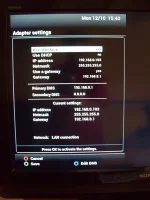
In Adaptor settings where it says Use DHCP make sure that is set to no, then scroll down to IP address and change it to your last working IP address and don't forget to press Green to save .
 
at the minute it's set to 192.168.0.100 when it was first set up and then died
it was 192.168.0.103,
I assume i am changing the right one's ??
and I have tried the 103, with diabling DHCP first

thanks

Unplug all other cables in your router but leave your box plugged in. Restart network on your receiver and do a test see if that works.


Sent from my iPhone using Tapatalk
 
Static IP on device = Device requests IP address from router. If available, it will be fine.
If already issued to another device, you have problems.

DHCP = Router assigns IP address.

Using DHCP is better as avoids conflicts/errors.

I use DHCP and reserve IP addresses. This means router will reserve the IP addresses for the devices and will not issue to any other device.
 
@abu without going away from @Billynomates thread how do I ( use DHCP and reserve IP addresses. This means router will reserve the IP addresses for the devices and will not issue to any other device):confused:
 
@abu without going away from @Billynomates thread how do I ( use DHCP and reserve IP addresses. This means router will reserve the IP addresses for the devices and will not issue to any other device):confused:
fritzbox router allows you to do that (in router network settings).
 
In Adaptor settings where it says Use DHCP make sure that is set to no, then scroll down to IP address and change it to your last working IP address and don't forget to press Green to save .

My Adapter settings


Adapter Settings.webp

Thanks
 
Static IP on device = Device requests IP address from router. If available, it will be fine.
If already issued to another device, you have problems.

DHCP = Router assigns IP address.

Using DHCP is better as avoids conflicts/errors.

I use DHCP and reserve IP addresses. This means router will reserve the IP addresses for the devices and will not issue to any other device.


I think this is the problem, am I right in thinking in my router setup
DCHP > Address reservations > and reserve 192.168.0.103

thanks
 
I have just done mine with my VM router reserved my Mutant IP address restarted the box and everything working fine thanks @abu. Hope you get it sorted m8.
 
i really don't know how the mg config file would break the connection to the router. :confused::confused::confused::confused:

Very easily, the default file most users find on the internet contains a line left active essentially DDOS'es your home network.
 
interesting... i wonder what the purpose of this is. :eek:

Nothing. Just people re-using a config file & not taking the time to see how it should work on their network.
 
Well It's Cured / Fixed
First In my router settings DHCP> Address Reservation > I assigned 192.168.0.103
I turned everything off, Xtrend turned off power button on back
Unplugged everything from back off router except Xtrend
turned on router then Xtrend
and frig me, it worked.

I like to thank everybody who tried to help me with this problem
without your help the box would be in the bin

Cheers
 
Happy days m8 at least we have learnt something I did not know u could reserve a IP address thanks to @Abu.
 
I always give my boxes a static IP address outside the DHCP range. (e.g. 192.168.0.10)
(no reservation in the DHCP server).
 

OpenViX Feeds Status

Back
Top