Superb quality and spec AB-Com PULSe 4K SE. Crazy offer! Only £99! FREE UK DELIVERY! 4K UHD, Enigma 2, Multiboot 4 images & more!...
Superb quality and spec AB-Com PULSe 4K Rev II Twin Satellite tuner only £149! FREE UK DELIVERY! 4K UHD, Enigma 2, SATA HDD facility, Multiboot 4 images & more!...

Unicable setup - selecting tuner on Solo2 running VIX

  • Thread starter Thread starter Redkite
  • Start date Start date
R

Redkite

Guest
Hi,
Is it possible to switch between tuner A and B? I want to set tuner B as default.
When I watch TV it defaults to Tuner A.
If I record, it records using Tuner B, and I can watch other channels at the same time via Tuner A.
I would like it the other way round, watch TV on B, record on A, because Tuner B gives a better quality picture.

I have an Inverto Unicable LNB with (obviously) just the 1 cable. It connects to a splitter that came with the LNB with short cables running to each tuner.

It may be that all I need to do is switch the 2 tuner feed cables over?

Thanks!
RK
 
The short answer is: yes, you can.
Customise --> preferred tuner --> B

But you really should look into the problem.

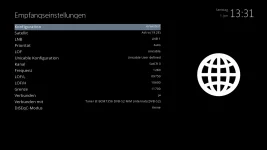
First of all: don't use an external splitter. There's no need for all the extra cables and connectors. Just connect the feed to tuner B and setup tuner A as in attached screenshot (to make use of the internal loop through).

Secondly: if there is a problem with Unicable, it's worth trying to use another frequency. If I remember correctly the first tuner (seen from the LNB) should use the highest frequency, the second tuner the frequency second to that etc.
 

Attachments

  • Unicable Tuner A LoopThrough.webp
    Unicable Tuner A LoopThrough.webp
    25.6 KB · Views: 189
Hi Rob, thanks.
I've gone for the splitter because I've tried the setup as shown in the screenshot. I could watch BBC1 while recording BBC2 but all other channels gave the message 'no tuner found'.
It all works just as I want with the splitter and I've taken your advice and changed frequencies and both channels are now good.
BUT: I will try again to get the loop through working, this is all new to me, so I'm happier to experiment now I know I can get a fully functioning system back up and running if it all goes wrong!
RK
 
Make sure you connect the feed to tuner B and set tuner A to loopthrough (not the other way around).
And a splitter will do it's job; it's only the extra amount of vulnerable cables and connectors that could cause trouble.
 
Hi Rob, have done as suggested and it's working perfectly without the splitter.
I don't know what I did wrong at first, I think I may have connected tuner B to A, but also A to B.
Sorted now, thank you!
 
Yes, on both channels, roughly the same 83\45. These should be better once I get the new dish installed, it's just been too wet or too windy lately to get up on the roof.
The Unicable LNB is not correctly aligned as the holder is broken (can't tighten the clamp).
 

OpenViX Feeds Status

Back
Top