Superb quality and spec AB-Com PULSe 4K SE. Crazy offer! Only £99! FREE UK DELIVERY! 4K UHD, Enigma 2, Multiboot 4 images & more!...
Superb quality and spec AB-Com PULSe 4K Rev II Twin Satellite tuner only £149! FREE UK DELIVERY! 4K UHD, Enigma 2, SATA HDD facility, Multiboot 4 images & more!...

Upgraded LNB now get Tune Failed message

Right now we are concerned with tuner A only.
Disable all other tuners.
Use user band 1.
Plug the aerial cable direct in tuner A.
Do not use any splitter or other device, must be direct.
Send an image of the back of the box showing the one cable and where it is inserted.
Go in signal finder and see if it is showing signal.
 
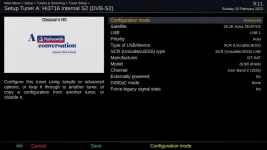
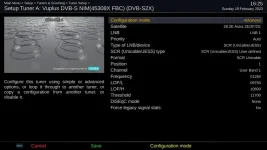
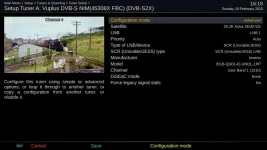
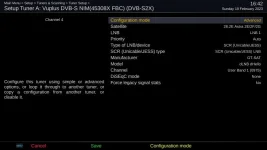
This is the settings for Tuner A on my SF8008. Tuner B is the same apart from SCR10.
I think the delay of 2500 is automatically set after choosing the LNB in settings.
It is set in /usr/share/enigma2/unicable.xml.

1_0_19_CD6E_844_2_11A0000_0_0_0_20230218152742.webp

I notice that the delay is slightly longer on DLNB dHello.

HTML:
		<manufacturer name="GT-SAT">
			<product name="GT-S1-2-3SCR4" scrs="1210,1420,1680,2040"/>
			<product name="dLNB dHello" format="jess" bootuptime="2700" scrs="0975,1025,1075,1125,1175,1225,1275,1325,1375,1425,1475,1525,1575,1625,1675,1725,1775,1825,1875,1925,1975,2025,2075,2125"/>
			<product name="GT-dLNB1-T" format="jess" bootuptime="2700" scrs="0975,1025,1075,1125,1175,1225,1275,1325,1375,1425,1475,1525,1575,1625,1675,1725,1775,1825,1875,1925,1975,2025,2075,2125"/>
			<product name="GT-dLNB1-DY" format="jess" bootuptime="2700" scrs="0975,1025,1075,1125,1175,1225,1275,1325,1375,1425,1475,1525,1575,1625,1675,1725,1775,1825,1875,1925,1975,2025,2075,2125"/>
			<product name="GT-S1dCSS24" format="jess" bootuptime="2500" scrs="0975,1025,1075,1125,1175,1225,1275,1325,1375,1425,1475,1525,1575,1625,1675,1725,1775,1825,1875,1925,1975,2025,2075,2125"/>
			<product name="GT-S2dCSS24" format="jess" bootuptime="2500" scrs="0975,1025,1075,1125,1175,1225,1275,1325,1375,1425,1475,1525,1575,1625,1675,1725,1775,1825,1875,1925,1975,2025,2075,2125"/>
			<product name="GT-S3DCSS24" format="jess" bootuptime="2500" scrs="0975,1025,1075,1125,1175,1225,1275,1325,1375,1425,1475,1525,1575,1625,1675,1725,1775,1825,1875,1925,1975,2025,2075,2125"/>
 
Last edited:
On a Vu the delay is academic because the socket is permanently powered.
 
I am slightly confused about your hardware/wiring physical setup. You keep mentioning configuring tuner before describing wiring. For tuner config to be correct, it must match the hardware. To me, best to describe hardware first, then tuner config. From what I can make out from your descriptions, you do not have any wires hooked up to tuner A ( top slot of first card/matrix). So no wonder it is not working. The "connected to" ( what I describe as "through another tuner") only works on the same tuner module/matrix. When you say "Tuner B" I think you are saying the module B (i.e tuners I-P)

Please also post a screenshot of Menu > Information > Devices

May I suggest the following:
Disconnect the USBT tuner (just for now)
Please flash image again. Do not restore settings/plugins after flashing (i.e you are starting from scratch).

For now (in line with exiting train of thought/testing):
Hardware:
Hook up signal wire from Unicable port to top hole of the first tuner/matrix. I.e tuner A.
Configure tuner A to unicable. Remember it has it's own signal wire, so you are not going through another tuner, so "connected to" must be no.
Disable all other tuners.
Scan/Test it is working.

Stage 2.
Do not touch wiring/do not install USB tuner.
Configure tuner B-H as unicable. You are going through tuner A, so connected must be yes.
Check signal on all tuners.

Stage 3:
Re-add splitter
One wire to go to top slot of first module (tuner A)
One wire to go to top slot of second module (tuner I)
Leave tuners I-P as not configured
Test tuners A-H

Stage 4
Hardware still as in stage 3
Configure tuner I as unicable. It has a wire from splitter, so connected = no
Configure tuner J-P as unicable. They do not have thir own wire and you are going through the wire in tuner I, so connected = yes
Test all the tuners.

Stage 5.
Re-add the USB tuner. Install drivers
Repeat the signal tests
 
Last edited:
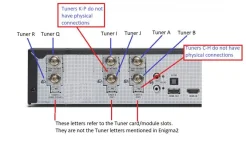
I suppose this is the issue when people refer to letters on casing instead of the actual tuner letters. I hope this picture helps.
 

Attachments

  • Ultimo 4k  2 sat fbc  and  twin sat.webp
    Ultimo 4k 2 sat fbc and twin sat.webp
    54 KB · Views: 25
I am slightly confused about your hardware/wiring physical setup. You keep mentioning configuring tuner before describing wiring. For tuner config to be correct, it must match the hardware. To me, best to describe hardware first, then tuner config. From what I can make out from your descriptions, you do not have any wires hooked up to tuner A ( top slot of first card/matrix). So no wonder it is not working. The "connected to" ( what I describe as "through another tuner") only works on the same tuner module/matrix. When you say "Tuner B" I think you are saying the module B (i.e tuners I-P)

Please also post a screenshot of Menu > Information > Devices

May I suggest the following:
Disconnect the USBT tuner (just for now)
Please flash image again. Do not restore settings/plugins after flashing (i.e you are starting from scratch).

For now (in line with exiting train of thought/testing):
Hardware:
Hook up signal wire from Unicable port to top hole of the first tuner/matrix. I.e tuner A.
Configure tuner A to unicable. Remember it has it's own signal wire, so you are not going through another tuner, so "connected to" must be no.
Disable all other tuners.
Scan/Test it is working.

Stage 2.
Do not touch wiring/do not install USB tuner.
Configure tuner B-H as unicable. You are going through tuner A, so connected must be yes.
Check signal on all tuners.

Stage 3:
Re-add splitter
One wire to go to top slot of first module (tuner A)
One wire to go to top slot of second module (tuner I)
Leave tuners I-P as not configured
Test tuners A-H

Stage 4
Hardware still as in stage 3
Configure tuner I as unicable. It has a wire from splitter, so connected = no
Configure tuner J-P as unicable. They do not have thir own wire and you are going through the wire in tuner I, so connected = yes
Test all the tuners.

Stage 5.
Re-add the USB tuner. Install drivers
Repeat the signal tests

Thanks for this. I've printed your post off. I'll follow your instructions and report back.
 
Before starting Abu's suggestion, I've confirmed that the cable from the SCR output is ok by connecting it to my SFX6018. This also will confirm that a signal is present!

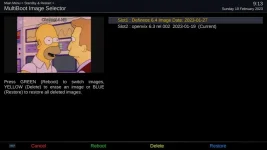
Multiboot.webp

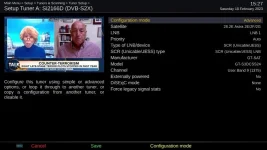
Tuner A.webp

I'll now transfer the cable to Tuner A of the Vu+
 
Cable transferred to Tuner A, USB stick installed, USBT tuner confirmed disconnected. Reflashed. No restore, no plugins.

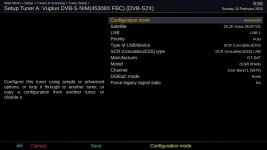
Configured Tuner A, others disabled.

Tuner A on its own.webp

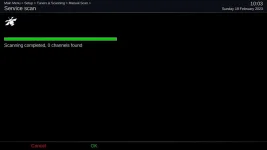
Attempted both full and single tp scans.

Scan Results.webp

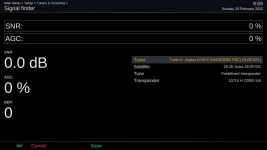
Confirmed by Signal Finder

Signal Finder.webp

Shall I continue with Stage 2? I have confirmed that a signal is being received by the LNB via one of the legacy feeds.
 
1) No point adding the plugin for this parameter on the Vu.
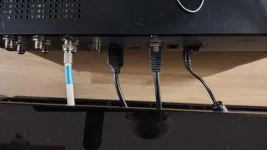
2) Send a photo of the back of your receiver with the one cable inserted.
3) Send a screenshot of the tuner config of the Octagon tuner that you say is working.
 
1) No point adding the plugin for this parameter on the Vu.
2) Send a photo of the back of your receiver with the one cable inserted.
3) Send a screenshot of the tuner config of the Octagon tuner that you say is working.

2)

IMG_20230219_081546177_HDR.webp

3) Already have - see post #28
 
So set it identical to that. If doesnt work retest in the octagon, pluging the exact same cable in the octagon.
 
So set it identical to that. If doesnt work retest in the octagon, pluging the exact same cable in the octagon.

But I've already done that today. The tuner setups in both boxes are the same apart from the passband. The passband chosen doesn't affect the outcome. I had the Octagon sitting on top of the Vu+ and swapped the RJ45, HDMI and LNB cable between the two.
 
Sorry, I am out of ideas. The last thing I could suggest is to try ATV, they have different FBC code. Select reliable tune. I have a duo 4k and also the gt-sat. Last time I had vix on the receiver it worked with that LNB.

May I take the opportunity to emphasise putting receiver in deep standby before removing the HDMI cable. I also use to think this was non-sense until swapping HDMI burned the chip on my GB UE 4K.
 
But I've already done that today. The tuner setups in both boxes are the same apart from the passband. The passband chosen doesn't affect the outcome. I had the Octagon sitting on top of the Vu+ and swapped the RJ45, HDMI and LNB cable between the two.
So what happens if you disable A/B and connect to teh 2nd FBC tuner I/J
 
With the same cabling as before on the Vu+, I swapped the LNB with two others - the original Technisat, an Inverto which I have bought for Tuner I in the future and back to the GT-SAT.

Technisat - success

Tuner A Technisat LNB.webp

Inverto - success

Tuner A Inverto LNB.webp

GT-SAT - nothing

Tuner A GT-SAT LNB.webp
 
Sorry, I am out of ideas. The last thing I could suggest is to try ATV, they have different FBC code. Select reliable tune. I have a duo 4k and also the gt-sat. Last time I had vix on the receiver it worked with that LNB.

May I take the opportunity to emphasise putting receiver in deep standby before removing the HDMI cable. I also use to think this was non-sense until swapping HDMI burned the chip on my GB UE 4K.

Regarding your last comment - a very timely reminder. Thank you!

A couple of days ago Amazon (DE) delivered a DUR-line UK 124-3L dCSS LNB.
This morning (when it got light) I swapped the LNB and decided to bite the bullet.
Connected a splitter for the Octagon and the Vu+. Connected another splitter to feed Tuner A and Tuner I.
Reconnected USBT along with its terrestrial feed.
Connected a lead from a DiSEqC switch (13.0E/19.2E/23.5E/9E) to Tuner Q
Checked all leads. Had breakfast.
Fired up the Octagon and set it to userband 1 Tuned up BBC1 Lon HD no problems. Rebooted to the other image and that worked too. Had a coffee.
Booted up the Vu+ and reflashed it. No restore, set up tuners A (ub9), B (ub10), I (ub17), J (ub18), and Q. Loaded driver for USBT, rebooted and set up tuner S and did a scan - no problems.
Selected tuner Q and did single channel scans on the four satellites. All okay except 23.5E, which has a known problem (to be sorted 'another day')
Set up the remaining leaf tuners with userbands 11-16 and 19-24.
Tested all tuners with Signal Finder. All okay.
Wrote this post.
Going to take an image and settings backup, then have a sandwich.

Part of me wants to get to the bottom of the problem with the GT-SAT LNB and the Vu+. You are probably on the right track that a change of image may fix it.
The other part of me wants to move on with my life now I've got a working system. It would be the icing on the cake if WoS refunded me with the cost of the GT-SAT LNB.
 
I've got GT-SAT GT-S3DCSS24 & GT-dLNB1-DY and both work fine with the FBC tuners on my Vu+ Uno 4K using ViX 6.3.
 
If that is the case then it looks as I may have been sold a dodgy one :eek:

Maybe :confused: the only thing different in my settings apart from the scr is the model number of the lnb.
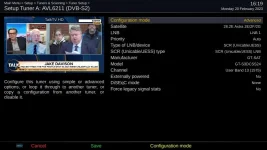
I think the dLNB dHello is generic and covers all GT-SAT models.

1_0_19_CD6E_844_2_11A0000_0_0_0_20230220161951.webp

Are you sure you're not connected to one of the legacy ports?
Have you tried changing the settings to Simple > Automatic to see if anything is detected?

.... sorry, I see that you've used other LNB's on the same cable, forget that.
 
Last edited:

OpenViX Feeds Status

Back
Top