Superb quality and spec AB-Com PULSe 4K SE. Crazy offer! Only £129! FREE UK DELIVERY! 4K UHD, Enigma 2, Multiboot 4 images & more!...
Superb quality and spec AB-Com PULSe 4K Rev II Twin Satellite tuner only £179! FREE UK DELIVERY! 4K UHD, Enigma 2, SATA HDD facility, Multiboot 4 images & more!...

Vix 5.1.006. Time wrong

An E2 box had absolutely no decent time during startup of the core OS (yocto Linux), making cert based things like OpenVPN fail at boot time.
The solution to that is:
  • don't run these until there is a valid system time set.
  • set the system time early in the boot-up sequence (beit using NTP or querying a transponder) before enigma2 ever starts up.
 
So you can not make safe assumptions that networked once = always networked.
I wasn't. I was thinking of three settings.
  • Always use NTP
  • Always use transponders
  • If I (now) have a network use NTP otherwise if I (now) have a transponder use that, otherwise report that no time could be set....

The last being the default setting.
 
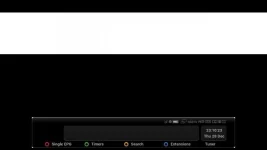
Just flashed latest Dev image. No restores. This is what I get. Screenshot taken at 06:24, receiver has network connection. Previous behaviour would have had correct date in this scenario.
 

Attachments

  • 28DEC0624.webp
    28DEC0624.webp
    5 KB · Views: 28
Code:
root@vusolo4k:~# date
Thu Dec 28 22:34:31 GMT 2017
root@vusolo4k:~#

Posting this so that Spacerat can see this.
 
Just flashed latest Dev image. No restores. This is what I get. Screenshot taken at 06:24, receiver has network connection. Previous behaviour would have had correct date in this scenario.
That screenshot doesn't look like there is any station tuned ... where is the time supposed to come from?

Gesendet von meinem SM-N910F mit Tapatalk
 
One shot sync at startup. This always worked before the recent changes.

Tuning to station did not sort it either.
 
Unfortunately I didn‘t take a picture, but for a time today the HD51 was running on the 29th December ..... I was trying to fix an issue at the time (a plugin was crashing) so couldn‘t wait to snapshot... and had to reboot and came up 28th.....
... and I am running at very latest OE-A with all changes including dvbtime.cpp. .. I had to look at the clock to check that it was the 28th.
 
One shot sync at startup. This always worked before the recent changes.
Looking at OpenVix 5.1.007.005 I can't see any one-shot ntp sync at boot time.
There is a cron job that runs at 30mins past the hour - or there would be, but there is no cron daemon running....
 
Looking at OpenVix 5.1.007.005 I can't see any one-shot ntp sync at boot time.
There is a cron job that runs at 30mins past the hour - or there would be, but there is no cron daemon running....

If you go to timers /cron then it all starts up... but I only went there by finger trouble
 
Using Vix 5.1 007 (I built this myself yesterday afternoon but based on "release" build type rather than "developer" so not sure if this is still 006), I just noticed my time was also wrong. Approximately 1.5 hours ahead of actual time.

I don't remember this being that far out yesterday when I flashed it but didn't really pay much attention.

Having swapped between both syncing via transponder and NTP, the time was correct after a reboot on either transponder syncing or NTP syncing.

I like to think the time was also correct yesterday because obviously several reboots were done as I flashed/setup image and installed odd plugins but couldn't confirm this.

After flashing and setting up yesterday afternoon, the box was on standby not used at all until this morning when I noticed time was out and I only noticed this because EPG didn't match what was being broadcast at the time hence I then investigated it.

As to what caused my time to be an hour and half ahead of actual time I don't know but will keep an eye out!

I have power cycled box and whether sync'd via transponder or NTP, I couldn't re-create the time being incorrect issue again.

Could it have been wrong since initial flashing despite odd reboot after this and as I didn't use box yesterday late afternoon/evening (was on standby) until this morning when I noticed time was out?
 
Last edited:
EPG sometimes disappears on restart. I am presuming time mismatch. I couldn't find anything in the log.

Obviously the Germans who have EIT EPG or tthose who dowload from Rytec on restart won't be affected. But a huge inconvenience for those using what remains on 28.2 or tune to download EPG.


This has worked flawlessly for over two years until now.
 
My setup is just plain 28.2 with IPTV for black channels and CrossEPG (openTV) for EPG.

I do have xmltv epg import happening after 28.2 EPG download that tries to get EPG for odd few IPTV streams not covered by OpenTV EPG update.

If time update is set to transponder, how often does it/should it update? Everytime a channel change is done or/and on reboot?
 
Using Vix 5.1 007 (I built this myself yesterday afternoon), I just noticed my time was also wrong. Approximately 1.5 hours ahead of actual time.
Ahead?
Is your build server also ahead of time?

When fake-hwclock gets installed into the image (Usually at build time during do_rootfs), the current time (UTC) on the build server gets dumped into /etc/fake-hwclock.data
That time gets restored very early at boot to at least have a semi-accurate time.

Later during boot, stb-hwclock reads the pseudo-RTC from front-panel (If the box has one). It's only a pseudo-RTC as it is not battery backed up, so it would be 0 or near 0 after power off. It's only preserved during reboot or deep standby, but not when the box gets powered off.
For that reason, the system time only gets restored to that time if it's ahead of system time (As the fake time restored previously is either build time or last shutdown time, it's always more or less behind real time).

So at this point, the box will either have
-the image build time/the last shutdown time if it was started from power off (no better pseudo-RTC time)
or
- the time it was last synced to when just rebooted or started from deep standby (= pseudo-RTC was powered and has preserved the time).

Next step is the one-shot NTP sync during ifup, a networked box will get the true current time here, a non-networked of course will not.
If the NTP sync succeeds, the synced time will also be written into the pseudo-RTC.

Finally, E2 gets started and here is where the only problem was: As the time is at least the image build time, the check "is now < 2004?" always failed and E2 considered the time to be properly set up - which it only really is if the NTP sync succeeded - and skipped all further transponder sync.
This issue is addressed by the dvbtime.cpp patch: No time is considered "perfect" and a first transponder sync always gets done (As long as transponder sync is activated). This is where non-networked boxes get their time from.


After flashing and setting up yesterday afternoon, the box was on standby not used at all until this morning when I noticed time was out and I only noticed this because EPG didn't match what was being broadcast at the time hence I then investigated it.
That's a known problem neither related to nor caused by the latest changes, they just came to my attention that way:
E2 will not do more than exactly one transponder sync at boot. All later so-called syncs are only allowed to confirm the time we already have, but not to correct it if it is wrong.
Any offset >120 sec gets discarded, respectively "recorded" only.


As to what caused my time to be an hour and half ahead of actual time I don't know but will keep an eye out!
That's simple:
E2 considers the 1 Cent quarz in your box to be more accurate than that multi-million EUR satellite up there and internally adjusts the sat/transponder time according to the 1 Cent quartz:
https://github.com/OpenViX/enigma2/...341aaae6a07f77/lib/dvb/dvbtime.cpp#L462-#L510

This code was introduced because some more exotic sat positions have bad times (local time rather than UTC and/or drift). The problem is that this code doesn't make any difference between those bad sat positions and the known good ones, so all E2 users suffer from Aussie or Russian sats that deliver bad times.


I have power cycled box and whether sync'd via transponder or NTP, I couldn't re-create the time being incorrect issue again.
The time has always been forcibly re-synced again on power cycle, which has become the only "solution" provided to E2 users ever since the "only one transponder sync" code was introduced.
Due to the latest E2 code change, a GUI restart would also be sufficient, but the main issue remains: E2 doesn't really sync with transponder time more than once while it's up and running.
 
Last edited:
If time update is set to transponder, how often does it/should it update? Everytime a channel change is done or/and on reboot?
Once for real on GUI (E2) start
After that periodically every 15 min, but only as long as the transponder time confirms the box time. As soon as the transponder time differs (by more than 120sec), further syncing is disabled and box clock may drift wherever it wants to drift to.
 
Yes.
Is your build server also ahead of time?
Just checked and VM build server (and host for that matter) have correct date/time. Neither have been subject to a reboot for weeks now.

FYI, my box is networked.

Once for real on GUI (E2) start
After that periodically every 15 min, but only as long as the transponder time confirms the box time. As soon as the transponder time differs (by more than 120sec), further syncing is disabled and box clock may drift wherever it wants to drift to.
Thanks for this.

I'll leave this with the you experts and you have probably already thought about this but if not, is it not possible that straight after a channel change and subsequent channel/dvb stream just been acquired/locked, could it not be possible to then actually change the time of box to that of transponder (if more than 120sec difference) rather than it just "check" but not actually correct date/time?

This is assuming user has transponder set as syncing method for the date/time thereby still providing us users with choice for those where situations where transponder info may actually be more likely correct or not depending on situation/area like Australia as mentioned earlier.

Just a thought!!
 
Last edited:
The concerning thing for me is that this did not work for me yesterday at 16:20 ish,. Stopping enigma2 and tehn running those commands also did not work. So it can't be the Enigma2 cpp code.

Code:
root@vusolo4k:~# date
Thu Dec 28 23:17:52 GMT 2017
root@vusolo4k:~# ntpd -qp pool.ntp.org
root@vusolo4k:~# date
Thu Dec 28 23:17:58 GMT 2017
root@vusolo4k:~# ntpdate -s -u pool.ntp.org
root@vusolo4k:~# date
Thu Dec 28 23:18:26 GMT 2017
root@vusolo4k:~#
 
Last edited:
This link has lots of references to what works and when, it probably doesn't apply here, but there may be some clues....

Code:
https://askubuntu.com/questions/254826/how-to-force-a-clock-update-using-ntp
 

OpenViX Feeds Status

Back
Top