Superb quality and spec AB-Com PULSe 4K SE. Crazy offer! Only £99! FREE UK DELIVERY! 4K UHD, Enigma 2, Multiboot 4 images & more!...
Superb quality and spec AB-Com PULSe 4K Rev II Twin Satellite tuner only £149! FREE UK DELIVERY! 4K UHD, Enigma 2, SATA HDD facility, Multiboot 4 images & more!...

VIX Team Vu+ Duo Image v1.3 - 05/12/2010

Status
Not open for further replies.
When a movie is deleted from movielist, the file is placed in trashcan. When a playing movie is stopped and deleting is selected, the file is gone forever. Is this a intended difference?
 
it should not be and the movielist was thourghly tested and recoded will need to look into this further
 
Speaking of the trashcan, I remember andy saying that he had fixed the "auto delete" after a few days, but it seems it still doesn't work, or maybe is there some different setting or something?

GiP
 
What an image, after a weeks use not one green screen. Many thanks to Andy and all the team for this super fast image. :D :D :D
 
Hi guys..
I got a wee problem.. about 3 times per day.. a message appears on my tv screen saying that :

Your box is going for its nightly shut-down ..
Do you want to allow this..
Yes / No

Please can anyone explain how to turn this off.. ??

Thanks guys..

Same problem here, the box shuts down even when the auto standby feature is disabled. Any thoughts?
 
short press blue, go down to Vix Menu and then autoshutdown and turn it off

note: if you are a crossepg user then autoshut down is needed as crossepg only downloads when the system is in standby
 
Hello,

first of all congratulation and thanks for this nice Image!

My problem now. Somtimes my harddisc is missing when i boot the box. Shut down und starting again the harddisc is back. I have this problem since VIX1.3. With PLI and VTI not.

VU+ Duo the new version and Samsung Spinpoint F2 EcoGreen HD103SI 1TB.

You know this problem?
 
Last edited by a moderator:
Hello,

first of all congratulation and thanks for this nice Image!

My problem now. Somtimes my harddisc is missing when i boot the box. Shut down und starting again the harddisc is back. I have this problem since VIX1.3. With PLI and VTI not.

VU+ Duo the new version and Samsung Spinpoint F2 EcoGreen HD103SI 1TB.

You know this problem?

don't know why,it not finding it, i use the F1 with no problems
 
My problem now. Somtimes my harddisc is missing when i boot the box. Shut down und starting again the harddisc is back. I have this problem since VIX1.3. With PLI and VTI not.
VU+ Duo the new version and Samsung Spinpoint F2 EcoGreen HD103SI 1TB.
You know this problem?
It happened to me twice. I reported it in

http://www.vuplus-support.co.uk/showthread.php?4428-Lost-internal-HD...

but there was no definitive answer.
Mine is a WD Caviar Green 500Gb, and it never happened before 1.3 either.

GiP
 
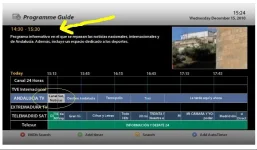
Does anyone kow how to get the program title next to the time in EPG? See screenshot.

It was there in VIX 1.2, but I can't find the setting to get it in Vix1.3.

Thanks

epg.webp
 
Does anyone kow how to get the program title next to the time in EPG? See screenshot.

It was there in VIX 1.2, but I can't find the setting to get it in Vix1.3.

Thanks

View attachment 4531


hmm, thats a bug, i'll look into it, thanks :)

EDIT: Bug found and fixed for next update.

in the mean time. open this file '/usr/share/enigma2/Vu_HD_plus/VIXEPG/PictureInGraphics.xml'

and search for
Code:
position="233,340" size="577,-190"
and replace with
Code:
position="233,120" size="577,30"
 
I am sure this is just a user error:)

But does anyone know how to change the location for individual recordings so you can have different folders for each program. I have created additional folders within /hdd/movie/ but are unable to point the timer or the auto time to them the only bookmark is for /hdd/movie/ I can delete this but cannot add a new one? I am using VIX 1.3

Thanks for the help
 
I am sure this is just a user error:)

But does anyone know how to change the location for individual recordings so you can have different folders for each program. I have created additional folders within /hdd/movie/ but are unable to point the timer or the auto time to them the only bookmark is for /hdd/movie/ I can delete this but cannot add a new one? I am using VIX 1.3

Thanks for the help

menu, system, setup, recording paths
 
Hi Silverfox
When I go to the recording paths options, i can change the paths for the default movie location. Timer record location, instant record location and the time shift location. I am still not sure how to create new book marks for individual locations.
Thanks for your help
 
Is this image now stable after all updates. I only ask as its the box we use in the main living area so dont want to load up till all sorted. I am running 1.2 at present as the kids and Mrs like the simple setup and functionality. The VU+ with VIX 1.2 is the most femail friendly linux setup i have found so far even beter than a sky+ box lol.
 
Hi Silverfox
When I go to the recording paths options, i can change the paths for the default movie location. Timer record location, instant record location and the time shift location. I am still not sure how to create new book marks for individual locations.
Thanks for your help

at the moment that is the only functions you would need to create folders and manually set them during timer/autotimer setup in the locatins part.

Is this image now stable after all updates. I only ask as its the box we use in the main living area so dont want to load up till all sorted. I am running 1.2 at present as the kids and Mrs like the simple setup and functionality. The VU+ with VIX 1.2 is the most femail friendly linux setup i have found so far even beter than a sky+ box lol.

The image is pretty much stable at this moment but as any image or software bugs can still be found but with that said andy is working hard to fix any bugs found as fast as possible
 
Thanks silverfox with your help i have sorted it. I needed to press the menu button while I was in the recording paths options to change to the file list to add additional bookmarks
 
Thanks silverfox with your help i have sorted it. I needed to press the menu button while I was in the recording paths options to change to the file list to add additional bookmarks

really???

what vith VIX 1.3 when i press menu i get nothing but a stop sign

edit: oh i get what you mean thats the same as i explained to make manual folders lol and book marks them within the box
 
Last edited by a moderator:
Status
Not open for further replies.

OpenViX Feeds Status

Back
Top