Superb quality and spec AB-Com PULSe 4K SE. Crazy offer! Only £99! FREE UK DELIVERY! 4K UHD, Enigma 2, Multiboot 4 images & more!...
Superb quality and spec AB-Com PULSe 4K Rev II Twin Satellite tuner only £149! FREE UK DELIVERY! 4K UHD, Enigma 2, SATA HDD facility, Multiboot 4 images & more!...

VIX Team Vu+ Duo Image v2.0 - 09/02/2011

Unfortunately I am "old school" FORTRAN, C, bash and LaTeX, that's the extent of my knowledge, never tryied this new things the kids are playing with.....

But speaking of "channel preview"... When in EPG is possible to ZAP to a channel remaining in EPG or "ZAP and EXIT"; is it possible to do the same (just ZAP) while in the channel list? Or OK -> ZAP and Exit is the only way to go.

G


not yet, but, i'm looking into it, the problem is that channel list is used at bootup and used to zap normal channels
 
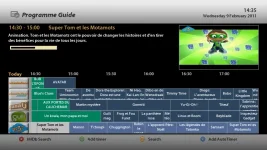
i cant seem to get this EPG up

vix_epg.png


even when i go into the settings and change the EPG options from VIX to single to multi etc etc none of the options look like this
 
i cant seem to get this EPG up

vix_epg.png


even when i go into the settings and change the EPG options from VIX to single to multi etc etc none of the options look like this

change it back to ViXEPG then press EPG, then press 'MENU' turn on PIG and set the items to 5. exit and repress EPG
 
Hey Andy,

Did you get a chance to look at adding an Event Progress bar like in the bouquet view? There was a request some time ago and you said you might put it in as long as it didn't affect performance :).

Cheers
 
Hey Andy,

Did you get a chance to look at adding an Event Progress bar like in the bouquet view? There was a request some time ago and you said you might put it in as long as it didn't affect performance :).

Cheers

sorry can you remind what is was exactly.
 
I am not at home now so can't give you any screenshot.
But basically, when you are in bouquets view, beside each event, there is a progress bar. Would it be possible to have this progress bar in VIX EPG too, either under the PIG or the programme description. see dirty mock-up below.
vix_epg.webp

Thank you
 
hi all sorry to keep going on but i don't seem to be able to get an answer can someone tell me can this component fault where the screen go's pink be sorted by a update patch or will it have to wait till openpli sort the base as i only have a Tv with component for hd and would love to run vix 2.0

thanks again

Cozmo

P.S i run vix 1.3 now and love it but would just love to play with the new vix 2.0 onward and upward and all that so just asking
 
i have a strange problem i have vix 1.3 on now all working good i have used the usb version of vix 2.0 and have now installed it from a usb stick np but when the image loads the screen turns pink after load its ok wile booting eg logos and so on but when the image is up and running its pink all the time i have set the right display setting as before i have noticed that i cannot change the brightness and contrast setting and that's what i think it is every thing else on the image is working fine just pink can anyone shed some light on this problem as im lost

thanks

cozmo

right looks like this problem is to do with openpli 2.0 i have downloaded the lastest one from there site and when i install it i get the same problem all pink i have changed all the av settings and they make no diff at all only dose this on openpli 2.0 and vix 2.0 so guess the something in the base that dose not like my setup on component all other images work fine without this problem is just this base that i have the problem with so looks like i will have to stay with vix 1.3

thanks

Cozmo

when does this happen what are you doing


lol that's the story so far and that's why i was asking

Thanks

Cozmo
 
we will need to look into this if its happening to you from both pli and vix
 
Hi.

I cant work out how to get the picons to show in the epg. is it possible to do this?

cheers.
 
In epg press menu. Scroll to enable picons. If using pig (picture in graphic) change amount of picons to 5 if not using pig then change in menu amount of picons to show to 8 or less.
 
ok i want to put my picons onto a usb but the problem im having is as soon i i select devices manager even without putting the usb in it starts to search for connected devices and crashes,is there a fix for this? thnx
 
Hi. I'm using the default ViX_HD skin, please could you tell me how to enable picons and where to copy them.
 
:confused: I test all images and now in VIX . When i record must be a blinking clock on screen (based on images custem option) visible , but there is not.
Why Blinking sign is in infobar. Is this a bug or ...... ???:rolleyes:
 
they want to go into media/hdd/picon/
Why would you want that? Because wken going to another channel you like to wait for the picture to appear on screen because your box is searching the (always slow) HDD to provide the picon?
Use /picon instead: the VU+ has plenty memory for many picons and more. And make sure that no folder with the name "picon" exists on your HDD; not even an empty one.
 
:confused: I test all images and now in VIX . When i record must be a blinking clock on screen (based on images custem option) visible , but there is not.
If you use one of the Magic-skins, you will see the "recording-icon" in (second)infobar and in the movie/DvD-player. If no OSD is visual, that icon will of course not be displayed.
 

OpenViX Feeds Status

Back
Top