Superb quality and spec AB-Com PULSe 4K SE. Crazy offer! Only £99! FREE UK DELIVERY! 4K UHD, Enigma 2, Multiboot 4 images & more!...
Superb quality and spec AB-Com PULSe 4K Rev II Twin Satellite tuner only £149! FREE UK DELIVERY! 4K UHD, Enigma 2, SATA HDD facility, Multiboot 4 images & more!...

VU Solo 2 unable to boot up

  • Thread starter Thread starter paul1909
  • Start date Start date
P

paul1909

Guest
005.webp

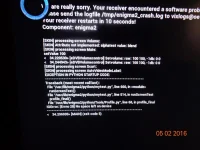
Hi, can anyone help with this problem please? never had this problem before. Went onto TS media and went to look on movies and my VU Solo 2 crashed and will not boot up again just comes up with message saying encountered software problem. I am running openvix Hades 18, I have downloaded openvix 3 2 030 to see if it would acknowledge the software change but no luck. Everything was running fine until I went into TS media so no idea what to try next! Any help would be gratefully appreciated. Thanks
 
The internal flash memory is full.

If you know what the file is causing this, you should still be able to ftp into the receiver and delete it. However, may be easier to flash latest image.
 
Thank you for your reply Abu Baniaz, I have tried to flash the latest images for both Hades and openvix 3.2 but does not recognise the image when starting up the unit and using the switch at the back of the unit and holding the power button when switching on. Regarding the ftp, I now cannot find the ip address for the VU solo 2 and wouldn't know where to start by opening the ftp software (I am using Filezilla) and looking to delete some of the internal flash memory.

Thanks

Paul
 
You do not hold the power button. Correct procedure is. Insert usb with latest 3.2-036 image. Turn off at the rear rocker switch. Now turn back on via the rear rocker switch, then on lcd screen will say "found image, flash?" Then immediately press the power button on the front left hand side of the Vu+ Solo2 and thats it. This will take around 2 mins to complete if done correctly.


Sent from my iPhone using Tapatalk
 
Also if not recognising the usb on startup, you haven't loaded the image on correctly. You need to format the the usb to fat32 via a pc. Download latest image to your desktop. Latest Vu+ Solo2 image found here >> http://www.openvix.co.uk/index.php/downloads/vu-plus-images/vu-solo-2/
Use something like WinRAR to extract contents to a usb. Root of usb should be vuplus/solo2/


Sent from my iPhone using Tapatalk
 
Hi Andy, that's fantastic it worked!!!! Thank you, very very very much!!! It's really appreciated. :)
 

OpenViX Feeds Status

Back
Top