Superb quality and spec AB-Com PULSe 4K SE. Crazy offer! Only £129! FREE UK DELIVERY! 4K UHD, Enigma 2, Multiboot 4 images & more!...
Superb quality and spec AB-Com PULSe 4K Rev II Twin Satellite tuner only £179! FREE UK DELIVERY! 4K UHD, Enigma 2, SATA HDD facility, Multiboot 4 images & more!...

[VU+ Solo2] VU Solo2 ViX Image Discussion

Status
Not open for further replies.
Thanks for the quick reply. "AMRITA, DIVINE TV, ASIANET, ASIANE PLUS" etc. channels from 9E have the problem.

You're right. No idea why this is: I'll make a bugreport for that.

Getting a crash on 665 when transcoding is enabled and trying to stream from the built in Transcoder tv box in openwebif. This is a fresh flash from 664 to 665, also tried on 664 before upgrading and same result. Streaming from the port 8001 is fine.

Crash log attached.
Thanks, we are looking into this.
 
Hi guys Im getting a crash when going into Menu/Setup/Service Searching/Positioner setup. Box does nothing for a few secs then spinning vix and crash log on screen then reboots.

Fresh Flash nothing added except catseye sttings from plugins server and my cams and configs

log attatched
 

Attachments

Hi Folks - Phoenix directed me here. I saw in recent release notes an update to Vix Magic-HD Light skin could have been 3.0.664?

Anyway Vix Magic-HD Light used to work fine when it installed as part of the parent Vix Magic-HD, now my VU+ Solo2 hangs at the Blue OpenVix Start Splash screen with the Vix Magic-HD Light skin. Can FTP etc to box, but no HDMI output other than splash or response from remote control

I am on lastest Vix release 3.0.665, and I have tested this issue on other images back to 3.0.558, and can repeat each time I select the skin from the "plugins download" (after the new format was released it is now listed seperately to Vix MAgic-HD), and restart - the VU+ Solo 2 does not restart the Enigma GUI properly - you see the VIX spinning icon stalling at retstart.

Vu+ Solo 2
ViX 3.0.665

Magic-HD Light skin
 
Dear Friends

I have also the same problem. Anyone can fix it ?

Best Regards

Hi guys Im getting a crash when going into Menu/Setup/Service Searching/Positioner setup. Box does nothing for a few secs then spinning vix and crash log on screen then reboots.

Fresh Flash nothing added except catseye sttings from plugins server and my cams and configs

log attatched
 
I updated from Vix 3.0.656 to 3.0.665 and my USB wireless dongle (rt2800usb) is no longer working, it's not even detected. Is this a known problem?

I've gone back to the slightly older image to get wifi back as it's worked perfectly fine prior to build 665. Have the rt2800usb drivers been removed from the new image?
 
If people keep posting problems in general discussion threads they shouldn't be surprised not to get any help. Best to start a new thread for each problem
 
I think this is a "General Post", apologies if I should have started a new thread. I have noticed over all of the releases the Information Menu for memory that the figure displaye for VU+ Solo 2 is approx ½GB - I have validated this with friend who has same, and tested across a number of skins. Unit purcheased from W of S, and spec is 256MB Flash and 1GB DDR3 DRAM - Flash use displayed correctly for VIX image, the DDR3 seems to be incorrect. Thanks for looking at, or please direct me to re-post and I will.

Vu+ Solo 2
ViX 3.0.665
 
Actually the Flash is incorrect also as it displays 196Mb, instead 256 Mb. Apologies
 
You can't see the total amount of flash this way, only the amount of flash that is available in userspace. The rest is reserved for systemtasks.

If you make a bootlog (via the serial connection) you'll see all the details. But why not trust the
manufacturer?
 
Sorry Rob, I do! I just thought the details should be correct. Thanks
 
I have another observation in regard to "User Settings", "Display Channel Number in Infobar". When selected the channel number is also displayed on the VU+ box front display. Where as this is helpful, it also means that the channel "description" is truncated, and it is difficult to see the asociated description for the selected channel. I am wondering if the front display can scroll horizontally as you change channel or if an option can be added to include the channel # in display selectable - after all the actual option refers to the "Infobar". Thanks again for all of the very hard work to make the experience great for us users.

VU+ Solo 2
Vix Magic-HD-Noire
 
Thanks for the fixes Rob. With regard to Magic HD Light the contents of /usr/share/enigma2/Magic-HD-Light folder seem to be the very same as the full "Magic HD Skin"; indeed the "Light Skin" reports itself as the Magic HD Skin in "Information About". There used to be four files for the skin lcd_picon_default.png, picon_default.png, prev.png, and skin.xml - now there is a complete set of files leaving no discernable difference between Light and Full Magic skins (including the large on screen buttons), Meters, EPG etc. I used to use the Magic Light Skin to achieve a pseudo reset to default as the "light skin" left the EPG pretty much at the VIX default - just choosing the "Default Skin" never achieved this, as "default" did not reset certain attributes e.g. EPG current setting does not go back to the White / Blue of default. Thanks agian for all of the active work.

VU+ Solo 2
Vix Magic-HD-Light

Thanks again for the efforts
 
The difference between Magic-HD and Magic-HD-light is that the full version supports dozens of plugins, whereas the light version only supports functions included in the default image.
The doubling of the files was not intended, but is a left over of several previous procedural changes; the cleaning up is still on my to-do-list.
 
Thanks Rob for the clarification in Magic HD / Light Skin. Perhaps when you get time you might look at how the "default" skin is reapplied as getting back to the simple Blue / White theme (on graphic EPG and other screens) does not seem consistent. If there is a workaround to "defaulting" that would be good to know. Thanks again.

VU+ Solo 2
Vix Magic-HD-Light -> Default
 
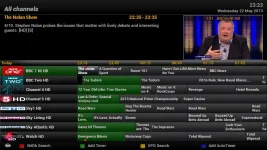
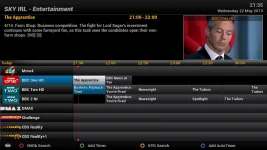
default epg after Magic HD Noire Skin.webporiginal default EPG.webp

To help I have attached two images - a screen shot of the "original default graphic EPG" (on right hand side Blue/White), as well as the graphic EPG after "default" is selected following a skin like Magic HD Noire (on left hand side Green).

For the most part all is good - fonts, layout etc, but the Graphic EPG does not get set correctly after "default" skin is restored.

Thanks

VU+ Solo 2
Vix Magic-HD-Noire -> Default
Vix 3.0.667 and earlier versions tested
 
Last edited:
Status
Not open for further replies.

OpenViX Feeds Status

Back
Top