
Superb quality and spec AB-Com PULSe 4K SE. Crazy offer! Only £129! FREE UK DELIVERY! 4K UHD, Enigma 2, Multiboot 4 images & more!...
Superb quality and spec AB-Com PULSe 4K Rev II Twin Satellite tuner only £179! FREE UK DELIVERY! 4K UHD, Enigma 2, SATA HDD facility, Multiboot 4 images & more!...
You are using an out of date browser. It may not display this or other websites correctly.
You should upgrade or use an alternative browser.
You should upgrade or use an alternative browser.
[VU+ Solo2] VU Solo2 ViX Image Discussion
- Thread starter Maxwell
- Start date

- Status
- Not open for further replies.

Hi ciao, thanks for response, and apologies if I made some assumptions - I was following on from a previous post. Indeed they do show different bouquets as I took them at different times, but that is not what I am trying to highlight. The default skin EPG view shows scroll bar and selection in Blue / White from the initial set-up. After selecting and installing other skins, reverting to the default skin at any time from any other skin leaves the annoying "green" footprint instead of Blue / White. Everything else with the "default skin" restores normally - font, font colours, justification etc.
Thanks for querying
VU+ Solo 2
Vix Magic-HD-Noire -> Default
Vix 3.0.667 and earlier versions tested
Thanks for querying
VU+ Solo 2
Vix Magic-HD-Noire -> Default
Vix 3.0.667 and earlier versions tested
 but I cannot help:-(

Delagroov
ViX Beta Tester
View attachment 26072View attachment 26073
To help I have attached two images - a screen shot of the "original default graphic EPG" (on right hand side Blue/White), as well as the graphic EPG after "default" is selected following a skin like Magic HD Noire (on left hand side Green).
For the most part all is good - fonts, layout etc, but the Graphic EPG does not get set correctly after "default" skin is restored.
Thanks
VU+ Solo 2
Vix Magic-HD-Noire -> Default
Vix 3.0.667 and earlier versions tested
Dont know if i understood the problem with epg colors correctly.
But in Magic-HD-Noire de Epg look like this, so your screenshot showing green bars is certainly not with Magic hd noire
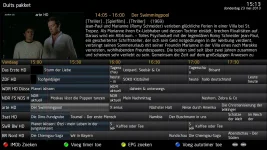
Last edited:

andyblac
Administrator ,
- Joined
- Apr 21, 2010
- Messages
- 12,698
- Reaction score
- 96
- Points
- 0
- Age
- 52
View attachment 26072View attachment 26073
To help I have attached two images - a screen shot of the "original default graphic EPG" (on right hand side Blue/White), as well as the graphic EPG after "default" is selected following a skin like Magic HD Noire (on left hand side Green).
For the most part all is good - fonts, layout etc, but the Graphic EPG does not get set correctly after "default" skin is restored.
Thanks
VU+ Solo 2
Vix Magic-HD-Noire -> Default
Vix 3.0.667 and earlier versions tested
the left is Default, the right is ViX Night, as default flashed ViX Night is enabled, NOT Default. do not not confuse the 2, both screens are correct, if you want blue/grey, enable ViX Night.
Thanks andyblac - you are indeed correct, I see it now! I was confused by the "green". If I subsequently confused others, I was trying to explain the skins I was moving from -> to, but there was no connection. Thanks again for clearing this up.
andyblac
Administrator ,
- Joined
- Apr 21, 2010
- Messages
- 12,698
- Reaction score
- 96
- Points
- 0
- Age
- 52
Thanks andyblac - you are indeed correct, I see it now! I was confused by the "green". If I subsequently confused others, I was trying to explain the skins I was moving from -> to, but there was no connection. Thanks again for clearing this up.
np, i even confuse our dev team at times


Rob van der Does
ViX Beta Tester


I have done a test this morning. I have installed Vix Image 6.0.658, and configured Cross EPG as well as a bouquet from Auto Bouquet Maker. Nothing else installed, and all settings left as default (exception EPG -> HDD). Basic install, no additions and effectively default settings.
Graphical EPG selection and display is "instant". I subsequently updated to Vix Image 6.6.668 using the Vix Update Software feature. Selecting the Graphical EPG now first displays "please wait while gathering data..." in white in the centre of the screen before displaying the EPG.
I am wondering the purpose of the message, is there a way to "hide it", or is this just the way it will be going forward? I had been seeing the message over the last few releases, and wanted to check if it was an extension I had installed or my config; it seems not. Thanks everyone
VU+ Solo 2
Vix Hight HD (Default)
Vix 3.0.658 -> 3.0.668
Graphical EPG selection and display is "instant". I subsequently updated to Vix Image 6.6.668 using the Vix Update Software feature. Selecting the Graphical EPG now first displays "please wait while gathering data..." in white in the centre of the screen before displaying the EPG.
I am wondering the purpose of the message, is there a way to "hide it", or is this just the way it will be going forward? I had been seeing the message over the last few releases, and wanted to check if it was an extension I had installed or my config; it seems not. Thanks everyone
VU+ Solo 2
Vix Hight HD (Default)
Vix 3.0.658 -> 3.0.668

Larry-G
V.I.P ,
- Joined
- May 19, 2010
- Messages
- 32,540
- Reaction score
- 405
- Points
- 0
- Age
- 48
I have done a test this morning. I have installed Vix Image 6.0.658, and configured Cross EPG as well as a bouquet from Auto Bouquet Maker. Nothing else installed, and all settings left as default (exception EPG -> HDD). Basic install, no additions and effectively default settings.
Graphical EPG selection and display is "instant". I subsequently updated to Vix Image 6.6.668 using the Vix Update Software feature. Selecting the Graphical EPG now first displays "please wait while gathering data..." in white in the centre of the screen before displaying the EPG.
I am wondering the purpose of the message, is there a way to "hide it", or is this just the way it will be going forward? I had been seeing the message over the last few releases, and wanted to check if it was an extension I had installed or my config; it seems not. Thanks everyone
VU+ Solo 2
Vix Hight HD (Default)
Vix 3.0.658 -> 3.0.668
It is there for a reason, previously when you hit the EPG button you would see a blank screen until the EPG data was populated then displayed. now most people would not notice the time it took for the EPG to display but a lot did, so we placed the message there so that users knew that the EPG was being populated.
Hi phoenix, thanks for reply. I can assure you on the Solo 2 there was never a delay what so ever or a "blank" screen - the graphic EPG was instant. I have a friend who purchased a Solo 2 at the same time, and has done exactly the same tests and confirms the same. The "no delay" behaviour was obeserved across the full bouquet EPG and as well the sections EPG from auto bouquet maker - all good - even with 500 channels.
The "new" feature has introduced a delay in the build of the EPG, at least on the Solo 2 - I seem to recall the behaviour was introduced after I upgraded to 3.0.664. Where as previously - I have done the tests this morning from scratch - the EPG appeared litterally as you pressed the EPG button on the remote, now you wait a little over a second. I have no idea what is happening whilst this message is displayed, or if it is a simple timer? Any which way, IMHO for the Solo 2 it was better in VIX 3.0.658. Not sure who on the admin team has a Solo 2, but what I am saying is easy to verify. Again, thanks to all who help.
VU+ Solo 2
Vix Hight HD (Default)
Vix 3.0.668
The "new" feature has introduced a delay in the build of the EPG, at least on the Solo 2 - I seem to recall the behaviour was introduced after I upgraded to 3.0.664. Where as previously - I have done the tests this morning from scratch - the EPG appeared litterally as you pressed the EPG button on the remote, now you wait a little over a second. I have no idea what is happening whilst this message is displayed, or if it is a simple timer? Any which way, IMHO for the Solo 2 it was better in VIX 3.0.658. Not sure who on the admin team has a Solo 2, but what I am saying is easy to verify. Again, thanks to all who help.
VU+ Solo 2
Vix Hight HD (Default)
Vix 3.0.668
Larry-G
V.I.P ,
- Joined
- May 19, 2010
- Messages
- 32,540
- Reaction score
- 405
- Points
- 0
- Age
- 48
Hi phoenix, thanks for reply. I can assure you on the Solo 2 there was never a delay what so ever or a "blank" screen - the graphic EPG was instant. I have a friend who purchased a Solo 2 at the same time, and has done exactly the same tests and confirms the same. The "no delay" behaviour was obeserved across the full bouquet EPG and as well the sections EPG from auto bouquet maker - all good - even with 500 channels.
The "new" feature has introduced a delay in the build of the EPG, at least on the Solo 2 - I seem to recall the behaviour was introduced after I upgraded to 3.0.664. Where as previously - I have done the tests this morning from scratch - the EPG appeared litterally as you pressed the EPG button on the remote, now you wait a little over a second. I have no idea what is happening whilst this message is displayed, or if it is a simple timer? Any which way, IMHO for the Solo 2 it was better in VIX 3.0.658. Not sure who on the admin team has a Solo 2, but what I am saying is easy to verify. Again, thanks to all who help.
VU+ Solo 2
Vix Hight HD (Default)
Vix 3.0.668
These changes were made across the board for all ViX supported receivers and was not specifically targeted at the solo2 which is the fastest receiver available at this time. what may be instantaneous on the solo2 is not on say the duo and yes i do have a solo2 along with 6 other ViX supported receivers.
Trial
Moderator
Hi,
the delay was introduced for slower STBs and for the Solo2 it is again removed in 668 or perhaps the next image and it will be at least as fast as before if not slightly faster as andy did some optimization. So try 668 or wait for next image.
ciao
the delay was introduced for slower STBs and for the Solo2 it is again removed in 668 or perhaps the next image and it will be at least as fast as before if not slightly faster as andy did some optimization. So try 668 or wait for next image.
ciao
Thanks for the info Trial. Am running 3.0.668, so perhaps in the next build? Thanks to andy for the optimising. Thanks for your reply too phoenix - I do get it...fully - sorry if I came across in the wrong way.
VU+ Solo 2
Vix Hight HD (Default)
Vix 3.0.668
VU+ Solo 2
Vix Hight HD (Default)
Vix 3.0.668
Rob van der Does
ViX Beta Tester
Indeed: wait for next build (>668).
Larry-G
V.I.P ,
- Joined
- May 19, 2010
- Messages
- 32,540
- Reaction score
- 405
- Points
- 0
- Age
- 48
Thanks for the info Trial. Am running 3.0.668, so perhaps in the next build? Thanks to andy for the optimising. Thanks for your reply too phoenix - I do get it...fully - sorry if I came across in the wrong way.
VU+ Solo 2
Vix Hight HD (Default)
Vix 3.0.668
no worries, no hostility was meant on my part and i certainly did not detect any from you. it is worth pointing out however that we support around 20 receivers and on the whole things that work fine on one work fine on all of them, for me i personally preferred to see the message on my solo2.
Rob van der Does
ViX Beta Tester
Hehe, are you sure? The Solo2 is so fast, I only noticed the message appeared only for a split second, even on very large bouquets.....for me i personally preferred to see the message on my solo2.
Larry-G
V.I.P ,
- Joined
- May 19, 2010
- Messages
- 32,540
- Reaction score
- 405
- Points
- 0
- Age
- 48
Hehe, are you sure? The Solo2 is so fast, I only noticed the message appeared only for a split second, even on very large bouquets.
yup the message only displays for a split second but i personally liked to see it, kind of reassuring that something is going on in the background.
Rob van der Does
ViX Beta Tester
Hmm, so not sure what you mean: on the Solo2 you see the EPG being presented on the foreground; so fast, that the loading message must disappear before it appears......yup the message only displays for a split second but i personally liked to see it, kind of reassuring that something is going on in the background.
Hey Folks, All I can say was on version 3.0.558 and before for Solo 2 - EPG is absolutely instant - No delay - Nada. As Rob van says - there should be no tme to see this message... but there is!
I have tested the behaviour many times on version 3.0.658 - the delay can be more than one second, and can be a tiny bit more at times.
Before I get any responses - my tests were run on default install, and bouquets as outlined in my earlier post. I have subsequently tried a number of skins -same/same. Don't take my word - Just do it. All said, IMHO for the Solo 2, the EPG is better without a message telling you to wait...... for what? Again, thanks to all who help willingly; the support and insight is great.
I have tested the behaviour many times on version 3.0.658 - the delay can be more than one second, and can be a tiny bit more at times.
Before I get any responses - my tests were run on default install, and bouquets as outlined in my earlier post. I have subsequently tried a number of skins -same/same. Don't take my word - Just do it. All said, IMHO for the Solo 2, the EPG is better without a message telling you to wait...... for what? Again, thanks to all who help willingly; the support and insight is great.
- Status
- Not open for further replies.
Similar threads
- Replies
- 4
- Views
- 270

