Superb quality and spec AB-Com PULSe 4K SE. Crazy offer! Only £129! FREE UK DELIVERY! 4K UHD, Enigma 2, Multiboot 4 images & more!...
Superb quality and spec AB-Com PULSe 4K Rev II Twin Satellite tuner only £179! FREE UK DELIVERY! 4K UHD, Enigma 2, SATA HDD facility, Multiboot 4 images & more!...

[ET10x00] What are these processes?

IAmATeaf

New member
Joined
May 1, 2011
Messages
507
Reaction score
0
Points
0
Location
South of the Watford Gap!
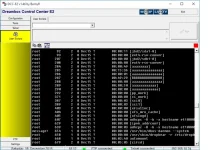
Does anybody know what these processes might be? I'm talking about the ones with aaaaa.... and BBBBB..... in the attached screenshot. The owning PID process is "kthreadd"

Was looking through the processes as every few seconds when in telnet the dialog stops responding and then a few seconds later comes back.
 

Attachments

  • ET10000-ps-ef.webp
    ET10000-ps-ef.webp
    60.1 KB · Views: 32
Hi,
not normal. I would close open ports for the receiver and reboot.

ciao
 
I've not specifically opened any ports, will give it a restart, the missus is watching at the mo.

I've installed KodiDirect and have a CIFS mount to my NAS, they really are the only bits of extra config that I've done to the box.

EDIT: I also have mgcamd 1.38 running and judging my the process numbers it looks like they ran pretty early in the boot process?
 
Last edited:
Just restarted and they are back. I removed KodiDirect and also had installed VideoEnhancement plugin which I've also removed and then restarted but still there.
 
Try following telnet command:

Code:
opkg list-installed > /tmp/packages.txt

This will save a list of all installed packages to the "packages.txt" file in /tmp folder.

Check that for anything that looks out-of-place.
 
I can see them as well, no ports open. (ET10k)

Code:
root       149     2  0 18:29 ?        00:01:17 [aaaaaaaaaaaaaaa]
root       150     2  0 18:29 ?        00:00:00 [aaaaaaaaaaaaaaa]
root       151     2  0 18:29 ?        00:00:06 [BBBBBBBBBBBBBBB]
root       152     2  0 18:29 ?        00:00:00 [aaaaaaaaaaaaaaa]
root       153     2  0 18:29 ?        00:00:00 [aaaaaaaaaaaa]
root       154     2  0 18:29 ?        00:00:00 [aaaaaaaaaaaaa]
 
Last edited:
I guess it's possible that these processes are used by things like drivers or something - at least as far as et10k is concerned.

Only way to know for sure would be to do a image backup and then a fresh usb install of latest images with no restore of settings. Don't install anything and then check if these processes are still running.
 

OpenViX Feeds Status

Back
Top