Superb quality and spec AB-Com PULSe 4K SE. Crazy offer! Only £99! FREE UK DELIVERY! 4K UHD, Enigma 2, Multiboot 4 images & more!...
Superb quality and spec AB-Com PULSe 4K Rev II Twin Satellite tuner only £149! FREE UK DELIVERY! 4K UHD, Enigma 2, SATA HDD facility, Multiboot 4 images & more!...

WiFi on OpenVix

dazh1970

New member
Joined
Aug 30, 2024
Messages
21
Reaction score
0
Points
0
Location
Yorkshire
Hi guys,
My ZgemmaH7S arrived from World of Satellites today, including the Wi-Fi dongle.
You guys rock, so quick, well packaged and a great price - can’t fault you at all.

Please that the guys at world of satellite were able to flash Openvix for me. I’ve gone through the set up but I cannot find a way of configuring the Wi-Fi on openvix.

I’ve done various searches, including Google and all the references to setting up Wi-Fi appear as though they are from old images of Openvix. The graphics/instructions appear to be out of date.

Am I missing something? Can you tell me what I need to do to get the Wi-Fi dongle configured? Do I have to flash something to the receiver do do this via plug-ins. If so, can you help me find this?

Hope you can get this complete Newbie in the right direction. Apologies for asking too many questions.

Many thanks guys.
 
if it came with dongle drivers shoul dbe installed and then go into network and configure it
 
if it came with dongle drivers shoul dbe installed and then go into network and configure it

Hi bellejt - Afraid not, the drivers aren't installed on the receiver as far as I can see. I've gone into most most menu screens that have something to do with network and can't find the drivers.
Can you suggest where I can find then and how to use a usb to flash them to the recever?
(I can't tell you the make and model of the usb wifi dongle as it came in clear blank plastic see-through casing.)
 
drivers are in feeds.You need to know the chip in the dongle for that but if it comes from WOS then ask them witch one is needed
 
drivers are in feeds.You need to know the chip in the dongle for that but if it comes from WOS then ask them witch one is needed

All I know which is taken from their invoice is that its a Wifi N 300Mbps USB.
I have sent an email off to support@worldofsatellite so hopefully they will come back with more info?
 
Drivers pre-installed in OpenViX, OpenATV and many other Linux Enigma 2 firmware / images.

Using OpenViX or OpenATV, simply plugin and reboot your receiver. Adapter will then be listed in Networks Adapters.
 
I’m in fear of getting on someone’s nerves here but now I’m lost!
The Zgemma came flashed with 6.6.005. I have shut down and bottled up the receiver.
I can’t see any option for network adaptors.
Adapter settings is set up for use interface or use dhcp.
There’s no reference to network adaptors in that section nor in information/network.
I’m probably being thick but I’m definitely not seeing network adaptators anywhere.
 
Put stick in box and restart.Just configure network settings for wireless and should be oke.You need to know the name of your network from router and login password.You think to mutch.
 
Ok, can confirm that the dongle is RTL8192eu.
Now I have turned off receiver fully, full shut down and reboot putting in the dongle but nothing happens.
Apparently I need to download by hard wire plugin which is going to be difficult given the fact that the router is 6m away from tv set. Is there any way of doing this by usb installation if I download the plugin onto my laptop?
 
Ok, can confirm that the dongle is RTL8192eu.
Now I have turned off receiver fully, full shut down and reboot putting in the dongle but nothing happens.
Apparently I need to download by hard wire plugin which is going to be difficult given the fact that the router is 6m away from tv set. Is there any way of doing this by usb installation if I download the plugin onto my laptop?

RTL8192eu driver should be loaded by default in a standard image, so normally no need to install anything. Have you tried an ATV image? Usually, they have a lot of drivers loaded by default.
 
Can you please clarify, did you insert the WiFi receiver before switching back on?

If you need to install drivers, the next best thing is going to be home plugs/long cable to get you out of the predicament. You can remove it later. Or move it near the router until you install the drivers. As with other thread, you don't need TV or satellite wires for that stage
 
Guys, many thanks for your postings. Your help is VERY much appreciated.
Here's an update so far.
Ok, I've had to resort to homeplugs and succesfully connected to the network.
From there, I was able to download and install the plugin for the RTL8192eu and was succesful at connecting to the network.
However, there's another "but" coming....
As soon as I disconnected the Lan / Homeplugs and tried to run via the Wifi Dongle, the receiver will not recognise connection to the internet.
It shows the link in green and the SSID and password are correct. It's ticked as the main connection device and the lan connection device is X disconnected.
I've tried resetting the network and runnoing the network wizard to get the receiver to connect via wifi but it won't.
If I try to do something that requires any form of internet activity it tells me there is no internet connection.
Any ideas? I really dont want to resort to plug ins permanently if I can help it.
Many thanks for your patience.
 
Reboot the receiver using the remote, not just restart. Configure the Wi-FI again. You may have to run the network wizard. It should ask you to disable the ethernet connection.
 
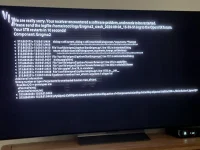
Afraid that hasn’t worked. In fact, when I do anything now, I get a crash log.
I’ve attached a photo from the tv screen to show what’s happening.
I get this if I go into network, plugins to name just a couple…

IMG_0110.webpIMG_0110.webp
 
I’m off to work now bro’ but I’ll have a look tmw and let you know.
How do I find the logs? I’m very much a 0 when it comes to Linux knowledge.
Cheers mate.
 
Afraid that hasn’t worked. In fact, when I do anything now, I get a crash log.
I’ve attached a photo from the tv screen to show what’s happening.
I get this if I go into network, plugins to name just a couple…

View attachment 66779View attachment 66779

So I have seen that issue where a user is using an old skin…..have you installed a skin? What skin are you using?
If so we can probably get around that issue.
If you haven,t setup,logs they will be in /home directory
Just for future information:
you setup logs via menu/setup/system/logs/settings … set location to hdd (not flash), local time, enable logs.
 
Last edited:
So I have seen that issue where a user is using an old skin…..have you installed a skin? What skin are you using?
If so we can probably get around that issue.
If you haven,t setup,logs they will be in /home directory
Just for future information:
you setup logs via menu/setup/system/logs/settings … set location to hdd (not flash), local time, enable logs.

Hello twol - thanks very much for your reply.

When I gained access and connected via the internet, I first of all upgraded from v5 to v6 (latest patch) of VIX.
After that I downloaded the driver for my wifi dongle and then finally I did download one skin from the list to try.
It was one which the list which came from the internet connection and was VIXBMC HD-Night.

Since changing to this skin, every screen change or every save comes up with that error screen code that I attached earlier.
I can't do anything with the receiver without it crashing.

If you can help, I'd very much appreciate it mate.

Incidentally, I have tried to re-flash the version by USB but the receiver wont respond to the USB either despite I used the HP USB Disk Storage program to fully clean the USB before saving the version openvix-6.6.006.release-zgemmah7_multi to the usb device.

I won't be able to check in again after tmw for a few days but I'd appreciate if we can keep the thread going to try and resolve the issues.
 
Issue following command by Putty or terminal in openwebif to stop enigma2

init 4

Using filezilla or any other FTP app on your PC, navigate to
/etc/enigma2 and edit the file called "settings"

Delete line with "config.skin.primary"

Save, transfer back and restart enigma2 with following command

init 3
 
If I may. I have an H7. I like to know the IP addresses of devices on my LAN. So my preference is to assign static IP addresses for them.
Of course in webif. Selecting Settings>Packages and either installed or all. Make sure the actual RTL8192eu drivers are installed.
Look in the LAN interface settings and write your current LAN settings down. Unplug the LAN cable and configure your wifi.
Just to check (for me always) Use DHCP: No.
IP address. The same as the wired connection but select an address a few higher or lower than you wrote down. If wired was XXX.XXX.XXX.141. Give it a 145 or 140.
Everything else should be entered the same. Primary DNS should be your router IP (no change from LAN). You can leave secondary dns blank or use Google 8.8.4.4
Hopefully you're not trying to connect to a wifi guest network.
Double check Nameserver settings. The same as DNS settings.
Depending on your router for the wifi connection. Encryption should be WPA or WPA2. You should know that. You can check on other devices.
SSID, you said you entered correctly. The key. Correct also.
Run network test after you save the settings. In this scenario only DHCP should be red. Of course.
Make sure all settings are saved. Sometimes I've found that a handshake between the receiver and router are needed. A cold boot of the router, then cold boot of the receiver. Meaning the white power button in back after deep standby.
My H7 has a RTL8192 (no eu designation) USB wifi dongle. If you head into packages (dongle unplugged) and search for the RTL8192eu and remove all drivers for it. Then shut it down cold (no power). Insert the dongle and power it up.I should find it and install the correct drivers automatically. Going through the wifi setup may or may not have to be done again.
Just some personal findings. Hope it helps a little.
 

OpenViX Feeds Status

Back
Top