Superb quality and spec AB-Com PULSe 4K SE. Crazy offer! Only £99! FREE UK DELIVERY! 4K UHD, Enigma 2, Multiboot 4 images & more!...
Superb quality and spec AB-Com PULSe 4K Rev II Twin Satellite tuner only £149! FREE UK DELIVERY! 4K UHD, Enigma 2, SATA HDD facility, Multiboot 4 images & more!...

WiFi on OpenVix

Look in the LAN interface settings and write your current LAN settings down. Unplug the LAN cable and configure your wifi.
Just to check (for me always) Use DHCP: No.
IP address. The same as the wired connection but select an address a few higher or lower than you wrote down. If wired was XXX.XXX.XXX.141. Give it a 145 or 140.
Sounds very dangerous to me. If the LAN address was DHCP assigned (as it probably would be) then a nearby address will likely be DHCP assignable too, so this is just setting up a future really-weird issue.
What you should do here is find out what range of addresses your router is using for DHCP then use one which is outside of that range. (And remember it, and don't use it anywhere else).
 
Sounds very dangerous to me. If the LAN address was DHCP assigned (as it probably would be) then a nearby address will likely be DHCP assignable too, so this is just setting up a future really-weird issue.
What you should do here is find out what range of addresses your router is using for DHCP then use one which is outside of that range. (And remember it, and don't use it anywhere else).

Good advice! Having duplicate IP addresses on your LAN is a major pain if and when it happens.
 
Issue following command by Putty or terminal in openwebif to stop enigma2

init 4

Using filezilla or any other FTP app on your PC, navigate to
/etc/enigma2 and edit the file called "settings"

Delete line with "config.skin.primary"

Save, transfer back and restart enigma2 with following command

init 3

Hello again.
Back from holidays and today started to look at your advice once more.
I have downloaded Putty and tried to connect to the receivers IP address using Putty on Port 22.
When I connect, I am requested to enter a user login and password. Now I haven't set anything up with the receiver so tried the defaults admin/password and admin/admin but both failed.
What am I doing wrong and how do I by-pass this?
Thanks guys.
 
set a password in the box and root/password
 
Hello again.
Back from holidays and today started to look at your advice once more.
I have downloaded Putty and tried to connect to the receivers IP address using Putty on Port 22.
When I connect, I am requested to enter a user login and password. Now I haven't set anything up with the receiver so tried the defaults admin/password and admin/admin but both failed.
What am I doing wrong and how do I by-pass this?
Thanks guys.
well if no password use root and blank .. then enter passwd (correct spelling) and set password
 
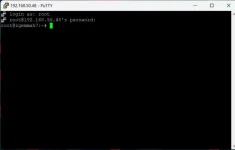
Right, the problem is I don't know how to get from here to /etc/enigma2.
I have tried to use commands such as "dir" but they won't work as they would do in the windows command prompt window.
Can you guide me on how to get to the correct directory?

telnet screenshot.webp
 
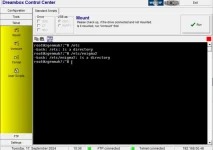
why not use DCC ? Much easyer
 
What's DCC? I've never heard of that before :confused:
Do you mean Dreambox Control Centre?
 
all in one : telnet ,ftp etc.Surch DCC 2.42
 
Great guys, thank you very much. I can’t say how much your help has been appreciated.
I’ve sorted the issue and deleted the erroneous line from settings and all works great.
All I have to do now is figure out how to delete the skin that caused all of the issue in the first place! LOL :-)
Thanks again guys, much appreciated!
 
Menu, Plugins, Red (uninstall), select the Skin category, highlight the skin you want to uninstall, press OK.
 

OpenViX Feeds Status

Back
Top