Superb quality and spec AB-Com PULSe 4K SE. Crazy offer! Only £99! FREE UK DELIVERY! 4K UHD, Enigma 2, Multiboot 4 images & more!...
Superb quality and spec AB-Com PULSe 4K Rev II Twin Satellite tuner only £149! FREE UK DELIVERY! 4K UHD, Enigma 2, SATA HDD facility, Multiboot 4 images & more!...

ZgemmaH17

Hello Twol.
I'll have another go after work this evening.
Should I save the log to ext USB or home/root?
save debug logs to whatever is HDD not flash(/home).
If you try this then leave for at least 45 minutes ... if not finished then cancel! post logs regardless.!
 
@SirOsis ... don,t think that will work but if you can 1st run it and then cancel after 5 minutes - but post debug log.
Then copy attachment to /usr/lib/enigma2/python/Components and restart... then run image backup again .. post log!!
 

Attachments

I thought I might do a fresh install on a free slot on the box later for any experimenting or mods.
As it is I have the build perfect and exactly as I want it on Slot 1.
Won't get a chance until later tonight.
 
I thought I might do a fresh install on a free slot on the box later for any experimenting or mods.
As it is I have the build perfect and exactly as I want it on Slot 1.
Won't get a chance until later tonight.
OK- no issue, whenever you have time
 
Only one log posted…and not correct!
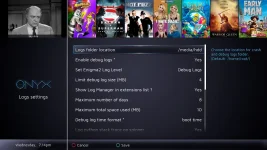
Easiest way is set in log settings “enable in extensions“…then blue button on remote, log manager, red button, delete all logs and restart before you begin a test…then created logs are the ones you should post
 
Can you check the screenshots and pic below please.
Seems to process as it should,takes about 45 mins but I'm not seeing anything in the logs.
Not sure where I'm going wrong but would love to sort it,thanks.
 

Attachments

  • Capture.webp
    Capture.webp
    34.8 KB · Views: 7
  • 369c9752-7016-4df1-8905-280c66fd433c.webp
    369c9752-7016-4df1-8905-280c66fd433c.webp
    60.4 KB · Views: 10
  • 1_0_1_1A60_7E7_2_11A0000_0_0_0_20250702201103.webp
    1_0_1_1A60_7E7_2_11A0000_0_0_0_20250702201103.webp
    65.4 KB · Views: 10
  • 1_0_1_1A60_7E7_2_11A0000_0_0_0_20250702191411.webp
    1_0_1_1A60_7E7_2_11A0000_0_0_0_20250702191411.webp
    96 KB · Views: 10
It should not take 45 minutes. To fix this, twol needs the logs. A restart is needed when you change those settings. The default location is /home root/logs Check there just in case you forgot to restart after making changes. Twol and most people prefer local time. It will actually help you see if you have the correct logs too. Its under `Debug log time format`
 
Can you check the screenshots and pic below please.
Seems to process as it should,takes about 45 mins but I'm not seeing anything in the logs.
Not sure where I'm going wrong but would love to sort it,thanks.
I am assuming thats without copying over the attachment in post #62
Can you do that, restart and see what happens?
 
It should not take 45 minutes. To fix this, twol needs the logs. A restart is needed when you change those settings. The default location is /home root/logs Check there just in case you forgot to restart after making changes. Twol and most people prefer local time. It will actually help you see if you have the correct logs too. Its under `Debug log time format`
save debug logs to whatever is HDD not flash(/home).
If you try this then leave for at least 45 minutes ... if not finished then cancel! post logs regardless.!
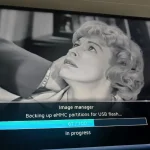
Going to run it again.
Do I save to home/root or hdd?
 
Ok,I transferred the systeminfo.py attachment and ran the back-up again.
Didn't time it but it took approx. 10 mins.
Here's the logs.
 

Attachments

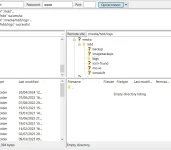
Just for info - you have specified /hdd to save the logs, but you are looking in /hdd/logs. So, maybe specify /hdd/logs in the menu selection. Also toggle through the "debug log time format" so that it shows local/boot time and be sure to press GREEN to save. I'm not sure why @twol wants you to save on the /hdd as I have found that it keeps the disk spinning (if you have an actual HDD), but I guess he just wants to ensure you don't lose logs stored in flash if you install a new image.
 
Ok, I see that you are now able to access the saved logs, but you need to toggle through the time format options so that you are using local time, not just the relative boot time.
 
Ok, I see that you are now able to access the saved logs, but you need to toggle through the time format options so that you are using local time, not just the relative boot time.
yes,will do that.
 
Question on Logs! ….. I always run with debug logs and with code that may sometimes generate a lot of activity, so don,t want anything in flash. In general will use usb for logs when attached, However, my lounge box has a spinning hdd and that has never been an issue
 
Ok,I transferred the systeminfo.py attachment and ran the back-up again.
Didn't time it but it took approx. 10 mins.
Here's the logs.
So it finished and produced an image backup? Did you try reloading that into another slot?
 
Do the logs I shared look correct Twol?
I have debug logs of which the 1st shows an ImageManager backup of about 30 minutes or so.The otehr 3 do not have an ImageManager backup run.
Do the logs I shared look correct Twol?
1st debug log shows 30 minute(?) or so ImageManager backup.
Other 3 don't show ImageManager backup and not the 15 minute backup.
Can you try and find it??
Also as Huevos has posted you should now have a backup in Imagebackups directory, which you should be able to flash to a slot in ImageManager
 

OpenViX Feeds Status

Back
Top