Superb quality and spec AB-Com PULSe 4K SE. Crazy offer! Only £129! FREE UK DELIVERY! 4K UHD, Enigma 2, Multiboot 4 images & more!...
Superb quality and spec AB-Com PULSe 4K Rev II Twin Satellite tuner only £179! FREE UK DELIVERY! 4K UHD, Enigma 2, SATA HDD facility, Multiboot 4 images & more!...

How to Zap + Exit after using Left/Right buttons

  • Thread starter Thread starter ea.xlns
  • Start date Start date
E

ea.xlns

Guest
This has been bugging me for a while and I'm not sure if it can be changed. I'm using the latest image (todays) on my VU+ Duo. When viewing channels/events on the left/right buttons I was hoping to Zap to a channel with the menu disappearing straight after the new channel opens.

Currently, after zapping to the channel I need to press OK then wait 5 seconds for the info bar to disappear. If I actually press exit when it has zapped to the channel it will actually go back to the previous channel which is annoying...

Is this possible?

Cheers
 
ok, i will add option to disable preview in next update
 
Actually u have to press ok Two Times. The first to preview the second to zap.
I really prefer this as a feature
 
just a update, just coded it, i am just testing it now so it is coming!!!.

brilliant work - any idea when it'll be ready? Also, would this feature be available via an online update or on a completely new image?

Thanks Andy!
 
LOL, it has been introduced already. Just make sure your image is up-to-date (ViX --> software update).

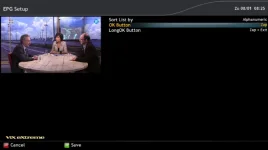
To set a choice: push right (or left) arrow or red --> Menu --> set function of (long)OK button.
 

Attachments

  • Set ZAP.webp
    Set ZAP.webp
    16.8 KB · Views: 18
Excellent

Sent from my Galaxy Nexus using Tapatalk
 
.....but something that both the missus and I would love would be a button to 'zap previewed channel and exit' as I really get annoyed with myself when I preview something in the epg then go hunting for something better and forget that the channel has only been previewed not zapped when I hit exit. (I know its my fault but thought others may do the same!!)
 
Sorry Rob, that's not quite what I meant, but thank you for your response...

What I was aiming for was the way it currently works, but for arguments sake lets say when you press exit it goes back to the tuned channel, ok previews and again or long press tunes and exits, but then another button exits but tunes the currently previewing channel (which maybe a long way away in the guide as you've browsed elsewhere).

Hope that makes sense.
 
LOL, ok I'll try again.

I like the way it is set up in your screenshot, but...

So Ok here's the thing.

1) I'm watching Channel 1
2) I open the guide and preview channel 2 (single 'ok' click)
3) I browse 6 pages away and then decide I actually want to watch channel 2.

At this point, it would be nice if I had a button to exit whilst tuning the previewed channel.

But all I can do is:
a) exit and let it tune back to channel 1
b) tune to the currently highlighted channel on page 6 of the guide.
 

OpenViX Feeds Status

Back
Top