Superb quality and spec AB-Com PULSe 4K SE. Crazy offer! Only £129! FREE UK DELIVERY! 4K UHD, Enigma 2, Multiboot 4 images & more!...
Superb quality and spec AB-Com PULSe 4K Rev II Twin Satellite tuner only £179! FREE UK DELIVERY! 4K UHD, Enigma 2, SATA HDD facility, Multiboot 4 images & more!...

Vu Duo ViX 2.3 (Linux 3.1.1) 25-12-2011

  • Thread starter Thread starter silverfox0786
  • Start date Start date
Yes I get it often. Also sometimes the playback picture will just freeze but audio continues. FF or RWD to fix it. It happened on openpli a few years ago and went away after a driver update.

I have this problem too (I usually hit "1" and "3" to fix it) But I had it for a while even with older versions of Vix, I hoped the new Vix would fix it but actually it's worse now.
G
 
I have this problem too (I usually hit "1" and "3" to fix it) But I had it for a while even with older versions of Vix, I hoped the new Vix would fix it but actually it's worse now.
G
You can find this reported on several forums (= using several images), so it could very well be a driver problem.
 
You can find this reported on several forums (= using several images), so it could very well be a driver problem.

Yes, and on the OpenPLi 2.1 images people have found some improvement (not total cures) by playing with different values of the <recording data sync size> and the <recording demux buffer size>. I'm currently trying with a sync size of 512kB and a demux buffer of 1MB. It does seem better (no glitches for the last hour)... YMMV

cheers
 
Yes, and on the OpenPLi 2.1 images people have found some improvement (not total cures) by playing with different values of the <recording data sync size> and the <recording demux buffer size>. I'm currently trying with a sync size of 512kB and a demux buffer of 1MB. It does seem better (no glitches for the last hour)...
Correct, but be aware: so far these are only preliminary reports by layman.
 
Yes, and on the OpenPLi 2.1 images people have found some improvement (not total cures) by playing with different values of the <recording data sync size> and the <recording demux buffer size>. I'm currently trying with a sync size of 512kB and a demux buffer of 1MB. It does seem better (no glitches for the last hour)... YMMV

cheers

Still working good? Where do you make these settings, FTP or menu?

Even if it's a bit good to see that I'm not alone with this problem, I really hope a solution will appear ASAP, as this is something I use on a daily basis.
 
Still working good? Where do you make these settings, FTP or menu?

Even if it's a bit good to see that I'm not alone with this problem, I really hope a solution will appear ASAP, as this is something I use on a daily basis.

Nup... it froze after about 1.5hours. Maybe better to leave the setting in default because then you get pixellation as soon as things start to go wrong and this can be cleared with the method noted by others in this topic.

If you do want to play with the settings, they're found at menu->setup->system->recording (scroll down to the second page of settings).

cheers
 
As explained on the PLi forum these settings influence the recording process.
If you experience this problem and (by replaying it) it doesn't happen at exactly the same recording time, the recording is fine, and hence changing these settings won't help you.
Only if they are reproducible at exactly the same time, experimenting with the values can prove to be worthwhile.
 
unable to use channel move mode no option available when i press the menu button,
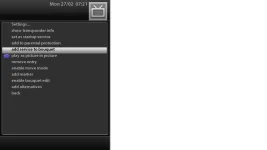
i choose add channel to bouquets say its itv1 Granada to entertainment, i go to entertainment scroll to the bottom itv1 Granada is available but when i press the menu button there is no move mode available the only options i have is
1. set as startup service
2. add service to bouquets
3. play as picture in picture
4. remove entry
5. add marker
6. enable bouquet edit
7. back

any idea how to fix this please
regards
 
unable to use channel move mode no option available when i press the menu button,
i choose add channel to bouquets say its itv1 Granada to entertainment, i go to entertainment scroll to the bottom itv1 Granada is available but when i press the menu button there is no move mode available the only options i have is
1. set as startup service
2. add service to bouquets
3. play as picture in picture
4. remove entry
5. add marker
6. enable bouquet edit
7. back

any idea how to fix this please
regards

What skin are you using? Are you defo using VIX? All fine here, see screenshot.

Press down arrow to go into current channel bouquet and then press menu.
 

Attachments

  • move.webp
    move.webp
    8.1 KB · Views: 22
What skin are you using? Are you defo using VIX? All fine here, see screenshot.

Press down arrow to go into current channel bouquet and then press menu.

hi defo using vix see info below.

Virtusso image xtreme
by team Vix

Hardware Vu+ Duo
Kernel 3.1.1
Driver 2012-01-18
image release
Version 2.3
Build 204
last update 2012-01-27 19.51

Translation
Andy Blackburn
 
Hello
I have problems playing iso, img and DVD files. The film is stuttering and freezes with a earsplitting sound.
Recorded Tv, mkv and avi files works fine.
I'm not sure but i think it happened after build 193. :confused: I'm on 204 now. Anyway it's noting wrong with the files, have played them before on my vu+ on previous version.
Hardware Vu+ Duo
Kernel 3.1.1
Version 2.3
Build 204
Using ViX built in media player.
Someone else experience the same problems?
 
Last edited by a moderator:
Here you go,
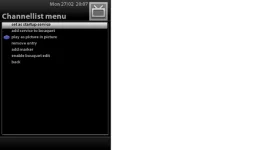
i press down on the remote control, then i press the menu button and it takes me to this menu in the image below.

Go to
Menu --> Setup --> System --> Customise
and set 'setup mode' to 'expert'. Now you have the move-entry in the channellist's menu you were looking for.
 
Last edited:
Do we know if there is a new release due anytime soon?
Still suffering from random reboots on channel changing-Turning on-EPG Update !
I know im not the only one suffering the same problems on here and other forums, but all I do know it all started since the Xmas Day Update!
Read all posts on here and tried everything to solve it all to no avail!
Have tried other images but dont like them, just want a working version of VIX!
 
as i said in the SB we dont get into ETA's. When were happy with the updates / image we will release. we have in the past given ETA's and frankly ended up with nothing but grief for it. all i can ask is that you be patient and understand that we are working very hard behind the scenes for the betterment of the image.
 
as i said in the SB we dont get into ETA's. When were happy with the updates / image we will release. we have in the past given ETA's and frankly ended up with nothing but grief for it. all i can ask is that you be patient and understand that we are working very hard behind the scenes for the betterment of the image.

Dont want to sound ungrateful and realise how much work goes into these images, just hope you can sort out all our problems with next release!
Vix are the best image by far and look forward to seeing an new version when its ready!
:eek:
 
Hello
I have problems playing iso, img and DVD files. The film is stuttering and freezes with a earsplitting sound.
Recorded Tv, mkv and avi files works fine.
I'm not sure but i think it happened after build 193. I'm on 204 now. Anyway it's noting wrong with the files, have played them before on my vu+ on previous version.
Hardware Vu+ Duo
Kernel 3.1.1
Version 2.3
Build 204
Using ViX built in media player.
Someone else experience the same problems?

Fixed it :)
Delete or renamed the file liba52.so.0
it's located in \usr\lib\
 

OpenViX Feeds Status

Back
Top