Superb quality and spec AB-Com PULSe 4K SE. Crazy offer! Only £99! FREE UK DELIVERY! 4K UHD, Enigma 2, Multiboot 4 images & more!...
Superb quality and spec AB-Com PULSe 4K Rev II Twin Satellite tuner only £149! FREE UK DELIVERY! 4K UHD, Enigma 2, SATA HDD facility, Multiboot 4 images & more!...

[ViX_Misc] VIX Image Online update to build 514, fantastic new feature.

Is there any reason this would have trashed my Irish-DTT channels - they were in my Favourites which I had configured it to save, however all DTT channels now show up as N/A - coincidental?
 
Why not set autoscan, so you'll never have to go there anymore?
If you enable background scanning in setup/system/customise, does the receiver look at all satellites? and how often are the scans made?

Similarly what satellites are scanned if you got to setup/Service Searching/Automatic scan?
 
Is there any reason this would have trashed my Irish-DTT channels - they were in my Favourites which I had configured it to save, however all DTT channels now show up as N/A - coincidental?
This happened to me too. I had to reset the dtt tuner config and rescan, then channels appeared in favourites again.
 
Is there any reason this would have trashed my Irish-DTT channels - they were in my Favourites which I had configured it to save, however all DTT channels now show up as N/A - coincidental?

Make sure the tuner is set up correctly & scan them again, this also happens me at times if I don't do a full reboot after scanning Irish channels.
 
Thanks you for all the work you put into creating this super fast plugin. Have it installed in my two Vu+ It will change the way i set up bouquets forever...Thanks for feedback re interactive channels.

Just one question. Do you intend to release an .ipk file of this plugin. I would love to install this in my receivers that are not supported by VIX.

there is an ipk, BUT, for the placeholder channels to be hidden in the channel lists requires some special code. so your image may not hide the placeholders.
 
Make sure the tuner is set up correctly & scan them again, this also happens me at times if I don't do a full reboot after scanning Irish channels.

Nothing to do with the tuner setup - it intermittently trashes my DTT channels. Unusable for me I'm afraid.
 
skysport interactive will be fixed in next update.
 
as said many times now, this isn't a plugin issue.
If you want STV SD to be at 103, don't use HD swap, simple.

The plugin is assuming that there is a HD channel at 178. For the Scottish regions this is wrong, and the HD swap feature fails to work correctly in this circumstance. In my opinion this is therefore a plugin issue - albeit it will disappear next year when STV HD becomes part of SKY UK channel lineup. I accept that you don't want to hack STV HD into 178, but could the plugin not be modified to swap 178 with 3 only if a channel exists at 178?

By the way - an excellent plugin otherwise. Thanks for the effort you've put into this.
 
A great plugin and will definetly make my life easier.

The plugin overwrites the lamedb and in my case has not kept my DVB-T transponder details.

I only realised after a GUI restart couldn't tune any DVB-T channels. A rescan on DVB-T resolves the problems but would be great if the plugin maintains the transponder details in lamedb like I csn maintain my DVB-T channels in the first bouquet (another great feature of the plugin:-) )
 
general debug, thanks.

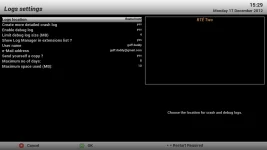
I enabled debug logs (I think - see attached) but I'm not seeing any logs in the log manager. Is there something else I need to do?
 

Attachments

  • screenshot.webp
    screenshot.webp
    26.7 KB · Views: 18
reboot the box & a debug log will be created.
 
I enabled debug logs (I think - see attached) but I'm not seeing any logs in the log manager. Is there something else I need to do?

Debug logs are held in live memory as they are constantly being updated with the functions of the box, they are only written to the storage device when enigma has closed down such as when the receiver is restarted or when they hit their maximum size limit.

reboot the receiver and look again you should see a log that corresponds to the bootdown / bootup time.
 
Debug logs are held in live memory as they are constantly being updated with the functions of the box, they are only written to the storage device when enigma has closed down such as when the receiver is restarted or when they hit their maximum size limit.
Sorry to say, but that is not correct. The log is written constantly (hence you can open the log and see the action you just carried out).

But changing the status from/to enabled requires an E2 restart to be effective.
 
Sorry to say, but that is not correct. The log is written constantly (hence you can open the log and see the action you just carried out).

But changing the status from/to enabled requires an E2 restart to be effective.

In that case i stand corrected.
 
I had rebooted/restarted Enigma and couldn't see the logs - tried it again and it worked OK.

I restored settings to a state prior to running AutoBouquetMaker (i.e. DTT working OK), ran the plugin and rebooted. DTT channels still available. Restarted E2 and the DTT channels were gone.

I've emailed two logs (one from when the plugin ran, the other created on the restart) Ref: 1355769372​.96

Thanks for your help on this.

Also on a separate issue - I've noticed if I configure the plugin to hide some bouquets (i.e. not create some standard bouquets) it instead creates an empty bouquet called N/A
 
Digidude put together a IPK installer for this a few days ago. The plugin should work on all other OE-A teams images but i'm not 100% certain if it will work with other images architectures, but being as it's OE-A it is open source for others to adapt and modify to their liking, providing that the source credits are not removed, modified or tampered with in any way.

I can confirm that the ipk did not work with a TM Twin using the 4D image. It rejected it owing to the architecture.
 

OpenViX Feeds Status

Back
Top