
Superb quality and spec AB-Com PULSe 4K SE. Crazy offer! Only £99! FREE UK DELIVERY! 4K UHD, Enigma 2, Multiboot 4 images & more!...
Superb quality and spec AB-Com PULSe 4K Rev II Twin Satellite tuner only £149! FREE UK DELIVERY! 4K UHD, Enigma 2, SATA HDD facility, Multiboot 4 images & more!...
You are using an out of date browser. It may not display this or other websites correctly.
You should upgrade or use an alternative browser.
You should upgrade or use an alternative browser.
MetrixHD_MOD (Now includes a full 1080 HD version too)
- Thread starter scwheeler
- Start date


Micromecca
Forum Supporter

Just started using MetrixHD_MOD today and very impressed so far, my thanks to all involved.
I have however noticed the following:
When entering a channel number directly the text appears to be cut-off.

And here the 'All Channels' Text appear to be a different font and the bottom left (Menu?) Box appears to be cut off.

I did scan the thread prior to posting so apologies if any of this has already been mentioned and I missed it.
Cheers
I have however noticed the following:
When entering a channel number directly the text appears to be cut-off.
And here the 'All Channels' Text appear to be a different font and the bottom left (Menu?) Box appears to be cut off.
I did scan the thread prior to posting so apologies if any of this has already been mentioned and I missed it.
Cheers
Last edited:
Hi Micromecca, many thanks.
For the channel number please make sure number zap is installed and and enabled in the skin part setting. There are many versions available in the store but only the one in the openvix section I can guarantee works. However if you prefer others by all means try them and if they don't work just uninstall and try another.
The other screen hasn't been skinned yet in MetrixHD and so rather than display nothing is shows the default Vix skin here. If you change the settings to quickEPG here rather than the miniEPG you will see the MetrixHD version.
Hope helps.
For the channel number please make sure number zap is installed and and enabled in the skin part setting. There are many versions available in the store but only the one in the openvix section I can guarantee works. However if you prefer others by all means try them and if they don't work just uninstall and try another.
The other screen hasn't been skinned yet in MetrixHD and so rather than display nothing is shows the default Vix skin here. If you change the settings to quickEPG here rather than the miniEPG you will see the MetrixHD version.
Hope helps.
Micromecca
Forum Supporter
Thanks scwheeler, I didn't realise that I had to install 'Number Zap' so I will check that out now.
It doesn't bother me the way the MiniEPG looks at the mo, happy to wait until you have time to fettle it.
thanks for all the hard work
Edit: Number Zap did the trick, thank you!
It doesn't bother me the way the MiniEPG looks at the mo, happy to wait until you have time to fettle it.
thanks for all the hard work
Edit: Number Zap did the trick, thank you!
Last edited:
J
jimbo_jones
Guest
I just wanted to say thanks to the creator for all his hard work on this skin which has quickly become a firm favourite of mine! :thumbsup:
I have a couple of questions that I'm hoping someone can answer - I've read *most* of this thread but it's a pretty long one so apologies if this has already been covered!
I'm running this skin on my VIX image and I have the Metric coloured buttons skinpart (I think, off the top of my head) installed. However I notice that on the infobar only the blue button shows a description of 'extensions'. When I show the second infobar then then the other button descriptions appear.
Is there something else I should install to enable the full descriptions on the first infobar or is it a feature that they're only shown on the SIB?
Which leads me onto my second question, to make life easier for my other half...and to satisfy my OCD! Is it possible to change the coloured button descriptions so that they match what I have setup with MultiQuickButton? If so, would someone be kind enough to point me in the right direction of the relevant file and the section of code I'd need to edit please?
I have a couple of questions that I'm hoping someone can answer - I've read *most* of this thread but it's a pretty long one so apologies if this has already been covered!
I'm running this skin on my VIX image and I have the Metric coloured buttons skinpart (I think, off the top of my head) installed. However I notice that on the infobar only the blue button shows a description of 'extensions'. When I show the second infobar then then the other button descriptions appear.
Is there something else I should install to enable the full descriptions on the first infobar or is it a feature that they're only shown on the SIB?
Which leads me onto my second question, to make life easier for my other half...and to satisfy my OCD! Is it possible to change the coloured button descriptions so that they match what I have setup with MultiQuickButton? If so, would someone be kind enough to point me in the right direction of the relevant file and the section of code I'd need to edit please?
Micromecca
Forum Supporter
Is there something else I should install to enable the full descriptions on the first infobar or is it a feature that they're only shown on the SIB?
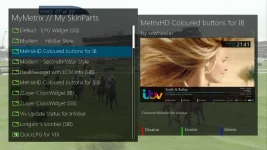
Is "MetrixHD Coloured buttons for IB" enabled in My SkinParts ?
J
jimbo_jones
Guest
Is "MetrixHD Coloured buttons for IB" enabled in My SkinParts ?
Thanks for your reply Micromecca - yep, I have that enabled.
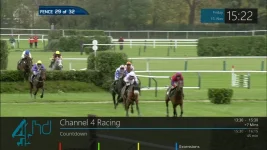
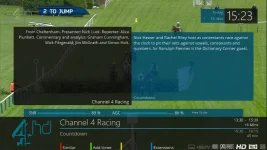
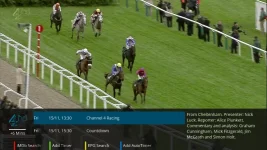
The coloured buttons show in the infobar and disappear if I disable that SkinPart. However, I only see the blue button description 'extensions' in IB view, with additional descriptions when I go into the SIB or QuickEPG for VIX, which is fine.
I just wondered if this was normal and if so, is there any way I can modify the initial IB descriptions myself?
Micromecca
Forum Supporter
I just wondered if this was normal and if so, is there any way I can modify the initial IB descriptions myself?
I think that the descriptions are working as intended and only appear with the Second Info Bar, but the labels for the coloured buttons should be appearing at all times, mine do anyway


Last edited:
J
jimbo_jones
Guest
I think that the descriptions are working as intended and only appear with the Second Info Bar, but the labels for the coloured buttons should be appearing at all times, mine do anyway
Thanks Micromecca. Sorry for the confusing terminology, by 'descriptions' I meant it's the button labels that are missing.
It's no biggy but it would be nice to have them displayed if possible (and ideally edit them myself too if it's not too difficult!). Hopefully someone might have a solution...
F
foz
Guest
Thanks for your reply Micromecca - yep, I have that enabled.
The coloured buttons show in the infobar and disappear if I disable that SkinPart. However, I only see the blue button description 'extensions' in IB view, with additional descriptions when I go into the SIB or QuickEPG for VIX, which is fine.
I just wondered if this was normal and if so, is there any way I can modify the initial IB descriptions myself?
View attachment 30414View attachment 30415View attachment 30416View attachment 30417
lol may i ask?
how did you get pic4 to show like that?
i've never seen that on mine
thanks
foz
J
jimbo_jones
Guest
lol may i ask?
how did you get pic4 to show like that?
i've never seen that on mine
thanks
foz
Hi Foz, it's with the SkinPart 'QuickEPG for VIX' - if your button setup is similar to mine then you should be able to use the left/right arrows on your remote to display it once enabled.
Micromecca
Forum Supporter
Thanks Micromecca. Sorry for the confusing terminology, by 'descriptions' I meant it's the button labels that are missing.
It's no biggy but it would be nice to have them displayed if possible (and ideally edit them myself too if it's not too difficult!). Hopefully someone might have a solution...
No probs mate, I wasn't sure If I had understood properly either tbh
Do you remember if the labels were there prior to installing the skin?
You could always try: disable the coloured labels IB skin part > rebuild skin> re-add them > rebuild skin
and hopefully Scwheeler will be along shortly with some real help
H
hsbajwa316
Guest
Hi - I am having issues with seeing/ changing the options for cam conifig switcher. Is there any workaround for this or settings I need to change
J
jimbo_jones
Guest
No probs mate, I wasn't sure If I had understood properly either tbh
Do you remember if the labels were there prior to installing the skin?
You could always try: disable the coloured labels IB skin part > rebuild skin> re-add them > rebuild skin
and hopefully Scwheeler will be along shortly with some real help
Thanks for your help mate - I think I've kinda got to the bottom of it now.
In the VIX menu (setup - system - button setup) I had the 'use VIX coloured buttons' set to 'no'. If I change this to 'yes' then the button labels display as expected:
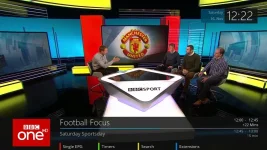
However, this makes me think that the labels themselves aren't anything to do with the skin. So if I want to modify them I guess I'll have to do a bit more digging to find out how they're generated/where they're stored...
Micromecca
Forum Supporter
Ahh yes disabling the Vix Colored buttons will do that, pleased you sussed it out :thumbsup:
Start a new thread in the Vix Team Images Support Section and one of the Devs will let you know if its possible to customize them
Start a new thread in the Vix Team Images Support Section and one of the Devs will let you know if its possible to customize them
Hi guys,
Yes the button labels aren't fixed in the skin and vary according to VIX. While it is possible to edit the skin to put a fixed text instead for most people this won't work. If you really wished to change it you could you the coloured buttons for IB skin part as a base and replace the 'widget name="key_green" ' lines with "label="
Yes the button labels aren't fixed in the skin and vary according to VIX. While it is possible to edit the skin to put a fixed text instead for most people this won't work. If you really wished to change it you could you the coloured buttons for IB skin part as a base and replace the 'widget name="key_green" ' lines with "label="
J
jimbo_jones
Guest
Hi guys,
Yes the button labels aren't fixed in the skin and vary according to VIX. While it is possible to edit the skin to put a fixed text instead for most people this won't work. If you really wished to change it you could you the coloured buttons for IB skin part as a base and replace the 'widget name="key_green" ' lines with "label="
Thanks for your reply scwheeler...I couldn't get the 'label' tag to work for some reason? However, in the (very unlikely lol!) event that anyone wants to achieve a similar thing, I edited the data.xml file in: /usr/lib/enigma2/python/Plugins/Extensions/MyMetrix/skinparts/widgets/active/widget_103
(/widget_139 for the second infobar)
And swapped out the 'widget name' lines with the following for each key and the relevant text/position:
<eLabel size="130,25" position="735,690" backgroundColor="metrixBackground" font="RegularLight; 20" halign="left" text="OnDemand" transparent="1" valign="top"/>
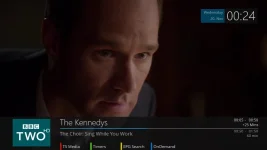
Thanks again for your help - it's actually got me interested in learning more about developing my own SkinParts. So if you have any useful resources that might help me then I'd really appreciate your advice...
Cheers
JJ

TK4|2|1
Member
- Joined
- May 31, 2011
- Messages
- 940
- Reaction score
- 1
- Points
- 18
Any way to make the text a different colour to the channel name, in channel selection screen?
J
jimbo_jones
Guest
Any way to make the text a different colour to the channel name, in channel selection screen?
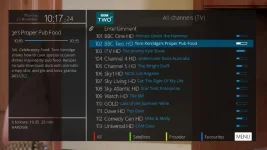
TK4, have you tried the SkinPart 'ChannelSelection (phyr)'?
I installed it mainly due to the scrolling for the running text description but was happily surprised to find that the programme name has a different coloured text to the channel name :thumbsup:
Similar threads
- Replies
- 39
- Views
- 36K

