Superb quality and spec AB-Com PULSe 4K SE. Crazy offer! Only £99! FREE UK DELIVERY! 4K UHD, Enigma 2, Multiboot 4 images & more!...
Superb quality and spec AB-Com PULSe 4K Rev II Twin Satellite tuner only £149! FREE UK DELIVERY! 4K UHD, Enigma 2, SATA HDD facility, Multiboot 4 images & more!...

[VU+ Duo] Vix image stopped working and Vu+ box not seeing USB stick

steevieboy4u

New member
Joined
Jul 23, 2013
Messages
82
Reaction score
0
Points
0
Location
Earth
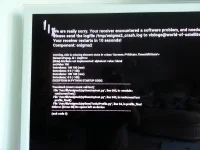
My brothers box has been playing up over the last few weeks until he's now at the stage Vix won't even get past the boot screen. It boots up to 99% then crashes showing the screen below. It then shows the World of satellite Vix planet screen and just stays there with the spinning Vix words on the top left side of the screen

I've tried re-flashing it with Vix image on a USB stick placed in the front but its not seeing it it just continuously does what i've stated above. I even tried the memory stick in the rear of the box to see if that made a difference but it didn't :-(

Any help would be greatly appreciated as i've not got a clue now its not seeing the USB stick (i've reformatted and checked its FAT 32 etc as well)
IMG_20140831_100855_zpspgg4crsw.webp
 
Which box?

With the USB stick do a full format of it and make sure its only folder VUPLUS on the USB and all other sticks have been pulled out and do a full power down before flashing.
 
old age buddy, I did try to see if it was in post:o
 
Cheers will do a full format now rather than a quick and see if it makes a difference.

I've just downloaded openvix-Apollo.028-vuduo_usb and unzipped so the vuplus folder is only on the stick.

Let you know what happens after full format and retry shortly - Thanks :)
 
Just done a full format on a 4GB integral memory stick to Fat 32 (default) and Default 'Allocation Unit Size'

Put the latest unzipped openvix-Apollo.028 on the stick, the vuplus folder is on the root of the stick and its still doing the exact same thing. I've tried all 3 USB ports as well. 1 at the front and the 2 at the rear.

The front LCD states starting then VU+ Duo, then Booting up to 99

Sure it should state loading or flashing or something like that when it works properly.

Any other suggestions?

Just a quick one, on the bottom of the crash log (screen shot attached) its states 'no space left on device' could the hard drive be full so nothing else can be written to it or something daft like that?

Also what does exit code 5 mean?

Cheers
 
Your flash is full. You could ftp or telnet in & find whatever is causing that & delete it.
 
Installed the HP tool and formatting now. Will get back to you all shortly - Cheers all :thumbsup:
 
Fixed :smiley_yup:

It was the USB drive. I used my USB drive that i've flashed with in the past and the box saw it straight away.

This is what has probably been causing the issues leading to what has happened as previously as he couldn't get his EPG to update etc as the files etc were stored on this USB stick in the back of his box.

Thank you ALLfor the pointers and help it is really appreciated.

Might update my box to this version now as well now i've seen it, love the new waterfall and cave boot screen :)
 
The OP is trying to flash the box, must be a USB stick issue that it's not detecting.

Yes, but at the time they couldn't flash...
FTP or telnet in & delete offending file & it would have booted.
Then a couch flash, settings backup, and so on could be done if they still wanted to flash.
 

OpenViX Feeds Status

Back
Top