Superb quality and spec AB-Com PULSe 4K SE. Crazy offer! Only £129! FREE UK DELIVERY! 4K UHD, Enigma 2, Multiboot 4 images & more!...
Superb quality and spec AB-Com PULSe 4K Rev II Twin Satellite tuner only £179! FREE UK DELIVERY! 4K UHD, Enigma 2, SATA HDD facility, Multiboot 4 images & more!...

[VU+ Duo] motorized dish move ?

chadda

Member
Joined
Sep 24, 2011
Messages
118
Reaction score
0
Points
16
Location
Liverpool ---- Spain
using
Apollo 166 build
is there a way to stop the motorized dish moving ----- using a 1.8m dish for terrestrial tv plus a 1.2m motorized dish for European stations

if i record a program on say itv the motorized dish will move to 28e
from 1w ?or what ever the dish has been set ( reason for 1.8m dish the 1.2 will not pic up 28e & )

cheers
 
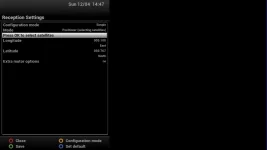
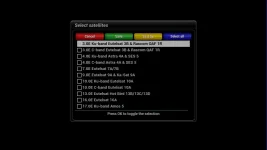
In the tuner settings for the 1.2 choose custom sats and remove the option for 28.2, 28.5. I don't know the exact terminology as not near a box at the moment.
 
There is an option for USALS selecting satellites. Not sure he is using USALS for a dish that big. Was waiting for response.

If he is using Advanced, he will have to deselect 28.2 on the the tuner config for the tuner with smaller dish.
 
yes using USALS on tuner B single sats on tuner A

In the tuner settings for the 1.2 choose custom sats had a look in settings but no custom sats to choose ?
 
It is definitely there. Wording not correct in my earlier post.
 

Attachments

  • select sats1.webp
    select sats1.webp
    8.5 KB · Views: 35
  • select sats2.webp
    select sats2.webp
    14.8 KB · Views: 35
OMG thanks abu i didn't know that function was there !!!!!!! so if i select a green tick on 28e will that stop it going to that sat
Opposite way round. The ones with the tick are the one that will be available to that tuner. As you cannot receive 28.2 on that tuner/dish, you have to ensure it is not selected.
 
Opposite way round. The ones with the tick are the one that will be available to that tuner. As you cannot receive 28.2 on that tuner/dish, you have to ensure it is not selected.

none of the boxes are ticked ---- so i ticked 28e so is that right seems to have worked ??
 
Last edited:
You ensure there is a tick next to the ones you want to use on that tuner.

For you, 28.2 must not be ticked.
 
need a bit of help please after flashing hades 007 i cannot see the ( press ok to select satellite ) in reception settings do i have to enable it some how ?

sorry just found it right click on mode which reveals OK to select sats thanks for looking
 
Last edited:

OpenViX Feeds Status

Back
Top