Superb quality and spec AB-Com PULSe 4K SE. Crazy offer! Only £129! FREE UK DELIVERY! 4K UHD, Enigma 2, Multiboot 4 images & more!...
Superb quality and spec AB-Com PULSe 4K Rev II Twin Satellite tuner only £179! FREE UK DELIVERY! 4K UHD, Enigma 2, SATA HDD facility, Multiboot 4 images & more!...

[VU+ Duo2] Recording rest of the program while timeshifting

  • Thread starter Thread starter Warlon
  • Start date Start date
No, if you switch to another chanenl, you will be asked if you want to continue timeshift, subject to you having tuners available. Provided you have not changed the default of ask user what to do in such situations.
oh, i have to try that. that would help.
 
IIRC the two recording files are eventually merged after the recording has finished but it can take some time depending on the size of the files.
 
IIRC the two recording files are eventually merged after the recording has finished but it can take some time depending on the size of the files.
yes, that's probably how it's implemented.
however, it has 2 major disadvanages: 1. you have to wait until the event finished, and 2. the merge causes a disruption at the merge point.
in my mind an appropriate implementation would be to continue recording into the timeshift file (this avoids disruption) and a rename of the timeshift file at the end of the event (is much faster than merging). with that approach you could seemlessly watch the timeshift/recording even if the event has not finished yet.
 
yes, that's probably how it's implemented.
however, it has 2 major disadvanages: 1. you have to wait until the event finished, and 2. the merge causes a disruption at the merge point.
in my mind an appropriate implementation would be to continue recording into the timeshift file (this avoids disruption) and a rename of the timeshift file at the end of the event (is much faster than merging). with that approach you could seemlessly watch the timeshift/recording even if the event has not finished yet.

And you can rewind after starting to record halfway.
 
Without wanting to come across as a dick (not that I particularly care), if you want sky+ features use a sky+ receiver. No and I do mean NO E2 team will ever have the finances, or manpower that a global corporation such as BskyB does and to expect the multi-million £ features from such a platform on E2 based image is just insane.

There is no need to be so defensive, I do have a Sky subscription with a Sky+ HD box, but I actually prefer OpenVIX and my Gigablue box, im just pointing out as others are doing that the time shifting feature is not working as we expect, that is all. Obviously if I (and assume we), knew how to code we could work on a solution, we would. Surely by pointing it out to those more knowledgeable, such as yourself, there can hopefully be a better outcome for everyone?

As shown, its hard enough to even describe the problem, never mind create a solution.

Anyway, I guess I would work better if it could work like this:

When you tune to a channel, automatically record the same feed twice. Once for the time shift capabilities, and the other just in case you choose to "Record and stop after current event". If you change channel then disregard both recordings and the process starts again. As time shifting already works as it should, would it be hard to implement a way to automatically record again and automatically delete if you don't want to use it? I assume it wouldn't because this already works if you set a program to record in advance. It would just be a case of doing this automatically, delete by default or on channel change, or save if you press record mid program.

Thats my thoughts anyway :confused:
 
When you tune to a channel, automatically record the same feed twice. Once for the time shift capabilities, and the other just in case you choose to "Record and stop after current event". If you change channel then disregard both recordings and the process starts again. As time shifting already works as it should, would it be hard to implement a way to automatically record again and automatically delete if you don't want to use it? I assume it wouldn't because this already works if you set a program to record in advance. It would just be a case of doing this automatically, delete by default or on channel change, or save if you press record mid program.
yes, that would be a good approach.

btw. i wonder how beta-testers test this function and come to the conclusion that it works ok. :confused:
 
OP here. What I meant is actually a bit different than what has been discussed here. Say I start watching something and five minutes in I put it on pause. I go do something for five minutes and decide that I'll have to finish watching the show later. So I select record (stop after this program) and turn off my box. Next day I start watching my recording but the recording starts ten minutes in and not five minutes in. So I missed part 0:05 -> 0:10 of the program. I don't care about the part I had already watched, but it would seem logical that the recording starts from whatever part of the stream is currently on the screen when I press record. Timeshift or not.
 
I'd have thought that if you select Record (stop after current event), it should record the whole thing from when you tuned to that channel. It doesn't do that currently. I think my method would be a good way to do it, sadly I have no idea how to do it.

Can this be looked at as a bug?
 
It does work but it's an area of Vix that I believe causes a lot of confusion for users who have used Sky+ in the past.

This is how Sky+ works:
Let's say I am watching Sky1 from 8pm to 10pm. There are 2 programs on during that time, one from 8pm to 9pm (Matlock) and one from 9pm to 10pm (Murder She Wrote). At 9.15pm I hit pause to make a cuppa. At 9.20pm return to the TV and hit play. At 9.30pm I decide to record "Murder She Wrote" for my wife. So I hit record. At this point, all the timeshift buffer from 9pm to 9.30pm is automatically saved into "Recordings" and the rest of the program is automatically appended to the end of the "Murder She Wrote" recording file. If my wife was to join me at 9.45pm that same evening, it's possible to browse into "Recordings" and watch "Murder She Wrote" that started at 9pm from the beginning (even though it hasn't finished yet). The last 15 minutes of the program of is recorded as normal. With Sky+ in this scenario, it wouldn't be possible to record Matlock.

This is how Vix works:
Take the same scenario again. Let's say I am watching Sky1 from 8pm to 10pm. There are 2 programs on during that time, one from 8pm to 9pm (Matlock) and one from 9pm to 10pm (Murder She Wrote). At 9.15pm I hit pause to make a cuppa. At 9.20pm return to the TV and hit play. At 9.30pm I decide to record "Murder She Wrote" for my wife. So I hit record (there is more than 1 way to record with Vix, so depending on how you record, your experience may vary). Now this is where Sky+ and Vix differ. The User Experience with Vix is not as "clean" as the Sky+ IMHO but the level of control makes up for this. After hitting record, I get presented with something like 6 or 7 options about what I want to record (I'm not in front of my TV so I don't have the exact list). Again, IMHO this is very confusing the first time you see this list!!! There is one option to save the current event and timeshift. This is normally what I want to do and is most similar to Sky+. If I take this option, the part of "Murder She Wrote" from 9pm to 9.20pm is still in the timeshift buffer - this will only get written to the recordings folder AFTER 10pm when the program is finished. So going back to the initial example, if my wife was to join me at 9.45pm that same evening, it's NOT possible to browse into "Recordings" and watch "Murder She Wrote". We'd have to wait until 10pm for "Murder She Wrote" to appear in recordings.
But there's more ... at 9.45pm if I hit record again and get shown the menu with 6 or 7 entries and I chose "Select Event", I can see it's also possible to record "Matlock". If I chose "Matlock", it immediately gets saved to disk and it's possible to watch in the "Recordings" immediately. This will work for several hours of timeshift on the same channel. This is where Vix is far superior to Sky+.

This would be nice if it worked, but it doesn't...

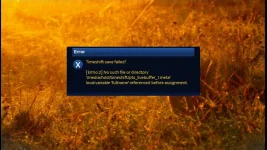
When selecting record when watching a channel you want to timeshift record - as in record from when you tuned to the channel - you press record then key 5 "Timeshift save recording (stop after current event)" or key 6 "Timeshift save recording (select event)" it displays "Timeshift will get saved at the end of an event." - however the recording never shows to start,except for at the very end of the event for 2 minutes - but the timeshift is discarded. If you change channel during the "timeshift record", you get an error:

1_0_1_183E_7D9_2_11A0000_1_0_0.webp
 
yes, same experience here... that's why i try to avoid timeshift wherever possible and use regular timer recordings.
 

OpenViX Feeds Status

Back
Top