Superb quality and spec AB-Com PULSe 4K SE. Crazy offer! Only £129! FREE UK DELIVERY! 4K UHD, Enigma 2, Multiboot 4 images & more!...
Superb quality and spec AB-Com PULSe 4K Rev II Twin Satellite tuner only £179! FREE UK DELIVERY! 4K UHD, Enigma 2, SATA HDD facility, Multiboot 4 images & more!...

[VU+ Duo2] All sorts of crashes and exceptions after fresh flash of 3.2.023

panch

New member
Joined
Feb 8, 2014
Messages
61
Reaction score
0
Points
0
Age
49
Location
Odense, Denmark
Hi,

My vu+duo2 has been working flawlessly before updating to the 3.2.023 version, but after doing a fresh install with no settings restoration, The box suddenly began to crash when starting up. The exception was something about the setupTranscoder. After shutting i down and rebooting, it failed to start the background update check, which resulted in an exception at startup. I could disable the checks in the settings, but when I then go into the plugin software downloads, the box crashes again. Something about the directory: '/var/lib/opkg' not existing.
I could mend this, but it would crash again...

Has this something to do with the GST 1.6.1 update? Tried the build 021, but this one apparently also has the 1.6.1 version, according to the info box.

I have attached 4 error logs, hopefully some you clever guys can help me out.
 

Attachments

Unikley to be GST related

Code:
Traceback (most recent call last):
  File "/usr/lib/enigma2/python/Plugins/SystemPlugins/ViX/SoftcamManager.py", line 548, in softcam_check
IOError: [Errno 2] No such file or directory: '/tmp/cam.check.log'
<   414.939354> [ePyObject] (CallObject(<bound method SoftcamAutoPoller.softcam_check of <Plugins.SystemPlugins.ViX.SoftcamManager.SoftcamAutoPoller instance at 0x619256c0>>,()) failed)
]]>
        </enigma2crashlog>
    </crashlogs>
</openvix>

Code:
Traceback (most recent call last):
  File "/usr/lib/enigma2/python/mytest.py", line 660, in <module>
    runScreenTest()
  File "/usr/lib/enigma2/python/mytest.py", line 466, in runScreenTest
    plugins.readPluginList(resolveFilename(SCOPE_PLUGINS))
  File "/usr/lib/enigma2/python/Components/PluginComponent.py", line 104, in readPluginList
  File "/usr/lib/enigma2/python/Components/PluginComponent.py", line 30, in addPlugin
  File "/usr/lib/enigma2/python/Plugins/SystemPlugins/Hotplug/plugin.py", line 67, in autostart
  File "/usr/lib/python2.7/site-packages/twisted/internet/posixbase.py", line 408, in listenUNIX
  File "/usr/lib/python2.7/site-packages/twisted/internet/unix.py", line 293, in startListening
CannotListenError: Couldn't listen on any:/tmp/hotplug.socket: [Errno 2] No such file or directory.
Code:
Traceback (most recent call last):
  File "/usr/lib/enigma2/python/Components/ActionMap.py", line 68, in action
  File "/usr/lib/enigma2/python/Components/ActionMap.py", line 48, in action
  File "/usr/lib/enigma2/python/Screens/Menu.py", line 55, in okbuttonClick
  File "/usr/lib/enigma2/python/Tools/BoundFunction.py", line 9, in __call__
  File "/usr/lib/enigma2/python/Screens/Menu.py", line 70, in runScreen
  File "/usr/lib/enigma2/python/Screens/Menu.py", line 76, in openDialog
  File "/usr/lib/enigma2/python/mytest.py", line 303, in openWithCallback
    dlg = self.open(screen, *arguments, **kwargs)
  File "/usr/lib/enigma2/python/mytest.py", line 316, in open
    self.execBegin()
  File "/usr/lib/enigma2/python/mytest.py", line 232, in execBegin
    c.execBegin()
  File "/usr/lib/enigma2/python/Screens/Screen.py", line 82, in execBegin
  File "/usr/lib/enigma2/python/Screens/SoftwareUpdate.py", line 204, in checkNetworkState
  File "/usr/lib/enigma2/python/Screens/SoftwareUpdate.py", line 218, in startCheck
  File "/usr/lib/enigma2/python/Components/Ipkg.py", line 85, in startCmd
OSError: [Errno 2] No such file or directory: '/var/lib/opkg'
<    73.140540> [ePyObject] (CallObject(<bound method NumberActionMap.action of <Components.ActionMap.NumberActionMap instance at 0x59c90af8>>,('OkCancelActions', 'ok')) failed)
]]>
        </enigma2crashlog>
    </crashlogs>
</openvix>
Code:
Traceback (most recent call last):
  File "/usr/lib/enigma2/python/Components/ActionMap.py", line 68, in action
  File "/usr/lib/enigma2/python/Components/ActionMap.py", line 48, in action
  File "/usr/lib/enigma2/python/Screens/Menu.py", line 55, in okbuttonClick
  File "/usr/lib/enigma2/python/Tools/BoundFunction.py", line 9, in __call__
  File "/usr/lib/enigma2/python/Screens/Menu.py", line 70, in runScreen
  File "/usr/lib/enigma2/python/Screens/Menu.py", line 76, in openDialog
  File "/usr/lib/enigma2/python/mytest.py", line 303, in openWithCallback
    dlg = self.open(screen, *arguments, **kwargs)
  File "/usr/lib/enigma2/python/mytest.py", line 316, in open
    self.execBegin()
  File "/usr/lib/enigma2/python/mytest.py", line 232, in execBegin
    c.execBegin()
  File "/usr/lib/enigma2/python/Screens/Screen.py", line 82, in execBegin
  File "/usr/lib/enigma2/python/Screens/SoftwareUpdate.py", line 204, in checkNetworkState
  File "/usr/lib/enigma2/python/Screens/SoftwareUpdate.py", line 218, in startCheck
  File "/usr/lib/enigma2/python/Components/Ipkg.py", line 85, in startCmd
OSError: [Errno 2] No such file or directory: '/var/lib/opkg'
<   378.598858> [ePyObject] (CallObject(<bound method NumberActionMap.action of <Components.ActionMap.NumberActionMap instance at 0x59931468>>,('OkCancelActions', 'ok')) failed)
]]>
        </enigma2crashlog>
    </crashlogs>
 
But if it isn't GST related, what could then be the problem, when I'm doing everything as a fresh install? Skin selection/hard drive issue?
---EDIT---
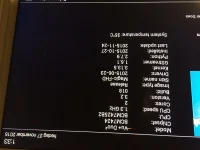
I have just tried installing the 3.2.018 version (but restoring from a backup of 023), the info box still states it is GStreamer 1.6.1 - or is that not the same as the GST version? I thought the 1.6.1 was introduced in the 023 build?
Billede 27-11-2015 01.33.48.webp (dont know why it is upside down)
 
Last edited:
My vu+duo2 has been working flawlessly before updating to the 3.2.023 version, but after doing a fresh install with no settings restoration, The box suddenly began to crash when starting up.
By "fresh install" do you mean "flashed a new version"?
Tried the build 021, but this one apparently also has the 1.6.1 version, according to the info box.
It had 1.6.0 according to the info box on my system. 1.6.1 came in at 023. To get back to 021 you'd need to reflash 021 (or restore a full saved-image of 021, not just a backup from it).

The logs in post #1 are odd. The first two shows files in /tmp missing (or /tmp itself ??) while the second two show /var/lib/opkg missing (which seems to be because you pressed some keys before it got to the bit where /tmp would cause a problem).

You could login to the system to find out what state the file-system is actually in, but beyond that I'd suggest a fresh flash (from USB) of 3.2.024
 
024 is not available as a download. 025 should be transferred to server after feeds are updated on Friday
 
The logs in post #1 are odd. The first two shows files in /tmp missing (or /tmp itself ??) while the second two show /var/lib/opkg missing (which seems to be because you pressed some keys before it got to the bit where /tmp would cause a problem).
Logs show an IOError. Probably out of RAM for some reason.
 
Logs show an IOError. Probably out of RAM for some reason.

Couldn't IO error be because of the missing file/directory as it shows?
Code:
IOError: [Errno 2] No such file or directory: '/tmp/cam.check.log'

By fresh install, I meant installing the image using USB, and setting everything up as if it was a new box. But I'm not sure if there are ways to properly clean out the system prior to the image install? Because it seems I cannot get back to GST1.6.0 or lower, even by installing an older image.

The error about the opkg dir missing, I could go in and create the directory, and manually call the opkg upgrade. That would solve the problem issued by one of the logs.

A filesystem check (using the GUI) of the harddrive did not reveal any problems (or nothing was posted on the screen afterwards).
 
On a fresh install certain things such as EPG default to internal memory, could this be your problem?
I know this doesn't help but I fresh flashed Duo2 to 023 and set up from scratch then online updated to 024 with no problems.
 
Last edited:
On a fresh install certain things such as EPG default to internal memory, could this be your problem?

Do you mean internal flash? Since memory gets erased when powered off. I absolutely have no idea, I have never changed the default way of using the EPG data.
 
I choose to have my EPG data save to HDD but after a fresh install it changes to flash, could it be loading your EPG into the flash and filling it?
 
Just go into EPG settings and change the location to somewhere else then reboot, it is one of the first things I do I do on a clean install.
 
Just go into EPG settings and change the location to somewhere else then reboot, it is one of the first things I do I do on a clean install.

I will try that with the 025 build when it is released - but it doesn't answer the question of how I get to know how much space is left on the internal flash? I'm not that well into linux, so if it can be done via putty, I would need some hints on the commands to call.
 
Thanks, I'll try that. What could be filling up the flash, other than EPG data?
But to be realistic - the box has 1GB flash storage - so the EPG data should take up >900MB? I have a hard time believing this.

I would very much like to have the question answered to, how I downgrade the GST from 1.6.1 to 1.6.0 or lower, since this is apparently not bein done when flashing an older image.
 
It depends what epg source you use, if you have a few rytec sources it can be massive.
 
since this is apparently not bein done when flashing an older image.

What on earth are you going on about? Flashing PRE 3.2.023 DOES give GST 1.6.0.

You issue is not caused by GST.

Disconnect your network cable and leave disconnected.

Re-flash and setup fresh todays 025 release. Do not restore anything. Leave ethernet or wifi off.

Test at free to air for hours without ANY network connection.

Also confirm, do you have any port forwarding setup to the receiver?
 
What on earth are you going on about? Flashing PRE 3.2.023 DOES give GST 1.6.0.

I was just concluding based on the infobox, if you see my (although rotated) image a few posts up, it says that it is build 3.2.018, and the GStreamer is 1.6.1 - if GStreamer and GST is not the same, then I'm sorry for jumping to conclusions, but how can I then see what the GST version is?

Disconnect your network cable and leave disconnected.
Re-flash and setup fresh todays 025 release. Do not restore anything. Leave ethernet or wifi off.
Test at free to air for hours without ANY network connection.
Thank you, I will try that.

Also confirm, do you have any port forwarding setup to the receiver
I am forwarding 8000-8002, as well as port 80 to from the router right now. That hasn't been changed since before 3.2.023

Lastly, I want to add that I tried to re-enable WOL since this has not been working for quite some time. I tested this and it worked. Could that cause any issues?
 
Last edited:
These STBs are not hardened for exposure to the public internet. Close the ports on your router and the problem will be gone.
 
Last edited:

OpenViX Feeds Status

Back
Top