Superb quality and spec AB-Com PULSe 4K SE. Crazy offer! Only £129! FREE UK DELIVERY! 4K UHD, Enigma 2, Multiboot 4 images & more!...
Superb quality and spec AB-Com PULSe 4K Rev II Twin Satellite tuner only £179! FREE UK DELIVERY! 4K UHD, Enigma 2, SATA HDD facility, Multiboot 4 images & more!...

[VU+ Duo2] 037 image problems?

harryajh

New member
Joined
Aug 21, 2015
Messages
58
Reaction score
0
Points
0
Upgraded to the latest Openvix image (3 2 037) from Hades 018 the other day.

All seemed to look fine except 2 problems I've now noticed -

1. CrossEPG auto-updating (that's worked for ages), doesn't bother to update now - I've tried "init 4", delete epg.dat, "init 3" but no difference - I have to manually do the download!

2. Also, setting a timer (which was virtually instantaneous before), now takes 20-30 secs - I get the spinning "VIX" symbol in the top left, and the timer eventually is set.

Any ideas people?

thanks in advance

EDIT : build is 037 but bizarrely, you can't edit the title?
 
Last edited:
0.webp2.webp1.webp
changed download time by 5 mins to see if it made any difference, and it didn't
 
2. Also, setting a timer (which was virtually instantaneous before), now takes 20-30 secs - I get the spinning "VIX" symbol in the top left, and the timer eventually is set.
i have this as well. has been there since the start of openvix 3.2 i think...
 
just trying to set epg.dat location to /media/hdd instead to see if that fixes crossepg problem. Doubt it has anything to do with timer one though
 
bizarrely no epg.dat file in /media/hdd directory like there was in /media/usb - even after another "init 3" - but epg data still shows against channels - now I am confused? -

EDIT : scrub that, needed "init 4" which must flush cache or something - only trouble is now, going to have to wait a day or two to see if it makes any difference - will post back

The timer delay is still bizarre though?
 
Last edited:
EDIT : scrub that, needed "init 4" which must flush cache or something
No. init changes the current level of the init program. Since it is usually in state 3 "init 3" does nothing at all. "init 4" moves it to state 4, which will shutdown enigma2 (as it only runs in state 3). "init 3" will get enigma2 running again, and hence changes to startup-only factors get enacted.
 
well the /media/hdd directory idea failed - I guess it's a case of manually downloading and trying each image update until hopefully, it's fixed
 
Or you can try xlmtv importer and see if that works ... If so throw out crossepg and enable schedule for xmltv :)
Doesn,t fix the original problem but could give you a permanent solution.
 
xmltv importer works fine. however, (at least for german channels) times are slightly different for some events. that's a bit annoying.
 
2. Also, setting a timer (which was virtually instantaneous before), now takes 20-30 secs - I get the spinning "VIX" symbol in the top left, and the timer eventually is set.
That sounds a bit like spinning up the hard-drive.
  • How do you set the timer (there are several routes to doing so)?
  • If you set another immediately afterwards, does it take a similar time, or is it much quicker?
 
just deleted crossepg directory as well to see if that helps, have to wait again though:( - will give xmltv idea a go if that fails though thanks
 
That sounds a bit like spinning up the hard-drive.
  • How do you set the timer (there are several routes to doing so)?
  • If you set another immediately afterwards, does it take a similar time, or is it much quicker?
why would it spin up the hard-drive? even if epg data would be on /hdd/media it would be loaded in memory.
I had epg.data in flash and still the wait.
 
A problem I am having with the updates is with 'IPTV' using the Live channels - none are loading up
I just get the error message 'login message error, only logged in user have access. set login data in configuration.
I have ther other icons and there are all working ok
 
it's about 18 seconds regardless how I set them and immediately afterwards, the same - really bizarre, like I said, before it was instantaneous - could it be linked to the crossepg update problem perhaps?
 
Which csv files are you importing?

What are the reasons/benefits achieved by digressing from the recommendations in the Vix manual? Namely 4.1.1.3 and 4.1.1.4

There is no need for the manual deletions. The feature to delete the EPG should be adequate.

The timers are created after obtaining details from the EPG data.
 
Which csv files are you importing?

What are the reasons/benefits achieved by digressing from the recommendations in the Vix manual? Namely 4.1.1.3 and 4.1.1.4

There is no need for the manual deletions. The feature to delete the EPG should be adequate.

The timers are created after obtaining details from the EPG data.

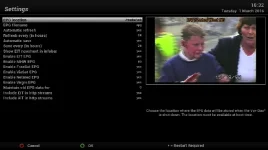
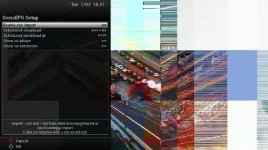
didn't realise that I was but see CSV option checked in screenshot. Don't remember ever setting it (and not even sure how I would get CSV files anyway), but this has been set and working for the last 8 months without problem, is this really the cause do you think?
 
I have been using CrossEPG (openTV EPG) for about 5 years. Not had an issue other than user error on my part.
 
Last edited:
why would it spin up the hard-drive? even if epg data would be on /hdd/media it would be loaded in memory.
You have a problem. I'm looking at the symptoms and trying to see what might cause it and rule some things out.
 

OpenViX Feeds Status

Back
Top