Superb quality and spec AB-Com PULSe 4K SE. Crazy offer! Only £129! FREE UK DELIVERY! 4K UHD, Enigma 2, Multiboot 4 images & more!...
Superb quality and spec AB-Com PULSe 4K Rev II Twin Satellite tuner only £179! FREE UK DELIVERY! 4K UHD, Enigma 2, SATA HDD facility, Multiboot 4 images & more!...

[VU+ Duo2] Rewind problem?

harryajh

New member
Joined
Aug 21, 2015
Messages
58
Reaction score
0
Points
0
All timeshift functions seem to work perfectly i.e when playing back a recording or when forwarding/rewinding a paused show but when I try to rewind live tv, it rarely works - this is well in to the programme and way past the timeshift delay before it should work, it says "4x" but just flickers the at the current programme point - any ideas?

I tried doing a softward update to 4.2.030 but the box just freezes on startup so reluctant to try again until 4.2.031+ released

Using Blue HD skin if that makes any difference

thanks for any advice in advance
 

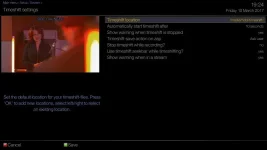
Attachments

  • 1_0_0_0_0_0_0_0_0_0 (1).webp
    1_0_0_0_0_0_0_0_0_0 (1).webp
    37.8 KB · Views: 27
There wont be an update to 4.2.031 as release 5 is already out you should try updating to that and see if it cures the issue
 
I have a Solo2 and have mentioned this problem in the past. Despite all the updates the issue has never been resolved and looks like it never will be!
I am currently on Vix 5.0.002
 
Last edited:
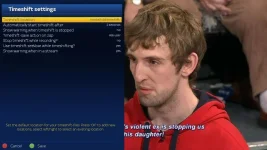
i have just tested Time Shift on my Duo2 running ViX 5.0.002 Release and every thing is fine at all FF & Rewind Speeds try setting the start to 10 seconds that is what i have mine set to and every thing is fine

Time Shift Settings Duo2.webp
 
Have tried changing the timeshift setting as suggested but rewind is still rubbish! Tried 10, 20 and 30 seconds.
 
Try reflashing and setting up as new, so no Restores. You may have previously saved some old corrupt settings files.


Sent from my iPhone using Tapatalk
 
Try reflashing and setting up as new, so no Restores. You may have previously saved some old corrupt settings files.


Sent from my iPhone using Tapatalk

Thanks but the problem has always been there. Had to do a completely clean install for vix 4.x and that didn't make any difference unfortunately and all updates since there has been no improvement.
Just a thought could there be an old file on the hard drive that maybe needs deleting or updating?
 
set it to 10 secs which worked, changed back to 2 and that worked also :confused: , going to wait until it happens again and see it 10 secs actully fixes it
 

OpenViX Feeds Status

Back
Top