Superb quality and spec AB-Com PULSe 4K SE. Crazy offer! Only £99! FREE UK DELIVERY! 4K UHD, Enigma 2, Multiboot 4 images & more!...
Superb quality and spec AB-Com PULSe 4K Rev II Twin Satellite tuner only £149! FREE UK DELIVERY! 4K UHD, Enigma 2, SATA HDD facility, Multiboot 4 images & more!...

Vu Duo, Vix freezing everyday

  • Thread starter Thread starter BRAVEHEART
  • Start date Start date
B

BRAVEHEART

Guest
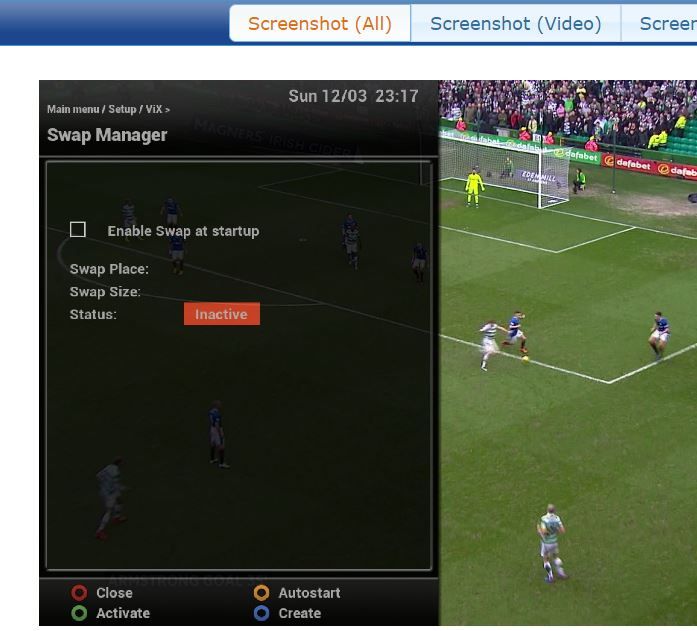
Does anyone know what this and how to stop it, photo attached ? 12th March 2017. (See attached photo image of issue).

This happens probably once every week or every couple of weeks I have noticed.

The screen freezes (whatever is showing on the tv at the time is frozen too just like in the photo) even the little VIX Logo image in top left corner hardly even moves/spins, it only moves a fraction every couple of minutes, no buttons on the remote control have any effect at all and the Open Webif interface that I can use to control the box from my computer will not even start or anything.

It's always noticed if just switching the tv on after its been off all all night and/or all daY, my VU+ Duo is left switched on 24/7, never on standby (don't ask, lol).

There is only one way out of this I have found and that is to turn the box off and then back on using the rocker switch at the back of the box and then it's fine again, but I totally hate doing that because we all know that causes a massive surge of electricty to go through them delicate capacitors and we all know what can and will eventually happen with them Again lol, so I would rather not use that method to sort it.

I was thinking, surely it has to be a setting of some sort in the on screen menu somewhere that is causing this to happen but I don't have a clue what it is that's even happening never mind what setting or settings to change to stop this from happening if that is possible ?

Does anyone know what is happening and how to quickly sort it, I'm just hoping it is a simple setting that needs changed and nothing else. ?

Thanks.

(See attached photo image of issue).


VU+DUO (Genuine box - not a clone)
FIXED 28.2e DISH
System OE:OE-Alliance 3.4
Firmware version:OpenViX 4.2.021 (2016-12-06)
Kernel / Drivers:3.9.6 / 20151124

IMAG2663.jpg
 
Last edited by a moderator:
Are you using crossepg?
 
Do you have a swap file enabled? Where are you storing your EPG data? What plugins do you have installed?


Sent from my iPhone using Tapatalk
 
Are you using crossepg?


EPG works if that's what you mean and it seems to stay up to date but I seldom even use it but I guess its handy sometimes,

The box has a hard drive installed but I dont record anything but I know its all configured to work, the only thing saved on it is the backup image.

There is a USB stick in the back which I think from memory is for things like epg and picons, I will be honest, I am unsure.

Here is a screenshot of the EPG settings >>>

EPG.jpg
 
Last edited by a moderator:
Do you have a swap file enabled? Where are you storing your EPG data? What plugins do you have installed?


Sent from my iPhone using Tapatalk

@Andy Hazza, where abouts is swap file in the settings and I will check ?

plus do any of those photo images I posted help at all ?
if you want to see more then tell me what you need to see ?

Same points to the other forum user "ccs" who answered in the thread too cheers.
 
if its any help another image here as I am unsure where to look >>>

FILESYSTEM.jpg
 
So what now ?, I am unsure of where to go from here, I am in not any way an expert or anywhere near it with VIX and I tend never even to touch the box or the settings once things are running sweet as they are 99% of the time apart from this small issue which could result in a massive issue with turning the power on and off at the switch etc, I don't want to have to replace all those cap's for a 3rd time, know what I mean ? Even though this issue only happens once every week or two I really get worried about surging all that electricity through those capacitors :eek:
 
Last edited by a moderator:
Any suggestions anyone ? remember the issue is shown and explained in my first post of the thread.
 
Does anyone know what this and how to stop it, photo attached ? 12th March 2017

I think Andy was thinking the box is runninv out of system memory and it's causing it to freeze. Downloading the EPG for instance can be quite system intensive for an ageing box like the duo.

I had a swap file enabled on my old duo. I had a 256mb swap file on my USB stick.

It givea the box a bit of leeway when it's under a bit of pressure doing Intensive tasks.

Might be worth enabling it on your usb stick and seeing if it makes any difference.

I think the stick needs to ext3 or ext4 file format though. So you would need to initialise(format) the usb stick via the box in storage devices menu. It will of course wipe the stick.


Sent from my iPhone using Tapatalk
 
Can try using the swap file and see if it helps.


Sent from my iPhone using Tapatalk
 
Can try using the swap file and see if it helps.

Cheers garryboy,

What will that do though and what harm if any can result as I would then be unsure of the way to get back out of anything that happens ?
 
EPG gathering is memory intensive. It grew some time ago and some receivers cannot cope. The change was with the EPG data, nothing to do with the image.

Create the swap file, as large as possible.
Activate it
set it to auto start.

There will be no harm in doing so, otherwise it would not have been recommended for you!

Should you wish to undo the changes, you would do the opposite.
Disable auto-start,
de-activate it,
delete it.
 
EPG gathering is memory intensive. It grew some time ago and some receivers cannot cope. The change was with the EPG data, nothing to do with the image.

Create the swap file, as large as possible.
Activate it
set it to auto start.

There will be no harm in doing so, otherwise it would not have been recommended for you!

Should you wish to undo the changes, you would do the opposite.
Disable auto-start,
de-activate it,
delete it.

Hi abu, are you refering to the settings right here like I posted the image of earlier, please let me know, thanks ?

swap%20manager.jpg
[/QUOTE]
 
Yes, in the swap manager section. As you pictured.

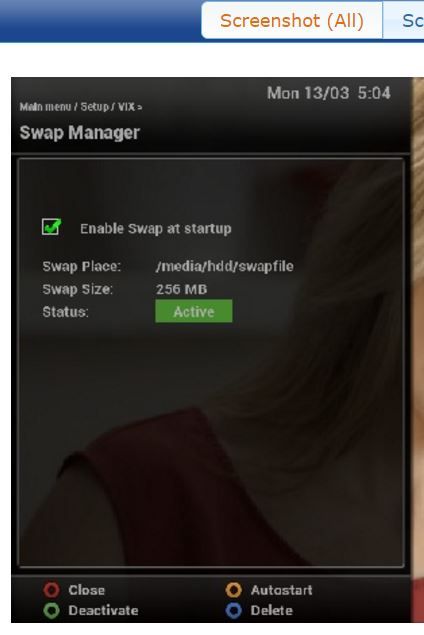
Thanks abu, as you can see I have done that and to max size it will go to and looks like its going to my hard drive (not usb) which is best, right ?

Can you tell me now a bit more about the pros and cons of this feature compared to the issue and changes I have now made compared to and shown in post one and page one of the thread ?

It's excellent, brilliant and straight to the point if it sorts the problem but hey man, you know, if no one tells you nuffin then you dont ever learn, you did tell me though, so Kudos to you man and thanks (even for trying to help if it doesn't work as no one else was even decent enough to try and help me, so I praise you on that man), we have all been there, I could probably run rings round you with computers but with Satellite boxes etc I have just never had that craze to get right into them for some reason, I am to old now man and not in good health, so things are against me, even the thought of getting a motorised system pro fitted scares me as I might then be left needing to ask everywhere a million questions, I can only imagine you know what I mean.

Are you quite confident this should sort it now ?

Thanks for your help and I look forward to your reply or anyones reply for that matter, cheers.

swap%20manager%20started.jpg
 
Last edited by a moderator:
Does anyone know what this and how to stop it, photo attached ? 12th March 2017

The HDD is good. The swap file will help immensely.
**CrossEPG has evolved over the years and uses quite a bit of memory in the process. The Vu+ Duo is an old ageing receiver that lacks the resources to cope and enabling a swap file will help things. [emoji4] **


Sent from my iPhone using Tapatalk
 
Last edited:

OpenViX Feeds Status

Back
Top