Thanks for the quick reply.
1)
"Official provider" means it was downloaded as part of the plugin. So if you submit your own it can be incorporated into the official one.
"Save the file" means collect the file from your receiver.
The rest I have no idea what you are asking. With this tool the data is always ready to use immediately.
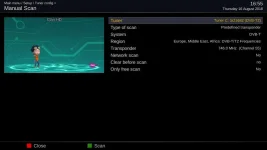
I am querying why it is necessary to "Disable the "official" ABM provider. You can re-enable it after the ABM file has been updated with the details you upload". This sounds to me as if the list of transmitters for the menu is generated when a provider is selected, and not updated until the provider is disabled and re-enabled (or a GUI reboot) - a reasonable design compromise between complexity and the ideal. If that is the case it is a warning that applies whenever updating config files, not just the specific case mentioned here.
2)
I never owned a Topfield and don't intend to. I have no idea what these terms refer to.
I was not suggesting the former, merely that there MAY be a lesson that can be learnt from it that would materially improve the DVB-T Frequency Finder.
3)
Service labels have nothing to do with background scanning. Don't touch the background scan settings unless you know why you are doing it. Service labels update automatically unless dxHoldName is set in lamedb.
Thanks for the clarification.
4)
I don't believe anything is deleted, only that new service will be added. This has nothing to do with bouquets.
So the bouquets are not updated, and therefore the new services will not be available to the user and it will be possible to try to tune into the removed service without getting any warning? It would appear, however that the new services will be available to AutoTimer - correct?
5)
How is this related to the original topic?
Wandering a bit, I agree, but it would seem sensible to get the user to set up everything under the "Tuner Config" heading at one go, rather than depending on some other user guide that probably doesn't exist.
Thanks
6.6)
Either download it from github (xmlUpdate plugin can do this for you)
Or update it yourself if you know the details,
Or use TerrestrialScan plugin to do it for you.
Seems reasonable in the context of the Enigma scans being for experienced users only.
Lastly Abu changed several texts from ABM last night based on your suggestions.
Is it too late to suggest the DVB-T Frequency Finder results are labelled with simply "My Transmitter", and the region mentioned in the closing message? Labelling the results with a region requires a little more explanation in the guide, and might lead someone to think they apply across a region whereas I suspect there might be as many as 100 different sets of results for one region.
I am hoping to be in a position to start collecting screenshots by the middle of next week - will the new version be available by then?
EMJB