Superb quality and spec AB-Com PULSe 4K SE. Crazy offer! Only £129! FREE UK DELIVERY! 4K UHD, Enigma 2, Multiboot 4 images & more!...
Superb quality and spec AB-Com PULSe 4K Rev II Twin Satellite tuner only £179! FREE UK DELIVERY! 4K UHD, Enigma 2, SATA HDD facility, Multiboot 4 images & more!...

[ViX_Misc] EMJB's Terrestrial Channels brainstorm

And why shouldn't ABM handle the complete job?
Because splitting things into definable stand-alone actions, then having something else combine them always makes more sense to me.
When I program I use subroutines/functions when there is a common action to undertake. Then the same code can be used from anywhere (happy to drop it into a shared library if necessary...) and only needs to be written/extended/fixed in one place.
But perhaps it's just the mathematician in me trying to simplify things....
 
Doesn't make sense. The data has already been read from the SI tables by ABM. Why then would we need Enigma2 to do the whole job again in a slower way.

Complete ABM Freesat scan takes 15 seconds. Tell me another way to do it that can compete with that.
 
I have been trying to draft the guide, which has raised a number of new questions as follows:

(1) Reading the thread "Thread: ABM (Terrestrail ): Add HD channels/regions:"

Screenshot no 4 of the end of DVB-T frequency finder search does not match the presentation I see (a standard "i" message box in the centre of the screen).
Q 1.1 Is mine the latest version, and likely to be retained?

Under that screenshot are the words "Disable the "official" ABM provider. You can re-enable it after the ABM file has been updated with the details you upload".
Q 1.2.1 I am not sure I understand the term "official ABM provider" - do you mean providers other than that generated by DVB-T Frequency Finder?
Q 1.2.2 Are you saying the list of transmitters will only be updated from any new configuration file after de-selecting and then re-selecting the relevant provider?
If the latter is true, it is a general issue of which the users need to be aware rather than something related to DVB-T Frequency Finder.

The thinking behind this statement seems to be that the user will upload his data to the OpenVix team, receive that data back some days later, update his config files, and next time use that data by selecting it from the transmitter list (which incidentally avoids the need for backing up the file!). However as it is already available on the Provider page, I would leave all the provider selection unchanged next time.
Q.1.2.3 Please clarify your thought processes here?

Under the last screenshot, the suggestion that the USER should save the file conflicts with my interpretation of the assurance that re-running would not be necessary after config file and OpenVix updates. From my understanding of the memory structure etc, the file referenced will be lost when flashing a new image, and occasional OpenVix updates involve re-flashing, so I had assumed the file was backed up to the hdd but perhaps I am wrong.
Q 1.3 Please clarify the circumstances when the file information will be lost so I help users judge if the effort of backing it up is worthwhile.


(2) DVB-T Frequency Finder Operation:

The Topfield community halved the search times by only searching the "LP" Freeview streams - the UK did not (and presumably still does not) use the "HP" streams (don't ask me what these terms mean - I just know the benefit of limiting the search and how to limit the search on a terrestrial Topfield). If the DVB-T Frequency Finder does not already use this "trick" and it were adopted, the search time would presumably come down from ~10 minutes to ~5. Then the reduced frequency range post 700Mhz clearance would reduce the time to < 4 minutes, to make it comparable with the digital TVs I have owned.

Q2.1 Does DVB-T Frequency Finder already use this "trick"?

Q2.2 If not, could it be readily modified to do so?


(3) I believe it has been said that whether service names auto-update is a matter of an Enigma2 setting.

Q3.1 Is the the setting at Main Menu -> Setup -> TunerConfig -> Miscellaneous -> Disable background scanning?

If not:

Q3.2 Where can I find what the default setting is?
Q3.3 Is it user controllable?


(4) The descriptive text associated with Main Menu -> Setup -> TunerConfig -> Miscellaneous -> Disable background scanning indicates to me that changes in the Freeview line-up such as addition of new services or old ones deleted will be detected if background scanning is not disabled.

Q4.1 Am I right in assuming the lamedb files will be updated but not the bouquets generated by ABM?
Q4.2 Is the "Last Scanned" bouquet updated also?


(5) Preferred Tuner setting:

Main Menu -> Setup -> TunerConfig -> Miscellaneous has various settings for "Preferred tuner for recordings" with "Disabled" and "Auto" among the choices.

Q5.1 What is the difference between these "Disabled" and "Auto"?


(6) Config Files

I order to advise the user when to update these, when to wait for updates such as after line-up changes, and on the implications of no internet connection, I would like to get a better understanding of which features depend on these files. My interpretations from what information I have found are that they are used for:

Q6.1 For the ABM transmitter list - Is this correct?
Q6.2 For the "Swap Channels" feature on the ABM Providers page - Is this correct?
Q6.3 For the section bouquets mentioned on the ABM Providers page - Is this correct?
Q6.4 For the hiding the sections mentioned on the ABM "Hide sections" page - Is this correct?
Q6.5 Anything else?

The "Update config files" command appears on the ABM page of the menu, and thus would appear not to apply to the Enigma automatic scan transmitter list that appears on the "Tuner Setup" pages.
Q 6.6 How does the user ensure that the Enigma scan transmitter list is up-to-date?

TIA,


EMJB
 
1)
"Official provider" means it was downloaded as part of the plugin. So if you submit your own it can be incorporated into the official one.
"Save the file" means collect the file from your receiver.
The rest I have no idea what you are asking. With this tool the data is always ready to use immediately.

2)
I never owned a Topfield and don't intend to. I have no idea what these terms refer to.

3)
Service labels have nothing to do with background scanning. Don't touch the background scan settings unless you know why you are doing it. Service labels update automatically unless dxHoldName is set in lamedb.

4)
I don't believe anything is deleted, only that new service will be added. This has nothing to do with bouquets.

5)
How is this related to the original topic?

6.1-4)
Yes to all.

6.6)
Either download it from github (xmlUpdate plugin can do this for you)
Or update it yourself if you know the details,
Or use TerrestrialScan plugin to do it for you.

Lastly Abu changed several texts from ABM last night based on your suggestions.
 
The Topfield community halved the search times by only searching the "LP" Freeview streams - the UK did not (and presumably still does not) use the "HP" streams (don't ask me what these terms mean - I just know the benefit of limiting the search and how to limit the search on a terrestrial Topfield).
VP and HP?
Vertically and Horizontally polarized. Not actually used.
 
This is about Terrestrial (UK Freeview - DVB-T).
Try doing an ABM scan of UK terrestrial compared to any other method. ABM takes just seconds. Are you asking all these questions without even opening the plugin?
 
VP and HP?
Vertically and Horizontally polarized. Not actually used.
Of course not. It is not something the box can control. That is down to how the aerial is mounted on the pole. i.e. either correct for your transmitter or wrong.
 
Are you asking all these questions without even opening the plugin?
Well, I am asking why I need to use a plugin rather than there being one standard method (and front end) for obtaining service frequencies.
 
I'll ask again. Are you asking all these questions without ever having used the plugin?
 
I'll ask again. Are you asking all these questions without ever having used the plugin?

If that question is aimed at me, the many of my questions arise from doing just that and writing down the sequence of activities and noting all the menu settings where a newbie might be confused as to the appropriate value, or where there is any suggestion that things might not work as that newbie might expect.
 
Of course not. It is not something the box can control. That is down to how the aerial is mounted on the pole. i.e. either correct for your transmitter or wrong.

I agree. It is something that is universal across the UK. As the benefits of using it are so great, I will try to do some research when I have got the user guide done.
 
Thanks for the quick reply.

1)
"Official provider" means it was downloaded as part of the plugin. So if you submit your own it can be incorporated into the official one.
"Save the file" means collect the file from your receiver.
The rest I have no idea what you are asking. With this tool the data is always ready to use immediately.
I am querying why it is necessary to "Disable the "official" ABM provider. You can re-enable it after the ABM file has been updated with the details you upload". This sounds to me as if the list of transmitters for the menu is generated when a provider is selected, and not updated until the provider is disabled and re-enabled (or a GUI reboot) - a reasonable design compromise between complexity and the ideal. If that is the case it is a warning that applies whenever updating config files, not just the specific case mentioned here.

2)
I never owned a Topfield and don't intend to. I have no idea what these terms refer to.
I was not suggesting the former, merely that there MAY be a lesson that can be learnt from it that would materially improve the DVB-T Frequency Finder.

3)
Service labels have nothing to do with background scanning. Don't touch the background scan settings unless you know why you are doing it. Service labels update automatically unless dxHoldName is set in lamedb.
Thanks for the clarification.

4)
I don't believe anything is deleted, only that new service will be added. This has nothing to do with bouquets.
So the bouquets are not updated, and therefore the new services will not be available to the user and it will be possible to try to tune into the removed service without getting any warning? It would appear, however that the new services will be available to AutoTimer - correct?

5)
How is this related to the original topic?
Wandering a bit, I agree, but it would seem sensible to get the user to set up everything under the "Tuner Config" heading at one go, rather than depending on some other user guide that probably doesn't exist.

6.1-4)
Yes to all.
Thanks

6.6)
Either download it from github (xmlUpdate plugin can do this for you)
Or update it yourself if you know the details,
Or use TerrestrialScan plugin to do it for you.
Seems reasonable in the context of the Enigma scans being for experienced users only.

Lastly Abu changed several texts from ABM last night based on your suggestions.
Is it too late to suggest the DVB-T Frequency Finder results are labelled with simply "My Transmitter", and the region mentioned in the closing message? Labelling the results with a region requires a little more explanation in the guide, and might lead someone to think they apply across a region whereas I suspect there might be as many as 100 different sets of results for one region.

I am hoping to be in a position to start collecting screenshots by the middle of next week - will the new version be available by then?


EMJB
 
I am querying why it is necessary to "Disable the "official" ABM provider. You can re-enable it after the ABM file has been updated with the details you upload". This sounds to me as if the list of transmitters for the menu is generated when a provider is selected, and not updated until the provider is disabled and re-enabled (or a GUI reboot) - a reasonable design compromise between complexity and the ideal. If that is the case it is a warning that applies whenever updating config files, not just the specific case mentioned here.
Why would you want 2 terrestrial providers enabled at the same time? The xml will be reloaded any time the mtime of the xml file is greater than the cache.

I was not suggesting the former, merely that there MAY be a lesson that can be learnt from it that would materially improve the DVB-T Frequency Finder.
I can't see one.

So the bouquets are not updated, and therefore the new services will not be available to the user and it will be possible to try to tune into the removed service without getting any warning? It would appear, however that the new services will be available to AutoTimer - correct?
How could you update bouquets based on an enigma2 scan? How would you know where users want any new channels to appear in their bouquets?

Wandering a bit, I agree, but it would seem sensible to get the user to set up everything under the "Tuner Config" heading at one go, rather than depending on some other user guide that probably doesn't exist.
Personally I find the tuner config for terrestrial completely intuative. It couldn't be simpler. Just enable the tuner in DVB-T2 mode and select your region. What is so difficult about that?

Seems reasonable in the context of the Enigma scans being for experienced users only.
Enigma scans are for everyone. Just open Manual Scan, choose the options you want and press GREEN to start the scan. If you think that is too complicated then descriptive texts should be added in that screen (like I did recently in the tuner config screen) to give users more info about the individual items, and not in a user guide that no one is going to read.

Is it too late to suggest the DVB-T Frequency Finder results are labelled with simply "My Transmitter", and the region mentioned in the closing message? Labelling the results with a region requires a little more explanation in the guide, and might lead someone to think they apply across a region whereas I suspect there might be as many as 100 different sets of results for one region.
For someone that lives in the North-West it makes complete sense the provider is labelled "North West terrestrial". For someone that lives in London it makes complete sense the provider is labelled "London terrestrial".

I am hoping to be in a position to start collecting screenshots by the middle of next week - will the new version be available by then?
I have no idea when the next Release build will be available. Sicilian is in charge of that and he is on holiday.
 
Last edited by a moderator:
Thanks again, Huevos.

Clearly there are two major points of difference between us:

(1) Is a user guide worthwhile? - Obviously a matter of opinion, but I would just like to make the point that the menu descriptions rarely little to help the user where to start, or what do when things go wrong. I think the question of use is a "chicken & egg" problem - if you don't provide them some people manage to find a way by trial and error, and some will just write off OpenVix altogether and recommend other PVR solutions their friends. I would have thought the greatest advantage to you would be that a good guide will reduce the number of lengthy forum threads.

(2) What constitutes an inexperienced/inexpert user? I would be tempted to say one has no more technical knowledge than is required to operate a television set. While that would no doubt please the forum sponsors as it would vastly increase the potential market for the equipment they sell, I think that would be an unrealistic goal in the short term at least. On the other hand creation/editing of bouquets is in my view definitely an "expert" activity from my understanding of available tools and documentation. As using the Enigma2 scans seems rather pointless unless you are prepared to manipulate bouquets, and as you have pointed out ABM is so quick, I view these as having no value to the inexpert.

I will try to complete the basics of my draft guide, and then ask any further questions.

EMJB
 
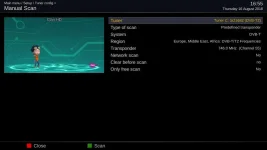
Please explain what is so difficult to understand about this screen.

Manual-Scan.webp
 
Please explain what is so difficult to understand about this screen.
I have no problems with that (expect I'm not sure what "Only free scan means", so I never set it).
All I'm asking is why the "Type of Scan" doesn't include "Rescan current muxes only" (and then Region need only in include countries - or similar - not transmitters).
 
Probably yes, as I don't use (or expect to need to use) a plugin for a scan.
Well that is up to you. But if you have never used it why are you making such an effort to find fault with the new feature of the plugin?
 
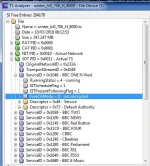
I have no problems with that (expect I'm not sure what "Only free scan means", so I never set it).
It skips services where the "FreeCAMode" flag = 1 in the SDT. See attachment.

UNTITLED.webp

All I'm asking is why the "Type of Scan" doesn't include "Rescan current muxes only" (and then Region need only in include countries - or similar - not transmitters).
Probably because nobody though such a thing was a very clever idea.

Also I added country and region at your request. Why didn't you say this at the time? Would have saved me the hassle.
 
Last edited:

OpenViX Feeds Status

Back
Top