
Superb quality and spec AB-Com PULSe 4K SE. Crazy offer! Only £129! FREE UK DELIVERY! 4K UHD, Enigma 2, Multiboot 4 images & more!...
Superb quality and spec AB-Com PULSe 4K Rev II Twin Satellite tuner only £179! FREE UK DELIVERY! 4K UHD, Enigma 2, SATA HDD facility, Multiboot 4 images & more!...
You are using an out of date browser. It may not display this or other websites correctly.
You should upgrade or use an alternative browser.
You should upgrade or use an alternative browser.
[TIVIAR-ALPHA+] Freeview Tuner doesn't show Freeview channels
- Thread starter SkyFan
- Start date


adm
Forum Supporter

I don't mind. Terrestrial Scan doesn't seem to have an option for selecting which transmitter (such as Caldbeck) to use. Is there something I'm missing? Or do I just set it to Caldbeck, Cumbria in the Tuner Config? I did that then did a Terrestrial scan of Europe UHF/VHF on my freeview tuner.
I then pressed the Green button for Satellites and went to Terrestrial Services and all the chanels have the aerial icon. BBC Four HD and BBC Two HD aren't listed for example. I only see two HbbTV BBC TWO HD channels listed which don't have a picture. Same issue that happened before.
My aerial is polorised horizontally and is pointing SE at Caldbeck.
I was told before "Terrestrial Scan plugin creates a Terrestrial bouquet. If you are now using ABM to create bouquets for Terrestrial services, delete the Terrestrial bouquet". How do I delete it? I thought ABM only makes bouquets for the bouquets in the Favourites section? It doesn't effect what channels appear via the green button Satellites menu does it?
No - the favourites bouquet is just what you put in it. The box doen't know your favoutite channels.
I use ABM to set up for both Freeview from my local transmitter and for Sky FTA
This is not the only way...... but this is what I do to get a Freeview Bouquet and a separate SKY FTA bouquet. I’m assuming that you also have satellite tuners – if not don’t do not select Sky in AutobouquetsMaker → providers
First my terrestrial tuner setup (you may have a different tuner type but the setting should be the same/similar). I have two terrestrial tuners and both are set up the same. I also have two satellite tuners.
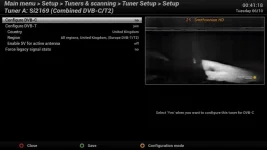
Next my settings for ABM
Menu → setup → tuners and scanning → AutobouquetsMaker → providers
My local transmitter for Freeview is Bluebell Hill – you need to set Caldbeck.
My preference is to lump all TV channels into a single list hence I don’t create sections or HD bouquets – your preference are probably different but use my settings to start with.
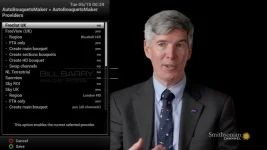
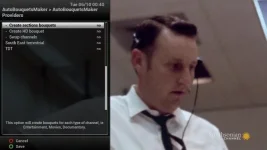
Press green to save
Then
Menu → setup → tuners and scanning → AutobouquetsMaker → Start scanning
This should result in on screen messages “Reading SKY UK” with number of services and radio channels increasing followed immediately afterwards by “Reading Freeview UK, again with services and radio channels increasing.
Now quit the menus.
Press the TV button on the remote and you should get a list of Bouquets including:
Sky UK (Sky UK all channels)
Freeview UK (All Channels)
Favourites – this will only contain what you manually put in it
Last scanned
Select the appropriate Freeview Bouquet and see if all the channels you want are in there, and working.
If you want to edit the Bouquets, or to create your own find the IP number of your box
menu → information → network → IP = 192.168.xxx.yyy
Type this number into the address bar of your Internet browser on your PC
What should appear is the Web Interface (Webif)
One of the options in the Web Interface is a Bouquet Editor
In the Bouquet Editor you can highlight your Terrestrial Bouquet and delete it. You can create a bouquet name of your own and drag drop TV channels into it, you can sort the list of TV channels by highlighting the entry and dragging it to a new position in the list etc. etc.
If sticking with the ABM way of getting the Freeview bouquets than you can experiment with the other configurable options in ABM to tailor the end result to what you want.
Last edited:

abu baniaz
Moderator
No - the favourites bouquet is just what you put in it. The box doen't know your favoutite channels.
From what I can gather, he is saying accessing bouquets by pressing the blue button when it says "Favourites". He is not referring to the bouquet called "Favourites (TV)". Otherwise he is selecting channels using the provider method. Hence his repeated references to HBBTV. Not everybody has the option to always show bouquets enabled.
abu baniaz
Moderator
@Skyfan,
1. Have you enabled the Service type icon?
A. Yes
B. No
C. I don't understand question
D. I don't know how to. Please explain
E. I don't want to do that
F. I will follow advice of someone else
2. Have you set he Ignore DVB-T namespace sub network to "No"
A. Yes (please provide screenshot)
B. No
C. I don't understand question
D. I don't know how to. Please explain
E. I don't want to do that
F. I will follow advice of someone else
3. Which image are you on now?
4. Is Freeview provider enabled in ABM at the moment? Do not mention what it was before, we just need to know what it is now.
A. Yes
B. No
5. Is ABM set to run automatically/regularly?
A. Yes
B. No
6. What is the Tuner that can receive aerial signal set to now? Provide a screenshot of it please. Do not mention what it was before, please state the current status.
1. Have you enabled the Service type icon?
A. Yes
B. No
C. I don't understand question
D. I don't know how to. Please explain
E. I don't want to do that
F. I will follow advice of someone else
2. Have you set he Ignore DVB-T namespace sub network to "No"
A. Yes (please provide screenshot)
B. No
C. I don't understand question
D. I don't know how to. Please explain
E. I don't want to do that
F. I will follow advice of someone else
3. Which image are you on now?
4. Is Freeview provider enabled in ABM at the moment? Do not mention what it was before, we just need to know what it is now.
A. Yes
B. No
5. Is ABM set to run automatically/regularly?
A. Yes
B. No
6. What is the Tuner that can receive aerial signal set to now? Provide a screenshot of it please. Do not mention what it was before, please state the current status.
Last edited:

ccs
ViX Beta Tester
- Joined
- Sep 6, 2014
- Messages
- 5,836
- Reaction score
- 5
- Points
- 0
There was was a post code posted earlier in the thread - I then just looked for the house in the photo.
I was replying to @SkyFan, but your post came in before mine, I should have quoted it.
Press the TV button on the remote and you should get a list of Bouquets including:
Sky UK (Sky UK all channels)
Freeview UK (All Channels)
Favourites – this will only contain what you manually put in it
Last scanned
Select the appropriate Freeview Bouquet and see if all the channels you want are in there, and working.
The TV button does nothing when I press it. How else do I access the correct bouquet?
When watching a channel I just pressed the down arrow, then Blue button for Favourites then entered the bottom "All channels" bouquet of the two listed identically named bouquets. The top one is for freesat and the bottom is for freeview. If that's the correct place I should be looking then I've still got the same problem as before. Don't have BBC Four HD, etc and most channels say Hbbtv on them and don't show a picture.
@Skyfan,
1. Have you enabled the Service type icon?
A. Yes
B. No
C. I don't understand question
D. I don't know how to. Please explain
E. I don't want to do that
F. I will follow advice of someone else
2. Have you set he Ignore DVB-T namespace sub network to "No"
A. Yes (please provide screenshot)
B. No
C. I don't understand question
D. I don't know how to. Please explain
E. I don't want to do that
F. I will follow advice of someone else
3. Which image are you on now?
4. Is Freeview provider enabled in ABM at the moment? Do not mention what it was before, we just need to know what it is now.
A. Yes
B. No
5. Is ABM set to run automatically/regularly?
A. Yes
B. No
6. What is the Tuner that can receive aerial signal set to now? Provide a screenshot of it please. Do not mention what it was before, please state the current status.
1. A. Yes
2. D. I don't know how to. Please explain
3. 5.2.022 on a Tiviar Alpha+ box.
4. A. Yes
5. A. Yes
6.
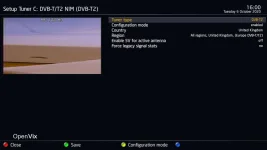
Please also forget HBBTV. You are confusing things and yourself by mentioning irrelevant things.
How else do I convey that a scan produced a lot of channels but most of them say HBBTV when I try to view them and don't show a picture?
OK I've done that now. I still have the same issue as before. If there's nothing else I can try with that method I'll try the Terrestrial Scan plugin method now if someone can give me instructions for that please.
Last edited:
abu baniaz
Moderator
Just enabling that option would have not done anything for you. The changes would have happened after you scanned.OK I've done that now. I still have the same issue as before. If there's nothing else I can try with that method I'll try the Terrestrial Scan plugin method now if someone can give me instructions for that please.
Disable Freeview provider in ABM.Run ABM again after you do it so you no longer have ABM Freeview bouquets.
I presume you still have Terrestial scan plugin installed. Set it as pictured in this screenshot. Then run it. Go make a cup of tea it will take a while.
Did all that however I don't have the the LCN Descriptor or Signal Quality Stabilization Time as an option.
What bouquet should I be looking at to find the freeview channels this time?
Plugged the aerial cable into the Sony Bravia KD55XD8577SU TV and did a Digital scan. It says no services have been found. I've never done a scan on my TV before so I've no idea if it always had that result or not.
What bouquet should I be looking at to find the freeview channels this time?
... if it hasn't been asked before, have you a freeview tv, and if so, what does it come up with (channel wise)??
Plugged the aerial cable into the Sony Bravia KD55XD8577SU TV and did a Digital scan. It says no services have been found. I've never done a scan on my TV before so I've no idea if it always had that result or not.
ronand
ViX Beta Tester
If its BBC 4 HD that you are after (you've mentioned it several times) then it does not appear to be available in your area according to the postcode checker on the freeview site
Code:
https://www.freeview.co.uk/helpabu baniaz
Moderator
[strike]Perhaps you should now flash 5.3 039.[/strike]
Please ignore this post for now
Please ignore this post for now
Last edited:
adm
Forum Supporter
If its BBC 4 HD that you are after (you've mentioned it several times) then it does not appear to be available in your area according to the postcode checker on the freeview siteCode:https://www.freeview.co.uk/help
Is that because the checker thinks the transmitter is Thornhill? We have already established that the aerial is (was) pointing at Calbeck. However we have only seen the state of the aerial as it was maybe months or a year ago on Google strret view.
Last edited:
abu baniaz
Moderator
What bouquet should I be looking at to find the freeview channels this time?
If you are indirectly saying you run it with the options it had, then check the Terrestrial bouquet.
ronand
ViX Beta Tester
Its getting hard to follow what is going on. Is the OP getting any channels at all or is just missing BBC 4 HD? Its not that hard to do a manual scan and create a bouquet. Is there really a need for ABM on terrestrial services - they hardly change that much.
abu baniaz
Moderator
These are bouquets created by ABM. To avoid teh identical names and be able to distinguish between them, enable the option in ABM that says "Add provider name to bouquets", then run ABM."All channels" bouquet of the two listed identically named bouquets.
Just to re-emphasise we are not using ABM at the moment for Terrestrial/Aerial services.
I also advised you to select services using the orbital selection mode. Do not use bouquets, do not use providers. You however insist on selecting providers and bouquets/favourites.
How else do I convey that a scan produced a lot of channels but most of them say HBBTV when I try to view them and don't show a picture?
Select the terrestrial services using orbital mode. See post 19
Then say "I selected BBC One on Ch 23, 490MHz, it did not work there was a blank picture. I selected BBC One on Ch 24, 498 MHz, it kept breaking up. I selected BBC One on Ch 25 506 MHz, it worked fine".
Similar threads
- Replies
- 12
- Views
- 872
- Replies
- 8
- Views
- 769
- Replies
- 1
- Views
- 2K

- Replies
- 10
- Views
- 1K