
Superb quality and spec AB-Com PULSe 4K SE. Crazy offer! Only £99! FREE UK DELIVERY! 4K UHD, Enigma 2, Multiboot 4 images & more!...
Superb quality and spec AB-Com PULSe 4K Rev II Twin Satellite tuner only £149! FREE UK DELIVERY! 4K UHD, Enigma 2, SATA HDD facility, Multiboot 4 images & more!...
You are using an out of date browser. It may not display this or other websites correctly.
You should upgrade or use an alternative browser.
You should upgrade or use an alternative browser.
[VU+ Duo4K SE] Cannot move up and down in a Setup screen
- Thread starter point17
- Start date


Can you actually get the debug from Recordings.py making the changes I posted earlier.

Can you actually get the debug from Recordings.py making the changes I posted earlier.
Here it is.
Attachments
So now the disc is showing:
So can you move now? Or is there a warning message showing?
Code:
[RecordingSettings] valid partitions ['/', '/media/sda2/']So now the disc is showing:
So can you move now? Or is there a warning message showing?Code:[RecordingSettings] valid partitions ['/', '/media/sda2/']
Just tried selecting /media/hdd/movie and it won't let me move. Green button produces the usual "... Partition must be ext of nfs ..." message. But that seems fair enough in the current circumstances because that location is not currently the mount point for the disk (as per my other message today, the machine seems determined to mount the disk now on /media/sda2, despite my efforts to change this).
If instead I select /media/sda2/movie I am allowed to move on to other settings.
Thanks,
Dan

Joe_90
Moderator
Just an observation from a user of one of those Seagate hubs. I found that the USB interface on it is quite proprietary and that it doesn't pass standard HDPARM commands to the disk controller which makes it difficult to control disk spin down etc. I found it quite difficult to use on my linux desktop as a general purpose disk so it is now used only for occasional backups of my folders. A generic USB to SATA caddy is probably a better bet in the long run. My quick look through your log file shows that timeshift is not configured as it's reporting less than 1GB of space available. In addition your EPG is set to use the internal flash, which may cause issues if flash space is limited. A better location for EPG is on the HDD. It's only written to disk at shutdown or read from disk at startup. All other times EPG is stored and updated in RAM.
Just tried selecting /media/hdd/movie and it won't let me move. Green button produces the usual "... Partition must be ext of nfs ..." message. But that seems fair enough in the current circumstances because that location is not currently the mount point for the disk (as per my other message today, the machine seems determined to mount the disk now on /media/sda2, despite my efforts to change this).
If instead I select /media/sda2/movie I am allowed to move on to other settings.
Thanks,
Dan
Please post a screen grab of Recording.py exactly as per the test.
Please post a screen grab of Recording.py exactly as per the test.
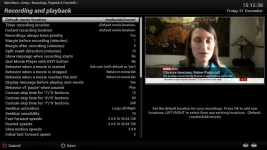
Shot 1 shows me about to select /media/sda2/movie
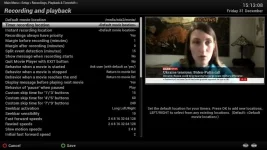
Shot 2 shows that I can move down the screen after this
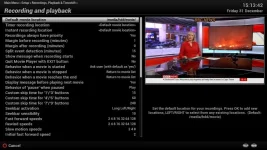
Shot 3 shows me about to select /media/hdd/movie
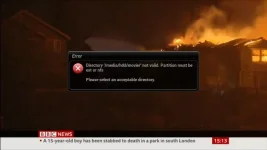
Shot 4 shows the error message after hitting the green button from the position shown in shot 3.
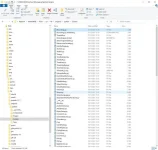
Shot 5 shows Recordings.py in the \Root\usr\lib\enigma2\python\Screens directory
Recordings.py is the file itself, from that location
Current debug log also attached for good measure.
Cheers,
Dan
Attachments
Just an observation from a user of one of those Seagate hubs. I found that the USB interface on it is quite proprietary and that it doesn't pass standard HDPARM commands to the disk controller which makes it difficult to control disk spin down etc. I found it quite difficult to use on my linux desktop as a general purpose disk so it is now used only for occasional backups of my folders. A generic USB to SATA caddy is probably a better bet in the long run. My quick look through your log file shows that timeshift is not configured as it's reporting less than 1GB of space available. In addition your EPG is set to use the internal flash, which may cause issues if flash space is limited. A better location for EPG is on the HDD. It's only written to disk at shutdown or read from disk at startup. All other times EPG is stored and updated in RAM.
That's an interesting observation - thanks. I am thinking it might be best just to buy a disk for the internal caddy and give up on my preferred approach of using an existing USB drive, as the latter approach seems less than smooth. I use the same approach on another box and it works OK but I did have teething problems getting that working when I first put them together.
I haven't configured timeshift yet as I wanted to sort these problems first. And thanks also for the tip re. EPG storage - again, I want to get the disk problems sorted first before transferring the EPG location there.
Joe_90
Moderator
The Seagate Hub was fine on a Windows box when I was using the supplied software (which also enabled disk spin down). On linux I just use it for backups. Most of the time it is powered off.
As regards your screenshots - are you saying that the menu interface is changing the movie location to media/hdd/movie when you get to "Timer Recording Location"? You need to use the right/left arrow keys to select media/sda2/movie which is the actual mount point. Or maybe I'm misunderstanding your actual setup process.
As regards your screenshots - are you saying that the menu interface is changing the movie location to media/hdd/movie when you get to "Timer Recording Location"? You need to use the right/left arrow keys to select media/sda2/movie which is the actual mount point. Or maybe I'm misunderstanding your actual setup process.
The Seagate Hub was fine on a Windows box when I was using the supplied software (which also enabled disk spin down). On linux I just use it for backups. Most of the time it is powered off.
As regards your screenshots - are you saying that the menu interface is changing the movie location to media/hdd/movie when you get to "Timer Recording Location"? You need to use the right/left arrow keys to select media/sda2/movie which is the actual mount point. Or maybe I'm misunderstanding your actual setup process.
Yes, I can select a different location using the left/right buttons. But after selecting a different location I'm then unable to move to the second line of the screen if it's a location it doesn't like. I can press the green button , resulting in the error message shown in shot 4.
Thanks,
Dan
Joe_90
Moderator
Ok - but why are you selecting a different location? The only valid location for you is /media/sda2/movie
Ok - but why are you selecting a different location? The only valid location for you is /media/sda2/movie
I agree, but there's a history here
 I'm doing it this time at huevos's request as he seeks to track down what Recordings.py is seeing and doing. He and the others on the forum have already updated Recordings.py as a result of my original posting. I then moved on to another issue - crashes on trying to set the mount point. This also appeared to have been fixed but now does not seem to be, as the mount point reset itself on rebooting and now stubbornly remains at /media/sda2 despite repeated efforts to change it. Once this problem is fixed I intend to change the mount point and then change the default movie location as per shot 3. But I agree that it can't work right now because of the problem I'm having setting the mount point.
..... you're running 6.0.003, not sure if that might be confusing things?
That's the version that was on the box when it arrived a couple of weeks ago from World of Satellite. I assumed it was the most up-to-date version so have not updated it. Should I be running something else?
Thanks,
Dan
Thanks for the screenshots.
You can access the disc by name as mounted, so not a bug.
You can access the disc by name as mounted, so not a bug.
Thanks for the screenshots.
You can access the disc by name as mounted, so not a bug.
Yes. I just need to work out why I'm now no longer able to change the mount point from /media/sda2 to /media/hdd. Then I'm confident I'll be able to change the default movie location to match.
Thanks,
Dan
Yes. I just need to work out why I'm now no longer able to change the mount point from /media/sda2 to /media/hdd. Then I'm confident I'll be able to change the default movie location to match.
Thanks,
Dan
I don't know, but it is not related to Recordings.py. Right now you should be up and running with the current partition name.

birdman
Moderator
You really want to see the contents of /etc/fstab.Please post a screen grab of Recording.py exactly as per the test.
You really want to see the contents of /etc/fstab.
Latest (for any of you not utterly sick of my saga by now) is that I tried once again to change the mount point for the USB drive. This time, instead of using the "Setup mounts" (green button) option in the Mount Manager, I demounted the drive, which worked, and then remounted it using the mount point I wanted. This seems to have worked. I won't fully believe it's finally fixed until the box has been rebooted a few times and not changed the mount point, but for the moment, the disk is mounted where I wanted it. I will test whether I can change the Default movie location to this mount after it's had a reboot.
I probably should have posted /etc/fstab before. Attached. I presume the last line is for the USB drive. The second last line looks odd to me but I'm no expert on fstab
Happy New Year everyone.
Dan
Attachments

ccs
ViX Beta Tester
- Joined
- Sep 6, 2014
- Messages
- 5,836
- Reaction score
- 5
- Points
- 0
The second last line looks odd to me but I'm no expert on fstab.
Me too !!!
Similar threads
- Replies
- 4
- Views
- 264
- Replies
- 10
- Views
- 493
- Replies
- 10
- Views
- 1K
- Replies
- 24
- Views
- 1K

