Superb quality and spec AB-Com PULSe 4K SE. Crazy offer! Only £99! FREE UK DELIVERY! 4K UHD, Enigma 2, Multiboot 4 images & more!...
Superb quality and spec AB-Com PULSe 4K Rev II Twin Satellite tuner only £149! FREE UK DELIVERY! 4K UHD, Enigma 2, SATA HDD facility, Multiboot 4 images & more!...

[VU+ Ultimo4K] Auto Volume

sandiego69

Forum Supporter
Donated Member
Joined
Jan 26, 2013
Messages
218
Reaction score
0
Points
16
For the last couple of buidls the AutoVolumeadjust does not remember the settings. In other words, I have to manually adjust volume each time I change to channels on a different satelite. e.g. from 28.2E to 13.E
 
I don't use any auto volume adjustment but I have no problem with volume levels on different satellites. The best method for volume control on enigma2 boxes is to put the box at 100% and then use the volume control on TV. Otherwise the levels tend to be different for AAC/MP3/AC3 audio etc.
 
As nobody seems to have an answer to what is supposed to be an Openvix feature, I would like to say that it is 'broken'.
 
As nobody seems to have an answer to what is supposed to be an Openvix feature, I would like to say that it is 'broken'.

1) I have a VuUltimo4k and cannot reproduce this.
2) It is not an "OpenViX feature", it is in the drivers. All OpenViX does is push your selection to the drivers. Driver problems are the responsibility of the manufacturer and will reveal themselves in all images.
 
If you are talking about the plugin this should be fixed in the next release.
 
Not sure what happened to autovolumeadjust in the latest build 6.2.005 but on 6.2.002 ut was working well for me in the following way. I had it set to 20 (boost) for AAC and the overall volume set to 80. if I was watching BBC1 HD on Satellite it sat at 80 and if I switched to BBC1 HD on freeview (aerial) it upped the volume to 100 (as intended to even out the volume between Sat and Terrestrial) and then back to BBC1 HD Satellite and it went back to 80.

Lovely

then......

In 6.2.005 it no longer works. I can set individual channels to a certain volume (and it remembers) but the auto switch between AAC and non AAC is no longer operating as it did :-(

Thanks
Paul
 
Not sure what happened to autovolumeadjust in the latest build 6.2.005 but on 6.2.002 ut was working well for me in the following way. I had it set to 20 (boost) for AAC and the overall volume set to 80. if I was watching BBC1 HD on Satellite it sat at 80 and if I switched to BBC1 HD on freeview (aerial) it upped the volume to 100 (as intended to even out the volume between Sat and Terrestrial) and then back to BBC1 HD Satellite and it went back to 80.

Lovely

then......

In 6.2.005 it no longer works. I can set individual channels to a certain volume (and it remembers) but the auto switch between AAC and non AAC is no longer operating as it did :-(

Thanks
Paul
Can you show us how you have this configured? And what box is it on?
 
Sure, The box is a Zgemma H7S

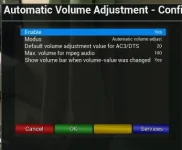
This is how it is configured:

2022-06-22 11_19_53-Window.webp

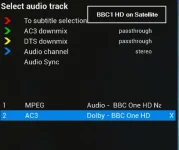
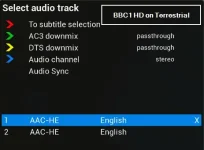
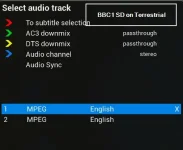
It used to work fine switching from BBC1 HD on Satellite to BBC1 HD on Terrestrial and vice versa (as well as switching to BBC 1 SD on Terrestrial). Now it only works when switching to "BBC1 SD on Terrestrial" from either of the other two HD channels (SAT or Terrestrial) but not inbetween HD on SAt and HD on Terrestrial. Nothing has changed in terms of the sound transmissions on any of them.

SAT HD is and always was AC3
Terrestrial HD is and always was AAC-HE
Terrestrial SD is and always was MPEG

Below to show what I mean. Hope that helps :-)

Paul

2022-06-22 11_20_34-Window.webp
2022-06-22 11_21_52-Window.webp
2022-06-22 11_22_51-Window.webp
 
Hi Huevos,

Not entirely sure how to make sure I download the right thing from Github there seems to be a good opportunity for me to download the wrong thing/version. - never used it before :-)
Can you possibly attach the correct py file here for me and I will install it on my build and do some testing.
Don't want to cock it up....

Cheers,
Paul
 
Hi Huevos,

Not entirely sure how to make sure I download the right thing from Github there seems to be a good opportunity for me to download the wrong thing/version. - never used it before :-)
Can you possibly attach the correct py file here for me and I will install it on my build and do some testing.
Don't want to cock it up....

Cheers,
Paul
Unzip and add the files to /usr/lib/enigma2/python/Plugins/SystemPlugins/AutomaticVolumeAdjustment and then restart enigma.
 

Attachments

That worked perfectly Huevos. Many thanks for sorting that one :-)

Paul
 
Hi,

I have also a problem with the Auto Volume Adjustment Plugin not working anymore after updating from 5.4.016 to 6.2.005 on my Vu+ Duo4kSE.
The plugin is enabled with modus "remember service volume value" - but it doesn't remember anything.
It just uses the same volume for all channels.

I even removed and re-installed the plugin from scratch.
And in /etc/enigma2 I only see the file "ava_setup.cfg" but no "ava_volume.cfg".

Harry
 
For me it changes the volume for each channel and remembers the level.
 
hi @huevos. I just upgraded to the latest build and this dissapeared (I got a crash in the restoring of backup which may be the reason - the crash did happen but all my settings appeared to be restored apart from some IPK's I like to use and my chosen skin(movieorgansor, EPGRefresh and the confluence skin).

I managed to get it all back working and the settings for thise extra IPK's and my skin were even present and configured the way I prefer. The restore of the settings clearly worked.

I found the plugin in the system plugins download feed for the AutomaticVolumeAdjustment. Will I need to download the source again at each upgrade / reflash / clean flash of OpenVix (from the Github site)? I have done this today and popped the py files I created from the github source into /usr/lib/enigma2/python/Plugins/SystemPlugins/AutomaticVolumeAdjustment in case of any more updates (as it indicated on Github that they were updated 3 months ago) or is the plugin direct from the plugin feed the latest and greatest?


Thanks

Paul
 
Last edited:
Just try to restore the backup again (in Menu > Setup > ViX > BackupManager).
 

OpenViX Feeds Status

Back
Top