Superb quality and spec AB-Com PULSe 4K SE. Crazy offer! Only £99! FREE UK DELIVERY! 4K UHD, Enigma 2, Multiboot 4 images & more!...
Superb quality and spec AB-Com PULSe 4K Rev II Twin Satellite tuner only £149! FREE UK DELIVERY! 4K UHD, Enigma 2, SATA HDD facility, Multiboot 4 images & more!...

OpenViX 6.3 Released! Support/discussion thread

We don't have "flash image" or "flash online" on Vix. We have image Manager which will allow you to download and flash the image into your chosen partition.

Blue, Vix, Image Manager
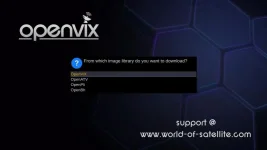
I know that, but the option is limited to few images:
vix.webp

I'm looking to install purE2 image, and/or others....
 
Sorry, I thought I answered what was asked. There was no mention of downloading in your post. Sorry. "I need this option to install other image in different slot."

Our image manager does not allow you to download as many other images as ATV or PureVision. You can still flash the image using image manager. Download the image you want to flash, no need to unzip it. Transfer zipped image to
/media/hdd/imagebackups
or
/media/usb/imagebackups

Downloading and flashing are two different process. As you have the image already, you can then flash it.
 
Yesterday after some great advice from fellow members I installed the new 6.3, everything is tickety boo except for one thing and bugger me if I can't find a parameter for it.

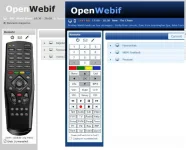
I use OpenWebIf a lot, probably 99% of the time and with both my machines and the particular version of OpenWebIf my remote Control on my browser screen has looked exactly like the one that came with the unit.
What I'm seeing now is a horrible bunch of boxes so does anybody know how I get back to the proper looking remote control please?

So an example of what I used to see on the left and what I see now.

OpenWebIf-1.webp
 
Yesterday after some great advice from fellow members I installed the new 6.3, everything is tickety boo except for one thing and bugger me if I can't find a parameter for it.

I use OpenWebIf a lot, probably 99% of the time and with both my machines and the particular version of OpenWebIf my remote Control on my browser screen has looked exactly like the one that came with the unit.
What I'm seeing now is a horrible bunch of boxes so does anybody know how I get back to the proper looking remote control please?

So an example of what I used to see on the left and what I see now.

View attachment 64636

Thats the new web interface. You a have virtual,remote with all the keys needed
 
Thats the new web interface. You a have virtual,remote with all the keys needed

But if all the other versions of OpenVIX were showing me a real remote why is this one showing an ugly version?
Surely that would be a feature that would be kept!
 
But if all the other versions of OpenVIX were showing me a real remote why is this one showing an ugly version?
Surely that would be a feature that would be kept!

We didn,t write the new webif ….. you would have to ask the author!
 
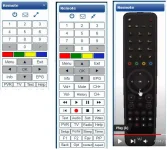
I got caught out also as you expand the photo to show the remote , above button 3 to expand it as like the real remote
 
I got caught out also as you expand the photo to show the remote , above button 3 to expand it as like the real remote

Mine is still rectangular boxes like in the picture I posted however I now understand it is an OpenWebIf issue.
I've either got a smaller rectangular boxes remote or larger rectangular boxes, I want a real looking remote like on all the other versions I've had.
I want mine to look like the last one
 

Attachments

  • remote.webp
    remote.webp
    41.3 KB · Views: 10
Last edited:
Just checked my Zgemma as messing on the slots and now see what you have with a small box and expanded box. This is on the latest Image 6.3

I rebooted box and changed image slot and have my remote back on an earlier image version.
 
Just checked my Zgemma as messing on the slots and now see what you have with a small box and expanded box. This is on the latest Image 6.3

I rebooted box and changed image slot and have my remote back on an earlier image version.

Thanks for that but I don't want to go up the route of multi-images, this box is mainly used by my wife so I want to make it straight forward as possible.
What I have done is unzipped one of my full backups, found the OpenWebIf folder and looked for the real remote control image with no luck but I've found the plain ones.
If I'd found it I was going to FTP it into the new image but I now have no clue where the real image is sitting on my old backup if it isn't in the OpenWebIf folder.
 
Thanks for that but I don't want to go up the route of multi-images, this box is mainly used by my wife so I want to make it straight forward as possible.
What I have done is unzipped one of my full backups, found the OpenWebIf folder and looked for the real remote control image with no luck but I've found the plain ones.
If I'd found it I was going to FTP it into the new image but I now have no clue where the real image is sitting on my old backup if it isn't in the OpenWebIf folder.
Its not in that folder and I am sorry to say that the code for remotes is quite convoluted, so I don't think there is any easy way around this for users.
 
Its not in that folder and I am sorry to say that the code for remotes is quite convoluted, so I don't think there is any easy way around this for users.

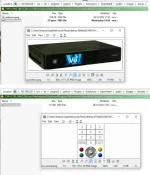
As you can see OpenWebIf knows I have a Uno4K and the normal remote is in there,
I'm getting used to the remote now :)

remote2.webp
 
Mine is still rectangular boxes like in the picture I posted however I now understand it is an OpenWebIf issue.
I've either got a smaller rectangular boxes remote or larger rectangular boxes, I want a real looking remote like on all the other versions I've had.
I want mine to look like the last one
The reason this was changed is because it relies on all 180 remotes that oe-alliance support to be mapped correctly. Many are not.

If you are not happy about this change please open an issue on OWI repo.
https://github.com/oe-alliance/OpenWebif/issues
 
Hello,

HbbTV is not working anymore. When pressing long Red button it opens it in the background, but nothing can be seen. Only Exit button works.

< 7369.8702> 10:04:00.5471 [InfoBarGenerics] Key: 398 (Long) KeyID='KEY_RED' Binding='('RED',)'.
unknown client
< 7371.1398> 10:04:01.8167 [Skin] Parsing embedded skin '<embedded-in-HbbTVWindow>'.
< 7371.1404> 10:04:01.8173 [Skin] Processing screen '<embedded-in-HbbTVWindow>', position=(0, 0), size=(1280 x 720) for module 'HbbTVWindow'.
killall: browser: no process killed
< 7371.1704> 10:04:01.8473 [Skin] Processing screen 'SimpleSummary' from list 'HbbTVWindowSummary, HbbTVWindow_summary, SimpleSummary, ScreenSummary', position=(0, 0), size=(800 x 480) for module 'ScreenSummary'.
 

OpenViX Feeds Status

Back
Top