Superb quality and spec AB-Com PULSe 4K SE. Crazy offer! Only £129! FREE UK DELIVERY! 4K UHD, Enigma 2, Multiboot 4 images & more!...
Superb quality and spec AB-Com PULSe 4K Rev II Twin Satellite tuner only £179! FREE UK DELIVERY! 4K UHD, Enigma 2, SATA HDD facility, Multiboot 4 images & more!...

OpenViX 6.7 Release discussion thread

I’m sure it can’t be, as not doing anything different than I’ve ever done during installation or use
And no one else has ever reported that issues. So i am sure is a problem at your side...
 
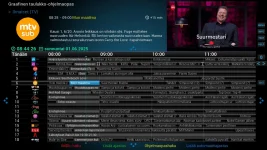
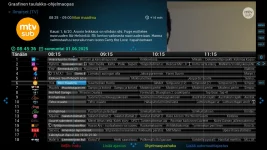
I think this is what @richca is trying to explain:

GraphicalEPGPIG: --> "session.VideoPicture" is the size defined at the skin

GraphicalEPGPIG_with_PiP: --> "session.VideoPicture" is at the background at full size, not the size from skin (for example size="640,360").

It has been like this forever (I'm used to it). I don't know can it be fixed or not ?
 

Attachments

  • GraphicalEPGPIG.webp
    GraphicalEPGPIG.webp
    129.8 KB · Views: 29
  • GraphicalEPGPIG_with_PiP.webp
    GraphicalEPGPIG_with_PiP.webp
    122.3 KB · Views: 29
Last edited:
The question is how it should work when PiP is activated? What should be shown in PIG?
 
stop using cccam and use oscam
 
"GraphicalEPGPIG: --> "session.VideoPicture" is the size defined at the skin"

And sometimes that is wrong too.
 
stop using cccam and use oscam
Not sure how that oscam works, never used it, is there anywhere that I can watch some form of installation? I never know where to put usernames, passwords and server ip Thanks
 
Last edited:
Specs are similar as far as I can see,apart from the second sat tuner.
Wonder if the H7 Vix firmware would work on the H17.
 
Hello,

question about subservices :
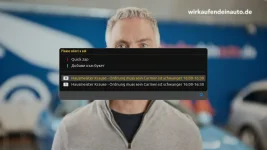
- 19.2E, Sport1 channel has subservices, how to open them ?
 

Attachments

  • Sport1_subservices.webp
    Sport1_subservices.webp
    58 KB · Views: 7
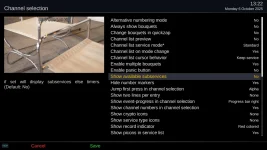
In ChannelSelection setup,
"Show available subservices" > "yes".

From the InfoBar press GREEN.

For more info press HELP, but help for subservices will only show after enabling it with the config setting above.
 

Attachments

  • 1.webp
    1.webp
    73.9 KB · Views: 10
< 15329.656594> 15:53:48.8404 [InfoBarGenerics] Key: 399 (Make) KeyID='KEY_GREEN' Binding='('GREEN',)'.
< 15329.992075> 15:53:49.1759 [eInputDeviceInit] 0 18f (399) 1
< 15329.992135> 15:53:49.1759 [eRCDeviceInputDev] emit: 0
< 15329.992567> 15:53:49.1764 [InfoBarGenerics] Key: 399 (Break) KeyID='KEY_GREEN' Binding='('GREEN',)'.
< 15330.019918> 15:53:49.2037 [Skin] Processing screen 'TimerEditList', position=(0, 0), size=(1920 x 1080) for module 'TimerEditList'.
< 15330.030683> 15:53:49.2145 [Skin] Processing screen 'TimerEditListSummary', position=(0, 0), size=(800 x 480) for module 'TimerEditListSummary'.
 

OpenViX Feeds Status

Back
Top