Superb quality and spec AB-Com PULSe 4K SE. Crazy offer! Only £99! FREE UK DELIVERY! 4K UHD, Enigma 2, Multiboot 4 images & more!...
Superb quality and spec AB-Com PULSe 4K Rev II Twin Satellite tuner only £149! FREE UK DELIVERY! 4K UHD, Enigma 2, SATA HDD facility, Multiboot 4 images & more!...

Vu+ 4k SE: channels missing and crashes too

digitl

Forum Supporter
Donated Member
Joined
Sep 6, 2023
Messages
160
Reaction score
1
Points
18
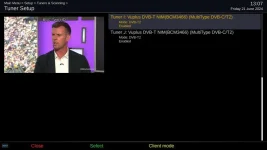
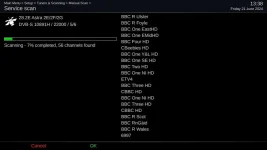
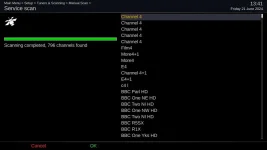
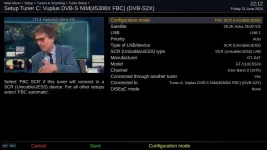
All of a sudden there's something gone very wrong on my Vu+ 4k SE in that when it boots and gets to the first Openvix splash screen there are several loud clicks through the TV sound then, when I scan the two FBC tuners, it finds BSkyB channels but it doesn't find any Freesat channels. The terrestrial scan works without any issues.

Once scanned, and when I press then epg, the box crashes after just a few seconds.

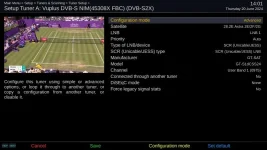
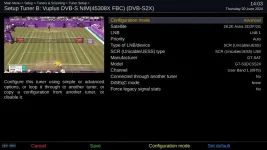
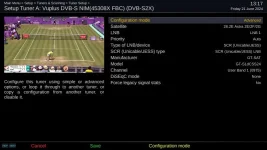
According to my WoS receipt, the LNB is a 'GT-Sat GT-S1DCSS24 SCR/dCSS Single Cable Unicable II LNB SCR24 with 1x Legacy Outputs' and the box is set up for that though the settings file I've attached shows it as a 'GT-S3DCSS24'.

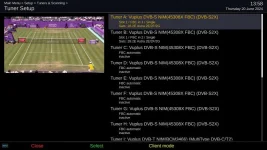
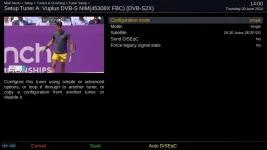
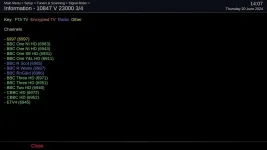
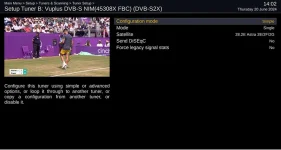
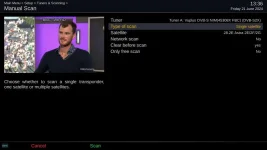
I've attached a series of images that I hope will provide some idea of what might be wrong and I've added the latest crash report.

Any help will be gratefully received.
 

Attachments

  • Vu tuning B 3.webp
    Vu tuning B 3.webp
    21.7 KB · Views: 15
  • Enigma2_debug_2024-06-20_14-19-36.zip
    Enigma2_debug_2024-06-20_14-19-36.zip
    26.9 KB · Views: 4
  • settings.zip
    settings.zip
    1.4 KB · Views: 1
  • Vu tuning 1.webp
    Vu tuning 1.webp
    46 KB · Views: 16
  • Vu tuning A 1.webp
    Vu tuning A 1.webp
    27.9 KB · Views: 11
  • Vu tuning A 2.webp
    Vu tuning A 2.webp
    42.2 KB · Views: 14
  • Vu tuning A 3.webp
    Vu tuning A 3.webp
    21.5 KB · Views: 14
  • Vu tuning A 4.webp
    Vu tuning A 4.webp
    18 KB · Views: 16
  • Vu tuning B 2.webp
    Vu tuning B 2.webp
    41.7 KB · Views: 15
  • Vu tuning B 1.webp
    Vu tuning B 1.webp
    35.3 KB · Views: 13
This isn't a unicable issue, it is an image issue. It seems you are combining three issues:

Not finding Freesat chanenls.
Crashing.
Tuner configuration uncertainty

How are you scanning? Please provide details of the scanning options you are using.

There is no crashlog attached, can you please attach it. It seems that this is similar to the issue reported here:
https://www.world-of-satellite.com/...s-on-selecting-final-channel-in-my-HD-bouquet

You have shown what the software tuner configuration on the receiver is. You have not described the phyisical hardware connected to the tuners. Both must match. It seems to me that you have set your tuners incorrectly. You have told it it has two signal wires form the Unicable LNB. Have you got a splitter for the unicable output or are you using one universal output on one tuner and one unicable output on the other?

Your tuners are not configured to best use your unicable LNB. And you have posted two different tuner configurations for tuner A.
 
Thanks for getting back to me.

I attached Enigma2_debug_2024-06-20_14-19-36 as I thought that that would include the crash details. I'll try to find a separate crash log.

I'm scanning using the Scan option in the Menu after I've set the tuners to Simple. Advanced gets no channels, Simple finds some.

It looks (to this uneducated eye) that the connections to the tuners may be the issue. The LNB has a shotgun cable coming from it and the guy who installed it put an f-plug on each cable and both are connected, one to the satellite A input and the other to the B input. Do I have to find just the one that's got the Unicable signal on it and leave the other tucked out of the way?

(Running before I can walk/showing my lack of understanding, but you mention a splitter. If the Unicable signal is on just one of the cables is it possible to use a splitter to any advantage?)
 
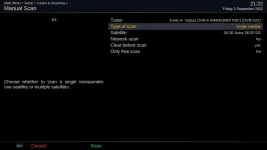
That is an incorrect description of scanning. Post a picture please. Signal finder is not the same and a waste of time for your purposes. It comes into its own for individual transponders. You should use manual scan and then select single satellite.

No need to use a splitter, but might be handy for your other receivers.

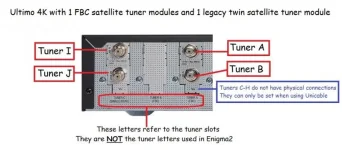
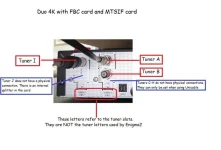
Top F-plug socket on card = Tuner A
Bottom F-plug socket = Tuner B

Identify which cable is connected to the universal output and which is connected to the unicable one. We can then go from there. I am sure if you use Auto diseqc, it should fail on the Unicable one and pass with the the universal one. It sounds like you have the universal output to Tuner A.
 
Last edited:
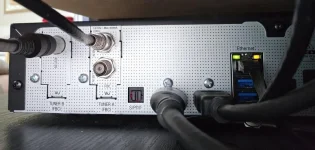
If you ever move your receiver, can you get a clear picture of the back. Not important.

Please find a picture attached to show the tuners/letters. It is of an Ultimo 4K, but should serve its purpose. People always seem to get mixed up between tuner cards and the actual tuners because of the text on the bottom.

ultimo 4k 2 cards fbc legacy.webp


The tuner attached to the universal output should be set as:
simple,
single,
28.2.

The tuner attached to the unicable output should be set as you have pictured above barring the letter issue.

For the scan, use manual scan and select the tuner you want to use. Then select single satellite. Not just a single transponder.

manual scan.webp
 
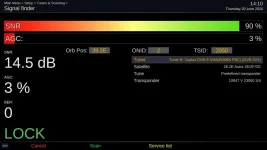
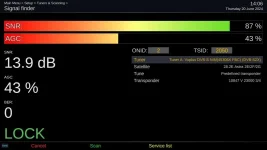
Sorry, I wasn't clear. I use the Autotune option for tuning. The images of the signal finder were to illustrate signal strength in an attempt to provide as much (hopefully relevant) information as possible.

I'll sort out the cables and get the image you wanted.
 
The transponders have different strengths. Lots of people check a strong transponder using signal finder, but still have an issue receiving some services. Getting them to understand the difference is sometimes impossible.
If you use manual scan, single satellite and get about 800 channels, dish and LNB are fine.

Once we get the wires identified, we can configure all 8 tuners. Please note the edit to my previous post about using splitter.
More details here:
https://www.world-of-satellite.com/showthread.php?59981-Guide-to-using-Unicable

Tuner configuration here. you will have to adapt to your physical setup. Looks like you got the gist of it. Just need to make use of the "Connected through another tuner" function.
https://www.world-of-satellite.com/showthread.php?60640-GT-Sat-GT-dLNB1DY-and-tuner-configuration
 
Apologies for leaving this hanging but 'Real Life' intervened and I was only able to get back to it this afternoon.

I have checked the feed cables and only one will provide any channels and so I have left that installed on tuner A by itself.

I have had to do multiple scans to get Freesat channels available but they finally are, along with a favourites bouquet which I set up in dreamboxEdit. I saved a set of screens to show the route I took to get there and they're attached along with the image of the back of the box you asked for.

Recordings are saved to an internal SSD unless they're for my wife in which case the go to a share on my NAS to be watched on a couple of ZgemmaH7 boxes which I've set to Client Mode. Things are a little unstable/stuttery on them and all three boxes are a little slow to find the channel when it's changed with them needing a button press or two to get the sound up.

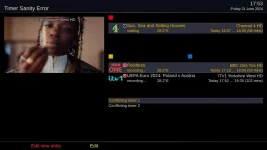
The one issue remaining is an inability to schedule concurrent recordings on the Vu+. When setting them with the green button in the epg, the picture starts to break up, the Vu+ soon reports conflicts and several channels become unavailable. Pictures also lack the kind of clarity typical of low bandwidth. No doubt I've not got something right.
 

Attachments

  • Vu+ tuner connections.webp
    Vu+ tuner connections.webp
    59.5 KB · Views: 10
  • Vu tuning 1.webp
    Vu tuning 1.webp
    45.8 KB · Views: 7
  • Vu tuning 2.webp
    Vu tuning 2.webp
    22.5 KB · Views: 3
  • Vu tuning 3.webp
    Vu tuning 3.webp
    39.7 KB · Views: 3
  • Vu tuning 4.webp
    Vu tuning 4.webp
    25.2 KB · Views: 5
  • Vu tuning 5.webp
    Vu tuning 5.webp
    21.1 KB · Views: 6
  • Vu tuning 6.webp
    Vu tuning 6.webp
    16.8 KB · Views: 6
  • Vu tuning 7.webp
    Vu tuning 7.webp
    24.2 KB · Views: 7
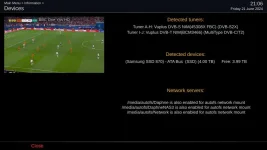
Can you please post a picture of Menu, Information, Devices.

Your Tuner configuration is inadequate and wrong. You are using internal loop through instead of configuring the 8 tuners to be independent. This is why the clashes are happening. Please read the thread I linked to. Gist of it is below.

Tuner A , this is correct .
Tuners B-H, set these like A , i.e Unicable. For "connected to through another tuner", Say yes. They are all getting Signal via Tuner A, so select that. They must all have unique SCR numbers.
 
Last edited:
So this thread is about unicable after all.

Note:
FBC Automatic = Internal loop through when required. The tuner is not independent and tied to the transponder that is in use on non-unicable tuner.
 

Attachments

  • duo 4k - fbc sat and mtsif.webp
    duo 4k - fbc sat and mtsif.webp
    35.4 KB · Views: 13
Last edited:
So this thread is about unicable after all.

That and my slips on the steep learning curve! Not just the hardware but also the terminology.

I really do appreciate the time (and patience) you've spent on this. :thumbsup:
 
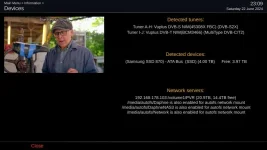
Can you please post a picture of Menu, Information, Devices.

Your Tuner configuration is inadequate and wrong. You are using internal loop through instead of configuring the 8 tuners to be independent. This is why the clashes are happening. Please read the thread I linked to. Gist of it is below.

Tuner A , this is correct .
Tuners B-H, set these like A , i.e Unicable. For "connected to through another tuner", Say yes. They are all getting Signal via Tuner A, so select that. They must all have unique SCR numbers.

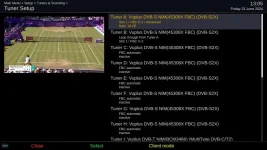
I had read the thread but hadn't appreciated/understood the 'subtleties' of the way in which B-H needed to have such independent configurations. Fingers crossed I've got it now.
 

Attachments

  • Vu devices.webp
    Vu devices.webp
    29.2 KB · Views: 7
  • Vu tuner setup.webp
    Vu tuner setup.webp
    37.8 KB · Views: 8
Seems fine. As a final check, can you please issue this command and post back the results:
cat /etc/enigma2/settings | grep config.Nims > /tmp/digitl_tuner_config.txt

With regards to the other receivers:
It may be better for you to supply the other receivers their own signal instead of using the fallback tuner. You will have to use a splitter, you can use them wherever convenient for you. See post 7
https://www.world-of-satellite.com/showthread.php?59981-Guide-to-using-Unicable

You can still share mounts between the boxes. But it is not client mode, so may be a bit more configuring needed.
 
Seems fine. As a final check, can you please issue this command and post back the results:
cat /etc/enigma2/settings | grep config.Nims > /tmp/digitl_tuner_config.txt

With regards to the other receivers:
It may be better for you to supply the other receivers their own signal instead of using the fallback tuner. You will have to use a splitter, you can use them wherever convenient for you. See post 7
https://www.world-of-satellite.com/showthread.php?59981-Guide-to-using-Unicable

You can still share mounts between the boxes. But it is not client mode, so may be a bit more configuring needed.

Delighted to know it seems fine! :thumbsup:

I've had a look at the post you linked to and, if I've understood it, it needs cabling? The Vu+ is in one room downstairs, one Zgemma in another room on the same floor but diagonally across from the Vu+ and the other Zgemma is on the floor above and, again, diagonally across from the Vu+. The only cabling is gigabit Ethernet which, I expect, is unsuitable.

However, we've got two dishes pointing at 28E. One has the Unicable LNB, the other has a quad LNB which feeds a Triax 5 x 8 multiswitch in the loft which then feeds the rooms in question. The three TVs connected to the receivers all have a Freesat (multiswitch) feed and a terrestrial aerial. Could the multiswitch be repurposed/replaced for the Unicable feed and, if so, would the TVs without FBC tuners function?

So many questions!
 

Attachments

Your tuner configuration is correct. Hopefully the 8 independent tuners will mean no more conflicts. You cannot use the gigabit cable for dvb signal. Alas, you should have replaced your switch instead of getting the other dish and LNB. Most switches will do legacy (universal) as well as unicable. There are oddities on types of LNBs needed. I am pretty sure I read the Unitron ones need a quad LNB instead of quattro to work in legacy/universal mode. Some switches will take wideband, quad or quattro.

Continue as you are for now. No point wasting money on this if it works. We can revist this later if you need to. You could use the satellite signal wires on the Zgemma instead of the TV as the interface on your E2 receiver is better. That way there is no network lag.

Please note, you don't need FBC tuners for unicable! It is disappointing lots of seasoned users keep perpetuating the misconception that you do. Even a DM 500 from 2006 can use unicable.
 
Your tuner configuration is correct.
Finally, I've got there! Down to your help which has been invaluable.

Hopefully the 8 independent tuners will mean no more conflicts. You cannot use the gigabit cable for dvb signal. Alas, you should have replaced your switch instead of getting the other dish and LNB. Most switches will do legacy (universal) as well as unicable. There are oddities on types of LNBs needed. I am pretty sure I read the Unitron ones need a quad LNB instead of quattro to work in legacy/universal mode. Some switches will take wideband, quad or quattro.

I've had two dishes for several years for reasons that no longer apply so, in my innocence, it appeared easier to install the Unicable LNB on the one that doesn't feed the multiswitch. It's a pity that the well-regarded AV and aerial guy didn't offer any advice. However, you raise a question. With the right multiswitch, fed from the G-Sat (or suitable) LNB's single cable, would the eight cables from the multiswitch serve the FBC tuners in all three boxes along with the non-FBC legacy devices (yes, I've got the message, just being careful though!) and so install 8 independent tuners in each of the boxes to negate the need for Client Mode?

Continue as you are for now. No point wasting money on this if it works. We can revist this later if you need to. You could use the satellite signal wires on the Zgemma instead of the TV as the interface on your E2 receiver is better. That way there is no network lag.

I'll give that a go.

Please note, you don't need FBC tuners for unicable! It is disappointing lots of seasoned users keep perpetuating the misconception that you do. Even a DM 500 from 2006 can use unicable.
Erm...got it!

And thanks again for the extreme hand-holding. Much appreciated.
 
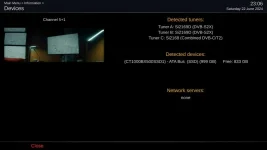
Remind me, how many receivers do you have?
For each receiver, describe the number of tuners and types.

Might be easier to post screenshots of menu, information, devices. Crop out the network drives.
 
Remind me, how many receivers do you have?
For each receiver, describe the number of tuners and types.

Might be easier to post screenshots of menu, information, devices. Crop out the network drives.

Two ZgemmaH7S boxes and a Vu+ Duo 4k SE.

(I'm still trying to get the NAS mounts set up. Hence the variations!)
 

Attachments

  • Vu+ Duo 4k SE devices.webp
    Vu+ Duo 4k SE devices.webp
    32.3 KB · Views: 9
  • ZgemmaH7S devices.webp
    ZgemmaH7S devices.webp
    16.7 KB · Views: 12
Can you please draw a diagram showing all the cabling, receivers and TVs connected to the satellite signal directly.You said you had 8 cables from the multi switch, I'd like to see where they go. Please also include the unicable one. I would like to know if it goes near the multi switch.

The outlets for the cables, are they diplex plates or just f plug sockets.
 

OpenViX Feeds Status

Back
Top