Superb quality and spec AB-Com PULSe 4K SE. Crazy offer! Only £99! FREE UK DELIVERY! 4K UHD, Enigma 2, Multiboot 4 images & more!...
Superb quality and spec AB-Com PULSe 4K Rev II Twin Satellite tuner only £149! FREE UK DELIVERY! 4K UHD, Enigma 2, SATA HDD facility, Multiboot 4 images & more!...

[VU+ Uno4KSE] Cannot configure network on this box.

For debug logs, the inability to FTP to the box obviously causes an issue with regards to obtaining them. The way around this is to add a USB stick, setup logs to use the USB device. A restart will be required. Once the logs have been saved to USB, you can put receiver into deep standby and then remove the USB device. You can then connect the USB device to your PC or other accessible device.
 
I'm assuming the OP can connect the box using ethernet temporarily, so that he can get screenshots of the config etc.
 
Okay... today has been a problem so far so I am behind schedule (long story but mental health problems screw things up sometimes)

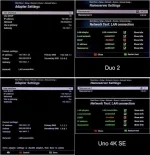
I got the image of the network settings which I have attached, not sure how much useful info they contain as it seems pretty basic stuff in there. The 4K SE still has the Google DNS servers but given the problem accessing my NAS on the LAN, I don't know if that's contributing to anything. I tried the Image Manager again today but still got the "Unable to find any images" message. My Duo2 still has no problem with that, so I know the servers are online.

I still need to work on the debug logs because I need to be calm for that and I am only just getting there, so expect them at some point in the very near future.

Sorry for any delays but every day is like rolling a dice where anything but a 6 equals a very bad day and even a 6 is a bad day... I can't predict when it will happen so I just have to go with the flow.

Thanks to everyone who has answered so far, the help is appreciated... which is why I became a donator yesterday. My benefits don't give me much luxury room but I thought something was better than nothing.

Edit: Images were taken on my phone then straightened and adjusted for clarity in Photoshop. I can't get to the 4K SE at all for screenshots, not even via LAN, so I had to use my phone. Sigh... I didn't realise the image was that small, sorry, I was trying to keep the size down to a reasonable KB level.
 

Attachments

  • network_settings.webp
    network_settings.webp
    41.1 KB · Views: 18
Last edited:
So on uno4kse why the DNS is 1.1.1.1? It is not the same in Duo2 where it is 192.168.1.1.
Did you tried to set the DNS in the same way like DUO2?
 
Yeah, I have tried it with both DNS settings with the same result.

Just to add to all this, I found my TP-Link wifi dongle which I hoped would give a solution to the problem... turns out I can't connect with that either. It all configures fine but I get the exact same errors and I still can't Telnet or FTP into the box, the connection always times out.

I am starting to wonder if there isn't a box fault at this point, I don't know what else it could be to affect all connection types, unless there is something very specific about the configuration on this box that I just haven't spotted.
 
Please make sure all wifi on the box is disabled. Then restart.
 
Just a quick update, did a no-setting flash with 6.7 from USB and very quickly realised that created another problem. Cross EPG isn't there by default, EPG-Importer uses the internet to get the EPG, because I can't connect to anything I can't get the Cross EPG plugin and I can't get the EPG from the EPG-Importer. I can't manage without the EPG, it would be a nightmare to use. So I am going to have to either go back to 6.6 or do a 6.7 flash with a settings restore to get Cross EPG installed as a plugin.

I am starting to really regret keeping this Uno now, it's affecting my usage more than it is benefiting it but because I don't know if it is faulty, I can't even sell it. :(

Will update with more info if/when I am able to get some.

Edit: Just noticed the post above after posting this... will do what that post says and report back later, I need a break from this for a while.
 
The photos are perfect, so no worries there. I don't know why you think you are using google DNS on the Uno? 1.1.1.1 is Cloudflare. Google DNS is 8.8.8.8

Your network test screen is showing all good for basic connectivity on the Uno, but it won't confirm that you are actually resolving outside URLs unless you have a working DNS. Just use your router gateway IP address as your DNS, so that both boxes are the same. As you are on a LAN ethernet connection it should be straightforward - no messing about with wifi AP names and passwords etc.

The alternative would be to set the Uno to use DHCP and see what address and DNS are allocated back to the Uno by the router. On ethernet there is really no difficulty (shouldn't be any!) if you just plug in the box with the default DHCP LAN settings.
 
Just a quick update, did a no-setting flash with 6.7 from USB and very quickly realised that created another problem. Cross EPG isn't there by default, EPG-Importer uses the internet to get the EPG, because I can't connect to anything I can't get the Cross EPG plugin and I can't get the EPG from the EPG-Importer. I can't manage without the EPG, it would be a nightmare to use. So I am going to have to either go back to 6.6 or do a 6.7 flash with a settings restore to get Cross EPG installed as a plugin.

I am starting to really regret keeping this Uno now, it's affecting my usage more than it is benefiting it but because I don't know if it is faulty, I can't even sell it. :(

Will update with more info if/when I am able to get some.

Edit: Just noticed the post above after posting this... will do what that post says and report back later, I need a break from this for a while.

A no restore flash setting of the Uno should not require any network configuration of the LAN adapter - you just plug it in and it uses DHCP by default. Ok, you will have to find out waht IP address your router has allocated to it but I assume you can check that in your router management.
 
Best to flash without restoring and use LAN connection. The IP address assigned by the router will be shown on the receiver if you don't want to search on router.

With regards to EPG, don't worry about CrossEPG not being pre-installed, you can install it later if you prefer it. Until then, you can use the OpenTV EPG reader. It's pre-installed in ViX.
 
Okay... today has been a problem so far so I am behind schedule (long story but mental health problems screw things up sometimes)

I got the image of the network settings which I have attached, not sure how much useful info they contain as it seems pretty basic stuff in there. The 4K SE still has the Google DNS servers but given the problem accessing my NAS on the LAN, I don't know if that's contributing to anything. I tried the Image Manager again today but still got the "Unable to find any images" message. My Duo2 still has no problem with that, so I know the servers are online.

I still need to work on the debug logs because I need to be calm for that and I am only just getting there, so expect them at some point in the very near future.

Sorry for any delays but every day is like rolling a dice where anything but a 6 equals a very bad day and even a 6 is a bad day... I can't predict when it will happen so I just have to go with the flow.

Thanks to everyone who has answered so far, the help is appreciated... which is why I became a donator yesterday. My benefits don't give me much luxury room but I thought something was better than nothing.

Edit: Images were taken on my phone then straightened and adjusted for clarity in Photoshop. I can't get to the 4K SE at all for screenshots, not even via LAN, so I had to use my phone. Sigh... I didn't realise the image was that small, sorry, I was trying to keep the size down to a reasonable KB level.

I would turn on DHCP and reboot the receiver then check what IP settings are applied and if you can access the online plugin feeds.
 
on the 4K your DNS settings are wrong.Always set DNS as LAN from your router (192.168.1.1) then the router does the translation to internet.Prefered 1ste adres router lan DNS and second the DNS from your provider.
 
I would turn on DHCP and reboot the receiver then check what IP settings are applied and if you can access the online plugin feeds.
Tried that, it made no difference. It says either "Your Uno 4K SE has no internet connection" or "URL Error".

on the 4K your DNS settings are wrong.Always set DNS as LAN from your router (192.168.1.1) then the router does the translation to internet.Prefered 1ste adres router lan DNS and second the DNS from your provider.
My DNS settings have been both and they were changed to the current settings based on a discussion between two people earlier in this thread. No matter what I change them to, it makes no difference, I can't access anything in my LAN and I can't access anything online. If you notice the image I posted, my Duo2 DNS settings are for my router but that box doesn't have any problems anyway.

Edit: For those wondering where I got those DNS settings from, it was in my Duo2 log file, I thought these were the ones I should be using.
[NameserverSetup] backup-list:[[1, 1, 1, 1], [1, 0, 0, 1]]

So to summarise:-
I have tried cabled with DHCP on... it doesn't work
I have tried cabled with manual IP... it doesn't work.
I have tried wifi with DHCP... it doesn't work.
When I did a flash without settings refresh and let it use default DHCP LAN settings... it didn't work.
When I did a flash with settings restore and use the manual IP settings... it didn't work.
I can't connect with FTP using either DCC or CoreFTP.
I can't connect with Telnet using either DCC or Putty.
I can't connect into the box and I can't connect out from the box.
I can't access plugin feeds.
I can't access the images on OpenVix.
I can't download EPG data with the EPG Importer.

Edit: I am still trying to get the Logs sorted but I am into the part of the day where several timers are set up so I can't restart or power-down the box. I have a 2 hour window later so I will try then.
 
Last edited:
Yeah, I have tried it with both DNS settings with the same result.

Just to add to all this, I found my TP-Link wifi dongle which I hoped would give a solution to the problem... turns out I can't connect with that either. It all configures fine but I get the exact same errors and I still can't Telnet or FTP into the box, the connection always times out.

I am starting to wonder if there isn't a box fault at this point, I don't know what else it could be to affect all connection types, unless there is something very specific about the configuration on this box that I just haven't spotted.

By testing with a USB WiFi dongle you've proved its not a hardware issue with the VU+ Uno itself and something in your setup causing the issue.

Have you checked that DHCP is turned on, on your router?
 
So lets do some basics… if you done some of it before please forgive me!
This sounds a lot but not that bad! This will,obviously reset the box, if you don,t want to do that exit now.

Check hdd, backup current settings ….> blue button, vix plugin, mountmanager—> check hdd is set to correct hdd, then backupmanager (whilst there press menu and check file is saved to hdd) and create new settings backup.
download current image from openvix….copy image to usb stick, insert in box, mount as usb if asked, reboot.
After reboot, ImageManager- if the image doesn,t show in downloads, menu button—-> select usb ——> blue button flash image.
On boot select multiboot (we can talk about that later) and follow instructions.
Eventually, you will be asked if you want to restore settings —-> answer NO…….then follow the wizard…..use dhcp for the network, don,t force settings just let it pick defaults.
When it gets to,tuners —> disable for the moment.
Exit wizard, long press blue button ———> plugins feeds —-> green button ——-> do you download list of plugins?

post result!
 
By testing with a USB WiFi dongle you've proved its not a hardware issue with the VU+ Uno itself and something in your setup causing the issue.

Have you checked that DHCP is turned on, on your router?
Yes, I have a reserved range set for DHCP which handles my phones, tablet and Sonos player. Depending on what has been allocated, the box can get either 11 or something from 14 onwards usually. The box also shows a green tick in the DHCP box when it is set, so I know that is working fine.

This sounds a lot but not that bad! This will,obviously reset the box, if you don,t want to do that exit now.

I have no problem resetting the box, I have a backup image that I can reflash anyway so it's not a problem. But even if I had to start from fresh, my setup is minimal... two tuners, both Astra 28 with Sky FTA channels. I do have a motorised dish but it has been unused for a very long time, I didn't watch TV for many years.

As for the logs I said I was getting, I managed to sneak in before the timers started so managed to get two log files, one is set to Debug level and the other to Debug+, I don't know what the difference is but tried both anyway. The process in both was pretty much the same.

Restart the GUI
Plugins > Download Plugins > "Your Uno 4K SE has no internet connection..."
Image Manager > Downloads > OpenViX > "No Images Found on the server..."
Network > Network Test

Please Note: These logs are on my current 6.6 system because I need the EPG and timers active at night. I can flash 6.7 tomorrow. If nobody wants to deal with 6.6 files I fully understand. I know that the site says that earlier versions won't be supported so I fully appreciate if nobody wants to get involved until I flash with 6.7... it's not a problem.
 

Attachments

I looked at your log. The network looks all wrong - you have no IP address etc. Your log shows :
Code:
< 11356.525853> 18:22:57.8422 [Network] read configured interface: {'lo': {'dhcp': False}, 'eth0': {'dhcp': True}}
< 11356.525969> 18:22:57.8423 [Network] self.ifaces after loading: {'eth0': {'up': True, 'dhcp': True, 'preup': False, 'predown': False, 'ip': [0, 0, 0, 0], 'netmask': [0, 0, 0, 0], 'gateway': [0, 0, 0, 0]}}

For comparison, here is mine: (also a VU Uno4kSE)
Code:
<    34.278471> 17:55:47.9344 [Network] read configured interface: {'lo': {'dhcp': False}, 'eth0': {'dhcp': True}, 'wlan0': {'dhcp': False}}
<    34.278615> 17:55:47.9345 [Network] self.ifaces after loading: {'eth0': {'up': True, 'dhcp': True, 'preup': False, 'predown': False, 'ip': [192, 168, 0, 128], 'netmask': [255, 255, 255, 0], 'bcast': [192, 168, 0, 255], 'mac': '00:1d:ec:18:a4:83', 'gateway': [192, 168, 0, 1]}}

Your router is not allocating an IP address. Maybe because your MAC address is not passed to it so that it can route? Are you sure that your LAN port is working (blinking lights etc.)? Your ethernet patch cable is ok? Maybe you have a hardware issue with the VU? Did you say you got it from the sponsor (world of satellite)?
 
Question - if you have no network access, how did you get your logs? Are you copying to USB stick? Kudos for that!

I would not install 6.7 just yet until we get to resolve the connectivity issue on 6.6.
 
Question - if you have no network access, how did you get your logs? Are you copying to USB stick? Kudos for that!

Yeah, I set it to write logs to the HDD and then just used filebrowser to copy it to the USB.

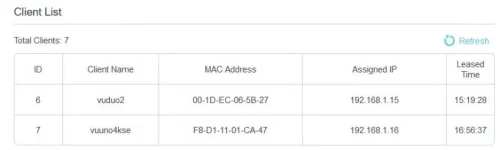
With regards your other questions, the LAN light is flickering away quite happily and my router shows what's in the attached image. Is it possible that the IP is getting assigned after that section of the log has been written?

Your ethernet patch cable is ok? Maybe you have a hardware issue with the VU? Did you say you got it from the sponsor (world of satellite)?

Cable should be fine because it's connected where my Duo2 used to sit and I have also had a 10 metre cable attached to test as well plus I tried a wifi dongle. Yeah, bought it from the sponsor last year.
 

Attachments

  • sat_macs.webp
    sat_macs.webp
    9 KB · Views: 9
Last edited:

OpenViX Feeds Status

Back
Top