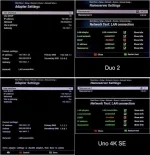
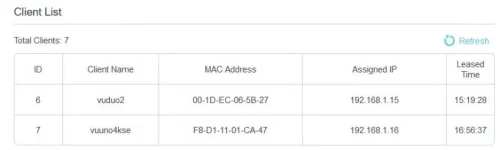
I would turn on DHCP and reboot the receiver then check what IP settings are applied and if you can access the online plugin feeds.
Tried that, it made no difference. It says either "Your Uno 4K SE has no internet connection" or "URL Error".
on the 4K your DNS settings are wrong.Always set DNS as LAN from your router (192.168.1.1) then the router does the translation to internet.Prefered 1ste adres router lan DNS and second the DNS from your provider.
My DNS settings have been both and they were changed to the current settings based on a discussion between two people earlier in this thread. No matter what I change them to, it makes no difference, I can't access anything in my LAN and I can't access anything online. If you notice the image I posted, my Duo2 DNS settings are for my router but that box doesn't have any problems anyway.
Edit: For those wondering where I got those DNS settings from, it was in my Duo2 log file, I thought these were the ones I should be using.
[NameserverSetup] backup-list:[[1, 1, 1, 1], [1, 0, 0, 1]]
So to summarise:-
I have tried cabled with DHCP on... it doesn't work
I have tried cabled with manual IP... it doesn't work.
I have tried wifi with DHCP... it doesn't work.
When I did a flash without settings refresh and let it use default DHCP LAN settings... it didn't work.
When I did a flash with settings restore and use the manual IP settings... it didn't work.
I can't connect with FTP using either DCC or CoreFTP.
I can't connect with Telnet using either DCC or Putty.
I can't connect into the box and I can't connect out from the box.
I can't access plugin feeds.
I can't access the images on OpenVix.
I can't download EPG data with the EPG Importer.
Edit: I am still trying to get the Logs sorted but I am into the part of the day where several timers are set up so I can't restart or power-down the box. I have a 2 hour window later so I will try then.