Superb quality and spec AB-Com PULSe 4K SE. Crazy offer! Only £129! FREE UK DELIVERY! 4K UHD, Enigma 2, Multiboot 4 images & more!...
Superb quality and spec AB-Com PULSe 4K Rev II Twin Satellite tuner only £179! FREE UK DELIVERY! 4K UHD, Enigma 2, SATA HDD facility, Multiboot 4 images & more!...

[VU+ Duo4K SE] Issue with backup manager & bluetooth remote

nighteagleowl

Forum Supporter
Donated Member
Joined
Mar 27, 2025
Messages
13
Reaction score
2
Points
3
What type of support thread are you creating?
Possible bug
What OpenViX Image build number are you using?
6.8.009
Have you tried re-flashing WITHOUT settings restore?
NO
Have you tried re-flashing WITH a settings restore?
NO
Duo4K SE and it was updated to latest OpenVix (though the same issue happens with previous versions for some time now): the issue is with backup manager and how it starts.

if I use normal IR remote - all works.

if I use Bluetooth remote and select inside Backup Manager screen/menu a New Backup --- then immediately two things happen:
(a) a menu is closed (screen returns to tv program full screen) an a pop-up window is shown that the remote is (re) connected;
(b) after that usual back-up progress bar is shown, but it stays at 0/100 with a text "starting..." and it stays like that for a long time (I waited for 15 min. at least)
with the only option to reboot with on-off switch. After restart - the same situation happens consistently with Bluetooth remote. With normal IR remote - backup is fine, it jumps from 0 to 11 and to 54/100 in two seconds, all good.

It's as if backup needs to reset plugins/drivers which forces bluetooth remote to reconnect, but the backup is not expecting any such interruptions and stucks at 0.
 
Duo4K SE and it was updated to latest OpenVix (though the same issue happens with previous versions for some time now): the issue is with backup manager and how it starts.

if I use normal IR remote - all works.

if I use Bluetooth remote and select inside Backup Manager screen/menu a New Backup --- then immediately two things happen:
(a) a menu is closed (screen returns to tv program full screen) an a pop-up window is shown that the remote is (re) connected;
(b) after that usual back-up progress bar is shown, but it stays at 0/100 with a text "starting..." and it stays like that for a long time (I waited for 15 min. at least)
with the only option to reboot with on-off switch. After restart - the same situation happens consistently with Bluetooth remote. With normal IR remote - backup is fine, it jumps from 0 to 11 and to 54/100 in two seconds, all good.

It's as if backup needs to reset plugins/drivers which forces bluetooth remote to reconnect, but the backup is not expecting any such interruptions and stucks at 0.
Can you post debug log… menu/setup/system/log/settings——> enable, save other than flash, local time
post before and after
edit out any userid/passwords!

BT remotes can be extremely touchy
 
Hm... That is getting interesting.... So I enabled debug logs. Box restarted. After that almost immediately (at about 16:46) I started BackupManager new backup with BT remote, it stuck at 0/100 as before for 10+ min till I reboot the box with on-off.

What I just realized is that backup actually created a file and the file is Ok, not corrupted and not zero (I downloaded the file and tested the tar.gz archive). So the issue should be with interface showing 0/100...

(below is small extract from the log file.... 'HelpWindow' and 'MessageBoxSimple' look suspicious)

Code:
< 64891.284458> 16:46:30.0751 [eActionMap] key from dreambox advanced remote control (native): 352 1
< 64891.284793> 16:46:30.0754 [InfoBarGenerics] Key: 352 (Break) KeyID='KEY_OK' Binding='('OK',)'.
< 64897.922103> 16:46:36.7128 [eInputDeviceInit] 1 18f (399) 1
< 64897.922144> 16:46:36.7128 [eRCDeviceInputDev] emit: 1
< 64897.922167> 16:46:36.7128 [eActionMap] key from dreambox advanced remote control (native): 399 0
< 64897.922402> 16:46:36.7131 [InfoBarGenerics] Key: 399 (Make) KeyID='KEY_GREEN' Binding='('GREEN',)'.
< 64898.134453> 16:46:36.9251 [eInputDeviceInit] 0 18f (399) 1
< 64898.134486> 16:46:36.9251 [eRCDeviceInputDev] emit: 0
< 64898.134507> 16:46:36.9252 [eActionMap] key from dreambox advanced remote control (native): 399 1
< 64898.134708> 16:46:36.9254 [InfoBarGenerics] Key: 399 (Break) KeyID='KEY_GREEN' Binding='('GREEN',)'.
< 64898.134800> 16:46:36.9255 [ActionMap] Keymap 'ColorActions' -> Action = 'green'.
< 64898.135077> 16:46:36.9257 [BackupManager] Device: /media/hdd/
< 64898.135137> 16:46:36.9258 [BackupManager] Directory: /media/hdd/backup/
< 64898.141239> 16:46:36.9319 [Skin] Processing screen 'JobView', position=(0, 0), size=(1920 x 1080) for module 'JobView'.
< 64898.146094> 16:46:36.9368 [Harddisk][splitDeviceName] devName = 'sda1', device = 'sda', partition = '1'
< 64898.173210> 16:46:36.9639 [Screen] Warning: Skin is missing element 'HelpWindow' in <class 'Screens.TaskView.JobView'>.
< 64898.181190> 16:46:36.9718 [Skin] Processing screen 'JobViewSummary' from list 'JobViewSummary, SetupSummary, ScreenSummary', position=(0, 0), size=(480 x 320) for module 'SetupSummary'.
< 64898.182719> 16:46:36.9734 [Skin] Attribute 'nowrap' (with value of '1') in object of type 'eLabel' is not implemented!
< 64898.190846> 16:46:36.9815 [Skin] Processing screen 'MessageBoxSimple' from list 'MessageBoxSimple, MessageBox', position=(480, 532), size=(960 x 15) for module 'MessageBox'.
< 64898.215938> 16:46:37.0066 [ePNG] loadSVG /usr/share/enigma2/skin_default/icons/input_message.svg 80x80 from 53x53
< 64898.217543> 16:46:37.0082 [MessageBox] Timeout set to 5 seconds.
< 64898.219212> 16:46:37.0099 [Skin] Processing screen 'MessageBoxSimpleSummary' from list 'MessageBoxSimpleSummary, MessageBoxSummary, ScreenSummary', position=(0, 0), size=(480 x 320) for module 'ScreenSummary'.
< 64899.236433> 16:46:38.0271 [BackupManager] Listing installed plugins
< 64899.363835> 16:46:38.1545 [BackupManager] Listing ExtraInstalledPlugins completed. Plugins found: ['enigma2-plugin-extensions-epgexport-src', 'enigma2-plugin-extensions-epgexport', 'enigma2-plugin-extensions-netspeedtest', 'enigma2-plugin-systemplugins-bluetoothsetup', 'enigma2-plugin-systemplugins-aboutboxbranding', 'enigma2-plugin-extensions-filebrowser', 'enigma2-plugins', 'enigma2-plugin-extensions-kodi']
< 64901.422667> 16:46:40.2133 [Harddisk][splitDeviceName] devName = 'sda1', device = 'sda', partition = '1'
< 64901.472552> 16:46:40.2632 [BackupManager] Backup running
< 64901.473304> 16:46:40.2640 [Console] command: tar -T /tmp/_backup-files.list -czvf /media/hdd/backup/vix-rel-6.8.009-20260526-1646.tar.gz
< 64901.473404> 16:46:40.2641 [eConsoleAppContainer] Starting /bin/sh
< 64901.671699> 16:46:40.4624 [Console] finished: tar -T /tmp/_backup-files.list -czvf /media/hdd/backup/vix-rel-6.8.009-20260526-1646.tar.gz
< 64901.671953> 16:46:40.4626 [BackupManager] Complete.
< 64901.934415> 16:46:40.7251 [eInputDeviceInit] 1 6c (108) 1
< 64901.934459> 16:46:40.7251 [eRCDeviceInputDev] emit: 1
< 64901.934485> 16:46:40.7251 [eActionMap] key from dreambox advanced remote control (native): 108 0
< 64901.934763> 16:46:40.7254 [InfoBarGenerics] Key: 108 (Make) KeyID='KEY_DOWN' Binding='('DOWN',)'.
 

Attachments

Thanks - interesting! Backup completes. Backup job completes. Hung message times out.
Now I know why I run with my modified version as I hate „jobs“ code.
Will look at it.
 
Hm... That is getting interesting.... So I enabled debug logs. Box restarted. After that almost immediately (at about 16:46) I started BackupManager new backup with BT remote, it stuck at 0/100 as before for 10+ min till I reboot the box with on-off.

What I just realized is that backup actually created a file and the file is Ok, not corrupted and not zero (I downloaded the file and tested the tar.gz archive). So the issue should be with interface showing 0/100...

(below is small extract from the log file.... 'HelpWindow' and 'MessageBoxSimple' look suspicious)

Code:
< 64891.284458> 16:46:30.0751 [eActionMap] key from dreambox advanced remote control (native): 352 1
< 64891.284793> 16:46:30.0754 [InfoBarGenerics] Key: 352 (Break) KeyID='KEY_OK' Binding='('OK',)'.
< 64897.922103> 16:46:36.7128 [eInputDeviceInit] 1 18f (399) 1
< 64897.922144> 16:46:36.7128 [eRCDeviceInputDev] emit: 1
< 64897.922167> 16:46:36.7128 [eActionMap] key from dreambox advanced remote control (native): 399 0
< 64897.922402> 16:46:36.7131 [InfoBarGenerics] Key: 399 (Make) KeyID='KEY_GREEN' Binding='('GREEN',)'.
< 64898.134453> 16:46:36.9251 [eInputDeviceInit] 0 18f (399) 1
< 64898.134486> 16:46:36.9251 [eRCDeviceInputDev] emit: 0
< 64898.134507> 16:46:36.9252 [eActionMap] key from dreambox advanced remote control (native): 399 1
< 64898.134708> 16:46:36.9254 [InfoBarGenerics] Key: 399 (Break) KeyID='KEY_GREEN' Binding='('GREEN',)'.
< 64898.134800> 16:46:36.9255 [ActionMap] Keymap 'ColorActions' -> Action = 'green'.
< 64898.135077> 16:46:36.9257 [BackupManager] Device: /media/hdd/
< 64898.135137> 16:46:36.9258 [BackupManager] Directory: /media/hdd/backup/
< 64898.141239> 16:46:36.9319 [Skin] Processing screen 'JobView', position=(0, 0), size=(1920 x 1080) for module 'JobView'.
< 64898.146094> 16:46:36.9368 [Harddisk][splitDeviceName] devName = 'sda1', device = 'sda', partition = '1'
< 64898.173210> 16:46:36.9639 [Screen] Warning: Skin is missing element 'HelpWindow' in <class 'Screens.TaskView.JobView'>.
< 64898.181190> 16:46:36.9718 [Skin] Processing screen 'JobViewSummary' from list 'JobViewSummary, SetupSummary, ScreenSummary', position=(0, 0), size=(480 x 320) for module 'SetupSummary'.
< 64898.182719> 16:46:36.9734 [Skin] Attribute 'nowrap' (with value of '1') in object of type 'eLabel' is not implemented!
< 64898.190846> 16:46:36.9815 [Skin] Processing screen 'MessageBoxSimple' from list 'MessageBoxSimple, MessageBox', position=(480, 532), size=(960 x 15) for module 'MessageBox'.
< 64898.215938> 16:46:37.0066 [ePNG] loadSVG /usr/share/enigma2/skin_default/icons/input_message.svg 80x80 from 53x53
< 64898.217543> 16:46:37.0082 [MessageBox] Timeout set to 5 seconds.
< 64898.219212> 16:46:37.0099 [Skin] Processing screen 'MessageBoxSimpleSummary' from list 'MessageBoxSimpleSummary, MessageBoxSummary, ScreenSummary', position=(0, 0), size=(480 x 320) for module 'ScreenSummary'.
< 64899.236433> 16:46:38.0271 [BackupManager] Listing installed plugins
< 64899.363835> 16:46:38.1545 [BackupManager] Listing ExtraInstalledPlugins completed. Plugins found: ['enigma2-plugin-extensions-epgexport-src', 'enigma2-plugin-extensions-epgexport', 'enigma2-plugin-extensions-netspeedtest', 'enigma2-plugin-systemplugins-bluetoothsetup', 'enigma2-plugin-systemplugins-aboutboxbranding', 'enigma2-plugin-extensions-filebrowser', 'enigma2-plugins', 'enigma2-plugin-extensions-kodi']
< 64901.422667> 16:46:40.2133 [Harddisk][splitDeviceName] devName = 'sda1', device = 'sda', partition = '1'
< 64901.472552> 16:46:40.2632 [BackupManager] Backup running
< 64901.473304> 16:46:40.2640 [Console] command: tar -T /tmp/_backup-files.list -czvf /media/hdd/backup/vix-rel-6.8.009-20260526-1646.tar.gz
< 64901.473404> 16:46:40.2641 [eConsoleAppContainer] Starting /bin/sh
< 64901.671699> 16:46:40.4624 [Console] finished: tar -T /tmp/_backup-files.list -czvf /media/hdd/backup/vix-rel-6.8.009-20260526-1646.tar.gz
< 64901.671953> 16:46:40.4626 [BackupManager] Complete.
< 64901.934415> 16:46:40.7251 [eInputDeviceInit] 1 6c (108) 1
< 64901.934459> 16:46:40.7251 [eRCDeviceInputDev] emit: 1
< 64901.934485> 16:46:40.7251 [eActionMap] key from dreambox advanced remote control (native): 108 0
< 64901.934763> 16:46:40.7254 [InfoBarGenerics] Key: 108 (Make) KeyID='KEY_DOWN' Binding='('DOWN',)'.
which skin are you using ???
 
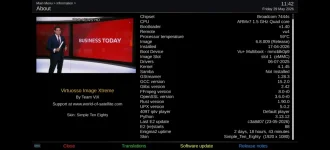
can you do a menu/Information/About just to check and post the skin name or better a picture of the About screen
 
Thanks for that picture.
Ok - has to be issue with Bluetooth driver - I have a bluetooth remote on my Gigablue Pro (this can be flaky with connection) but works perfectly in same test.
This commit just issued so lets see how that and several other recent commits chnage issue or not.
 

OpenViX Feeds Status

Back
Top