Superb quality and spec AB-Com PULSe 4K SE. Crazy offer! Only £99! FREE UK DELIVERY! 4K UHD, Enigma 2, Multiboot 4 images & more!...
Superb quality and spec AB-Com PULSe 4K Rev II Twin Satellite tuner only £149! FREE UK DELIVERY! 4K UHD, Enigma 2, SATA HDD facility, Multiboot 4 images & more!...

[ET5x00] Apollo 033 NAR set as default.

  • Thread starter Thread starter bushiee
  • Start date Start date
B

bushiee

Guest
Hi Guys,
I am using Apollo 033 kernal 3.8.7 on my xtrend ET5000
As the title says NAR seems to be the default audio selection on my et5000 with appollo 033 (updated yesterday) It was ok on previous versions so I was just wondering if its a setting in the update thats changed.
I remember having this on an earlier version of zeus but it seemed to be corrected on an update.
So will this be fixed in an update or is there a setting I can change to make the default audio non NAR ?

cheers
Bushiee
 
Menu -> Setup -> System -> Auto language selection -> Prefer audio track stored by service = no.
Then restart E2.
 
also just noticed theres another update, so Ill update and do your fix. thankyou
 
er , um ?????
who would want NAR set to on by default ???
dont get your reply at all judge , the op was reporting a fault in the image and rightly so ??
 
er , um ?????
who would want NAR set to on by default ???
dont get your reply at all judge , the op was reporting a fault in the image and rightly so ??

No, don't want it on by default. But if that's what the channel provides by default, it's not an image problem.
 
BTW, I've submitted a request to not enable default providers audio stream on 28.2 E, but with so many providers, it makes default options a bit harder.
 
Please read more carefully what is being asked/answered.
'remembering tracks stored by service' does exactly what is says on the tin: when activated a track that has previously been chosen, will automatically be activated next time. The setting doesn't make any setting by itself. The settings are being made elsewhere.

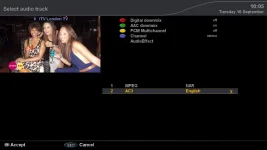
Let's take ITV as an example:
NAR 1.webp

You see that two audio streams are available: MPEG (NAR) & AC3 (English).
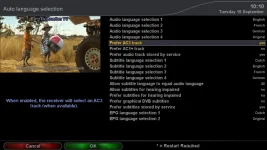
No go to Menu --> System --> Auto language settings
and see what setting has been made for 'Prefer AC3 track'
NAR 2.webp

When set to 'yes' ITV will automatically choose the English AC3 track.
When set to 'no' ITV will automatically choose the MPEG track (which happens to be the narrative track for this channel).

And on top of this you can use the remembering of stored tracks.
e.g.: when preferred AC3 track is set to 'no' and you don't want ITV to use the NAR-track, you manually choose the other track which will be remembered the next time you're on the same channel.
 
Its a matter of setting the box up for ones own needs/tastes - everyone has different requirements.
 
Point is that many people who don't have an AC3 capable sound system will probably set 'prefer AC3' to 'no', although there is no good reason for that as one would then choose to activate downmix.

Anyway: the fact that some UK-services have audio tracks as in this example will make many people think that NAR is chosen as default by the box, while in fact it is chosen by the settings they make themselves.
 

OpenViX Feeds Status

Back
Top