- What type of support thread are you creating?
- Support question
- What OpenViX Image build number are you using?
- 6.7
- Have you tried re-flashing WITHOUT settings restore?
- YES
- Have you tried re-flashing WITH a settings restore?
- YES
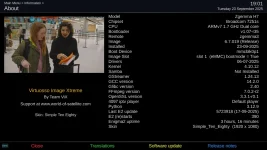
Hi, I had Openvix 6.7-13 installed and working fine . Today I checked Menu > Information > About ; It displayed Openvix 6.7-13 and all the other details that it should have.
So , I did an upgrade ; Menu > System > Software update > Software update; Created a backup image and did the update.
The box updated and rebooted but got stuck with "49" displayed on the front panel. Openvix screen was displayed on the tv. I waited and waited and waited, but nothing happened.
Powered down the box and turned it back on again, same outcome, So I connected to box with Filezilla , downloaded the backup image from the internal SSD and reflashed the box with usb.
Box boot up fine , I was back to a working Openvix 6.7-13. But now, if I go Menu > Information > About ; the box crashes and reboots but other then that, it seems to be working fine. Also If I go Menu > Standby & Restart > MultiBoot Image Selector, the same happens.
Ive tried installing a clean image of Openvix 6.7-19, disconnect everything from the box including the internal SSD, but I get the same crash if I try to access the "About" page in "Information"
Ive also flashed the older openvix image thats available to download through image manager, but still the same problem.
Then I flashed OpenATV 7.5.1 Current to slot 2 and booted to this image. With this image I can access the "About" page and " Multiboot Menu " without any problems or crashing. But If I reflash Openvix, The crash problem returns.
Just wondering if anyone here take a look at the crash log thats generated if I select "About" in the "Information" menu ?
At the time when this log was generated ; I pressed "OK" on the "About" option at 19:22
Thank you for your time,
If anyone can give me pointers to whats wrong Id be greatful .
Thanks
So , I did an upgrade ; Menu > System > Software update > Software update; Created a backup image and did the update.
The box updated and rebooted but got stuck with "49" displayed on the front panel. Openvix screen was displayed on the tv. I waited and waited and waited, but nothing happened.
Powered down the box and turned it back on again, same outcome, So I connected to box with Filezilla , downloaded the backup image from the internal SSD and reflashed the box with usb.
Box boot up fine , I was back to a working Openvix 6.7-13. But now, if I go Menu > Information > About ; the box crashes and reboots but other then that, it seems to be working fine. Also If I go Menu > Standby & Restart > MultiBoot Image Selector, the same happens.
Ive tried installing a clean image of Openvix 6.7-19, disconnect everything from the box including the internal SSD, but I get the same crash if I try to access the "About" page in "Information"
Ive also flashed the older openvix image thats available to download through image manager, but still the same problem.
Then I flashed OpenATV 7.5.1 Current to slot 2 and booted to this image. With this image I can access the "About" page and " Multiboot Menu " without any problems or crashing. But If I reflash Openvix, The crash problem returns.
Just wondering if anyone here take a look at the crash log thats generated if I select "About" in the "Information" menu ?
At the time when this log was generated ; I pressed "OK" on the "About" option at 19:22
Thank you for your time,
If anyone can give me pointers to whats wrong Id be greatful .
Thanks