
Superb quality and spec AB-Com PULSe 4K SE. Crazy offer! Only £99! FREE UK DELIVERY! 4K UHD, Enigma 2, Multiboot 4 images & more!...
Superb quality and spec AB-Com PULSe 4K Rev II Twin Satellite tuner only £149! FREE UK DELIVERY! 4K UHD, Enigma 2, SATA HDD facility, Multiboot 4 images & more!...
You are using an out of date browser. It may not display this or other websites correctly.
You should upgrade or use an alternative browser.
You should upgrade or use an alternative browser.
Channels problem
- Thread starter Agricola
- Start date

satteliter
Forum Supporter

- Joined
- Feb 20, 2021
- Messages
- 108
- Reaction score
- 0
- Points
- 16
sure thing.
satteliter
Forum Supporter
- Joined
- Feb 20, 2021
- Messages
- 108
- Reaction score
- 0
- Points
- 16
in case somebody else is able to help you earlier tmw, these files may be of use to them/you in configuring things. i'm in ireland aswell.
add irish channels to uk sections:
/usr/lib/enigma2/python/Plugins/SystemPlugins/AutoBouquetsMaker/custom
View attachment sat_282_sky_uk_CustomMix.xml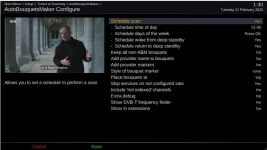
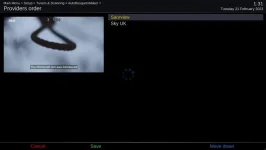
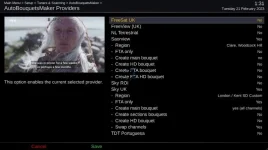
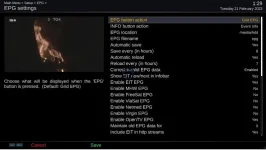
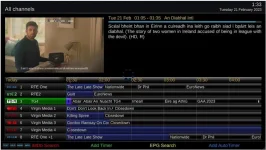
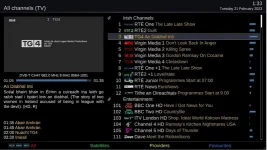
the end result of this config and the settings (change saorview from woodcock to whatever your local transmitter is - https://saorview.ie/en/check-coverage/ enter eircode and it tells you which to use)
gives you the epg/guide for 7 days etc.. the channels icons are added by the picons plugin (not sure if latest openvix carries latest picons but you can add them manually for the missing irish channels if needs be)
add irish channels to uk sections:
/usr/lib/enigma2/python/Plugins/SystemPlugins/AutoBouquetsMaker/custom
View attachment sat_282_sky_uk_CustomMix.xml
the end result of this config and the settings (change saorview from woodcock to whatever your local transmitter is - https://saorview.ie/en/check-coverage/ enter eircode and it tells you which to use)
gives you the epg/guide for 7 days etc.. the channels icons are added by the picons plugin (not sure if latest openvix carries latest picons but you can add them manually for the missing irish channels if needs be)

abu baniaz
Moderator
If you can get a longer network cable so that you can connect box to TV too, that will make life really easy. Or homeplugs.
The Ocram picons on Vix plugin server were updated on 17th February.
You can now use the ABM folder in /etc/enigma2
The Ocram picons on Vix plugin server were updated on 17th February.
You can now use the ABM folder in /etc/enigma2
Last edited:
Sorry, I did not realise it was not connected to the network. Can you try and download an image using Image manager?
Blue > Vix > Image Manager > Yellow (Downloads)
If that succeeds, select the 6.3 image and then flash it.
I presume that I try this now?
abu baniaz
Moderator
The openwebif advice was because you had moved the box nearer the router, it was not connected to the TV. Is that the current setup?
abu baniaz
Moderator
I have everything connected now, so box connected to the router and box connected to TV
Please try the image manager to download 6.3 002 and flash it.
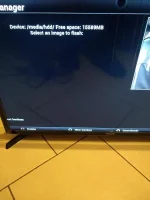
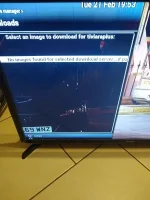
abu baniaz
Moderator
Are you ok to use Filezilla/winscp?
There was a server change awhile back, so probably why you cannot download it. We just need to transfer the image you downloaded to /media/hdd/imagebackups You can then flash it from imagemanager.
The other option is to put the image on a USB stick and make image manager use that.
There was a server change awhile back, so probably why you cannot download it. We just need to transfer the image you downloaded to /media/hdd/imagebackups You can then flash it from imagemanager.
The other option is to put the image on a USB stick and make image manager use that.
Are you ok to use Filezilla/winscp?
There was a server change awhile back, so probably why you cannot download it. We just need to transfer the image you downloaded to /media/hdd/imagebackups You can then flash it from image manager.
Yes I used it last night when sattelitter was guiding me so I have them downloaded already and open on my laptop
I have both downloaded so whichever is easier to use, given my level of incompetence

abu baniaz
Moderator
FTP (transfer) the zipped image file to /media/hdd/imagebackups. To void confusion, do not connect the USB stick to the box.
Once you have done that, it should show up in the list of images that are on your receiver and you can then select/highlight it and then flash.
Once you have done that, it should show up in the list of images that are on your receiver and you can then select/highlight it and then flash.
FTP (transfer) the zipped image file to /media/hdd/imagebackups. To void confusion, do not connect the USB stick to the box.
Once you have done that, it should show up in the list of images that are on your receiver and you can then select/highlight it and then flash.
Sorry, I spoke too soon!! I will have to be guided on how to transfer the zipped file, which I have on USB on my laptop.
abu baniaz
Moderator
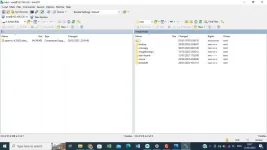
In your picture on post 31, you should be able to just drag and drop the zipped image file across from one location to the other. make sure you drag it into correct location.
Left hand side is local (computer). Right hand side is remote (satellite receiver)
Left hand side is local (computer). Right hand side is remote (satellite receiver)
In your picture on post 31, you should be able to just drag and drop the zipped image file across from one location to the other. make sure you drag it into correct location.
Left hand side is local (computer). Right hand side is remote (satellite receiver)
Just in case I do something wrong, I have followed post 30, so I now just drag the zipped file into imagebackups
abu baniaz
Moderator
Yes .
Similar threads


- Replies
- 10
- Views
- 493
- Replies
- 24
- Views
- 1K

