Superb quality and spec AB-Com PULSe 4K SE. Crazy offer! Only £99! FREE UK DELIVERY! 4K UHD, Enigma 2, Multiboot 4 images & more!...
Superb quality and spec AB-Com PULSe 4K Rev II Twin Satellite tuner only £149! FREE UK DELIVERY! 4K UHD, Enigma 2, SATA HDD facility, Multiboot 4 images & more!...

Channels problem

Are the next steps so to do a scan or what do I need to do to get the Saorview and freesat bouquets that you have in your post?

No just go into ABM and run it (Start Scan). It will create the bouquets. When you tune into RTE it will pull down the 7/8 day EPG automatically. I wouldn't go restoring any settings from a backup just yet as it may overwrite your configuration.
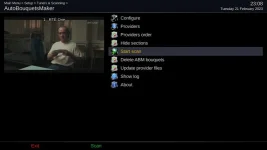
 
The word "SCAN" is a bit confusing/misleading. ABM just tunes a single terrestrial and or satellite channel and extracts the channel information. It doesn't actually scan through an entire satellite.
 
So I started scan to see what would happen but not sure if that is what I should do? Thanks for all your help. I will try and read more about it regarding configuring EPG and how to run the Open TV grabber. Lent begins tomorrow but to those who have helped me over the past few nights, I think that you have already done some penance!! Patience is a great virtue so thanks for your patience and I think somehow I will be back on this forum again very soon!
 
If you have connected the satellite wire (correctly) and aerial ABM will work (scan) fine. Don't do anything else until that is working.

Can you please confirm you have two satellite wires?
 
Hi again. TV off floor now (have ordered a 10M LAN cable to avoid having to do this again, so box not currently connected to router) and I have a whole list of channels. I have two satellite cables and one aerial.

Is there anything more I need/can to do at this stage? I am going to read the manual to try and figure out how to put together a list of favourite channels.

I also notice that the EPG function is not working for the satellite channels (as in none, or only the progamme immediately after the one I am looking at), but again I need to look at the manual.

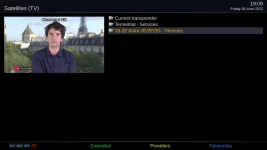
When I turn on the box I see 3 folders > Current transponder >Terrestrial Services (off the aerial) >28.2 Astra 2E/2F/2G so when I want to watch the channels from the aerial I go in to one folder and then to watch the satellite channels I go in to that folder so I am wondering is there a way that I can combine both (which is the way it was before I updated the box)
 
May I suggest that you read this thread:
https://www.world-of-satellite.com/showthread.php?63049-Bouquets-EPG-amp-Channel-navigation

Then to set up your EPG, there are several ways. But use this:
https://www.world-of-satellite.com/showthread.php?63896-Setting-up-Sky-UK-epg-download

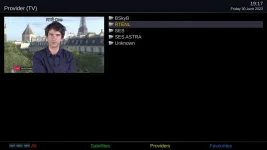
The first thread will hopefully explain why you are seeing what you are seeing. You are in orbital mode, not bouquet mode. I also recommend in ABM you set the option "add provider name to bouquets". Can you please post a picture of the providers page in ABM?
 
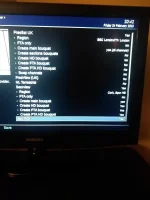
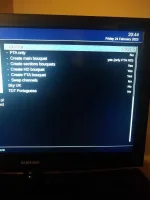
Thanks, have actually been looking at those manuals to try and figure things out, so I will do this until I get stuck, as I don't want to ask questions the answers to which are provided in the manuals and guide. IMG_20230224_204241994.webp IMG_20230224_204401754.webp
 
For screenshots:
https://www.world-of-satellite.com/showthread.php?44054-How-to-take-screen-shots-How-to-attach-files


In the saorview provider menu, set following to no
HD boquet. FTA boquet, FTA HD

You don't need Sky and Freesat. Use the UK one instead of Irish version as you will get free version of channel 4 etc.
Select London HD custom.
Create main bouquet = no
Enable the swap.

In Providers menu, set saorview as first one. Before you run, select the function to update provider files

After ABM runs, you will open the last select bouquet/category you used in cached mode. Change bouquets to refresh these. TV button should do it, or UP next to OK, then Blue to open boquets, select a different one to what you used last time.
 
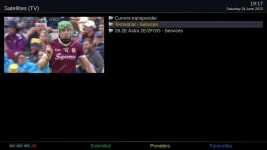
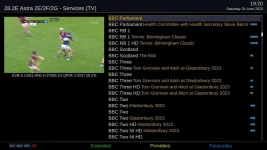
Back again looking for help! For the past few months I have been looking at the Sky channels by selecting 28.2 Astra from the following
1_0_19_44E_3E9_2174_EEEE0000_0_0_0_20230624191716.webp
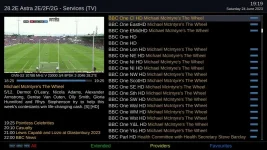
but I find that I have multiples of the same channel as in the following image
1_0_19_44E_3E9_2174_EEEE0000_0_0_0_20230624191957.webp
so can someone point me to a guide as to how to create a list of channels that I watch so that I only have one BBC 1 etc and that I don't have to scroll through lists of channels such as the Sky channels that I don't have anyway.
 

Attachments

  • 1_0_19_44E_3E9_2174_EEEE0000_0_0_0_20230624192031.webp
    1_0_19_44E_3E9_2174_EEEE0000_0_0_0_20230624192031.webp
    41.9 KB · Views: 5
Last edited:
How did you create that list. You should press blue to get to the channel list created by abm.
 
I got the list by following the instructions given by those who kindly were helping me out, Joe 90 and abu baniaz. I have another issue now, which is that when I go on to the terrestrial channels, some of them won't come on as per below

Tune failed image.webp

I thought this was something to do with the aerial but it isn't as I get some of the other terrestrial channels perfectly, but it seems to affect random channels at random times so I think I must need to change some setting?
 
How did you create that list. You should press blue to get to the channel list created by abm.

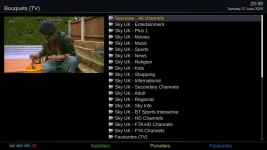
When I press the blue button I get the following
1_0_19_510E_80F_2_11A0000_0_0_0_20230627204944.webp
but when I go down to the favourites folder there is nothing in it so I wonder how do I add channels into that?
 
The bouquet called "favourites" is for you to add your favourites into. ABM does not alter it's contents. You can add channels using you remote or using a channel editor like Dreamboxedit, E-channelizer or even using the bouquets editor in OpenWebif.

To use the remote, press menu and you will options to do so. If you are in service list, you can move to a bouquet. If you are in an a other bouquet, you might have to enable edit mode first.
 
The bouquet called "favourites" is for you to add your favourites into. ABM does not alter it's contents. You can add channels using you remote or using a channel editor like Dreamboxedit, E-channelizer or even using the bouquets editor in OpenWebif.

To use the remote, press menu and you will options to do so. If you are in service list, you can move to a bouquet. If you are in an a other bouquet, you might have to enable edit mode first.

OK I will try that, thanks.
 
I got the list by following the instructions given by those who kindly were helping me out, Joe 90 and abu baniaz. I have another issue now, which is that when I go on to the terrestrial channels, some of them won't come on as per below

View attachment 65494

I thought this was something to do with the aerial but it isn't as I get some of the other terrestrial channels perfectly, but it seems to affect random channels at random times so I think I must need to change some setting?

You have disappeared off the radar for months, so I'm not sure how you are back to manual scanning of satellite transponders and (possibly) terrestrial transmitters that you perhaps can't receive. Back in February you were given pointers as to how to set up AutoBouquetsMaker (ABM) for Saorview (Spur Hill) and Sky UK. ABM will give you a single bouquet of Saorview terrestrial channels and a single bouquet of Sky channels if you follow the menu prompts. You can make the Sky bouquet as detailed as you want or as simple as the layout in my screenshots earlier in the thread.
 
Yes, have been off the site for a bit as a) having got the channels to work I just left them at that b)the technical aspects of the system can be a bit challenging for me and c) have been busy with work a lot of evenings.

I have sorted out the favourites folder now so have listed the channels that I actually watch so thanks to abu baniaz (again) for letting me know that I could do that through the boquets editor in OpenWebif (see told you I was challenged by the techinical aspects.

The only issue I have now is why some of the terrestrial channels won't appear. I thought this was an aerial issue and risked life and limb going on to the roof to see if it was, but as I am getting some of the channels perfectly I can only deduce that it's down to something in how I have set it up, or something that I need to update.

These are the lists of the Saorview channels I have
List of terrestrial.webp

I get a tuned failed image like below
Tune failed image.webp

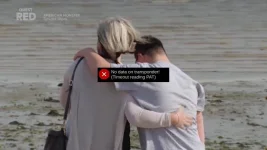
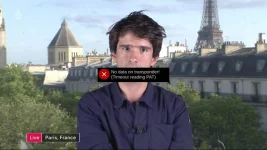
and then this comes up (this is for RTE 1 and +1, Virgin Media 3 and 4) but I can get RTE2, TG4, Virgin Media 1 and 2
No data on t'ponder.webp

As always any help greatly appreciated.
 
Those terrestrial lists show that you are scanning, rather than using AutoBouquetsMaker (ABM). There are only two channel groups (called multiplexes) in Saorview. RTE1/RTE1+1/Virgin Media 3 and 4 are in one multiplex (plus others). RTE2/Virgin Media 1/TG4 (plus others) are in the other multiplex. If you use ABM set to Spur Hill (are you still in the Spur Hill service area?) it will automatically tune the correct multiplexes and you will get all the services. You are making things difficult for yourself by doing manual scans. If you absolutely insist on a manual scan, then C45 (666MHz) and C39 (618MHz) are the frequencies and channel numbers for the Spur Hill multiplexes. I don't know why you have shown the screenshot for "Quest Red" as this is a satellite service, not terrestrial. Please use ABM to organise your satellite and terrestrial bouquets (lists) - it's so much easier!
 
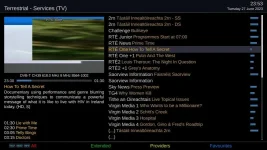
Thanks for your help Joe_90. Regarding the screenshot showing Quest Red, when I went on to the terrestrial services folder as in below
1_0_19_1452_7F2_2_11A0000_0_0_0_20230630190933.webp
and click on RTE 1 and wait to get a screenshot of what comes up, even though on the TV it is not showing any picture, the screenshot shows the channel I was watching prior to my going in to the terrestrial services folder as in below
1_0_19_835_3EA_2174_EEEE0000_0_0_0_20230630191054.webp
 
Looking back on your advice on post #80 when I press providers I get the following and don't see an option to select Saorview so maybe that is where I am going wrong with the loss of channels on Saroview?

1_0_19_835_3EA_2174_EEEE0000_0_0_0_20230630191701.webp
 

OpenViX Feeds Status

Back
Top