Superb quality and spec AB-Com PULSe 4K SE. Crazy offer! Only £99! FREE UK DELIVERY! 4K UHD, Enigma 2, Multiboot 4 images & more!...
Superb quality and spec AB-Com PULSe 4K Rev II Twin Satellite tuner only £149! FREE UK DELIVERY! 4K UHD, Enigma 2, SATA HDD facility, Multiboot 4 images & more!...

Connection Issues

GeoffatMM

Forum Supporter
Donated Member
Joined
Nov 3, 2021
Messages
166
Reaction score
2
Points
18
Location
Cognac, France
I have just come back to using my box after 3 years in a rental house with no dish.

After setting it up, everything was working fine and then I updated the software. Since then (it may be coincidence so bear with me) I keep having remote software connectivity problems.

When I start the receiver I can connect fine using either e2remote or Kodi. Then, some time later, for some reason when I have my back turned the box refuses any connections. Kodi cannot load the PVR data and e2remote says no box is connected.

I can ping the box so it is not the network. As Kodi and e2remote both have a problem it suggests the issue is the box.

When it happens, the box freezes. The time is captured (on the front screen) and even the remote controller doesn’t work (even though both it and the box flash when a button is pressed).

I would like to share some logs but there are none captured!

Any ideas on how to sort this out please?

Geoff.
 
What software version.
Debug logs ——-> menu/setup/system/logs/settings enable, save to hdd/usb, local time
post here
 
Hi Twol, Thanks for the response.

It went again at 2.06 this morning. Just rebooted it to get the information for you.

I upgraded to 6.7.019 (Release).

I have now enabled the debug logs (debug+). I will wait for it to happen again and post the results or a commentary on the results if I can see the error.
 
It stopped again. There are 4 debug logs but no crash logs. I can see from the file where it fails but cannot see why.

I tried to ssh in to the server to copy the files but the connection was refused and I cannot for the life of me remember how to manage ssh on the server. Is there any other way to get the file off the receiver?
 
I tried the connection through different machines and one of them appears to have kicked the ssh server into life as I can now access it.

Located the log files in /home/root/logs

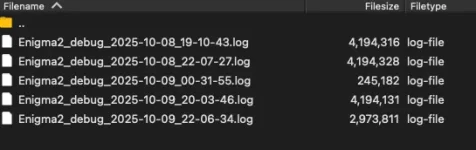
Got ftp access via root (would not allow sftp over tls for some reason? I used plain ftp over port 21 but it is a home network so is not an issue) and now have the following files downloaded:

Screenshot 2025-10-09 at 23.29.29.webp

I am guessing that the log with the crash/freeze is the middle one as I rebooted the server at about 20.00 this evening.

How do I post this data. I am sure you do not want it on the forum pages but again, I cannot remember where to list it for you to access.

Can someone let me know and I will post it for inspection.

Regards,

Geoff
 
I read an old post that Abu replied to and said just attach the file to the post so here goes. Hope this is not breaking protocol.
Change the log location in log sertings to hdd or usb(with usb you can always just pull the usb and read on a pc).. using up flsh is not a good idea. Would be nice to have local time as well for lazy guys like me.

So you get these lovely messages fron kodi and then timeouts… so if kodi not fixable here.
UnsafeErrorPage object at 0x65de4fd8> is returning a message body. I think I'll eat it.
 
Last edited:
Apologies I have been busy building and the system seemed to stabilise but las couple of days it has started again.

A hard reset cures it but disrupts recordings. I will look at logs and see what I can find but to be clear it is not just Kodi. It also stops me watching on mut iPhone and Kodi is not running permanently.

Could you see other messsges about the iPhone in the logs?

Geoff
 

OpenViX Feeds Status

Back
Top