Superb quality and spec AB-Com PULSe 4K SE. Crazy offer! Only £129! FREE UK DELIVERY! 4K UHD, Enigma 2, Multiboot 4 images & more!...
Superb quality and spec AB-Com PULSe 4K Rev II Twin Satellite tuner only £179! FREE UK DELIVERY! 4K UHD, Enigma 2, SATA HDD facility, Multiboot 4 images & more!...

[ViX_Misc] EMJB's Terrestrial Channels brainstorm

Well that is up to you. But if you have never used it why are you making such an effort to find fault with the new feature of the plugin?
I'm not. I started by asking about adding a "Save current muxes" and "Use current muxes" to Terrestrial scanning options.
 
It skips services where the "FreeCAMode" flag = 1 in the SDT. See attachment.
Thanks, although I'd word that as "Only scan free".

Also I added country and region at your request.
Really? All I can recall is submitting the original Sandy Heath data.

Why didn't you say this at the time?
If I'd though about it then I might have done so. But I also don't discount ideas just because they aren't the ones first thought of and implemented.
 
I think 'don't scan encrypted services' might be better. And as I said in post 34 hints text could be added to this screen.
 
@EMJB

I am getting lost in the threads. There are three separate process and I don't know which you are doing/asking about. The continued mix-matching does not help. Huevos did say in the first response he made in this thread to use terrestrial scan plugin. That would have been adequate for any setup.

With regards to tuner configuration:
You may wish to advise your audience to set tuner to the following unless they are in a clash region and :
Country: UK
Region: All regions (United Kingdom..."

The above does not matter if using ABM plugin
The above does not matter if using terrestrial scan plugin

ABM does not use terrestrial.xml
The xml file in /etc/enigma2/ will take precedence over the system one. As the created xml file will only have the frequencies valid at that location and point in time, that will be the one selected.

As a note, once you have channels, you can set your tuner configuration to Mars or Jupiter if you want, it won't make a difference to tuning.
 
Last edited by a moderator:
@EMJB

I am getting lost in the threads.
So am I at times, but I have tied many questions have been related to specific menu items, they should be unambiguous. Anyway hopefully I am getting nearer the end of my questions!

Huevos did say in the first response he made in this thread to use terrestrial scan plugin. That would have been adequate for any setup.
I am under the impression that it does have a number of limitations and it has been pointed out ABM does the job quickly and effectively now that the DVB-T frequency finder facility has been added, with the bonus that it is ready installed and leads naturally on to anyone wanting to mix terrestrial and satellite channels. However since you have reminded me of that post, I will add looking at that plug-in to my job list.

With regards to tuner configuration ……..
That was the conclusion I had reached, but it does seem very strange to an outsider to be able to configure one's tuners for Mars (to use your example), and still receive UK signals, so I wanted to make sure.

EMJB
 
Tuning/receiving and scanning are different things.

I appreciate that, but tuners are used for both. The name of the menu page "Setup Tuner A/B/C/D", therefore it is entirely reasonable to assume that the settings on this page apply to both (as do all the other settings on the page). Please appreciate that I am looking at these matters from the point of view of someone without your knowledge of the workings and history.


EMJB
 

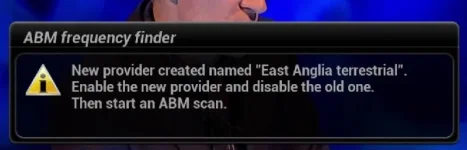
I have installed this, and it resolves my niggle concerning overwriting text - thank you to whoever is responsible. However I hit a snag when running DVB-T frequency finder. When I run it (not for the first time) on completion I get the message:

DTFF second run.webp

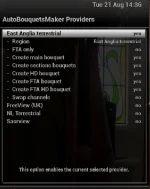
I don't remember getting a reference to the need to delete anything with the previous version on subsequent runs. When I go to the providers page:

new provider page.webp

where there is nothing that needs deleting.

I would have thought it extremely rare that anyone would re-run DVB-T frequency finder and end up with a different region & name, yet retain any interest in the previous results, so just overwriting the previous results would seem quite reasonable.


EMJB


EMJB
 
I have installed this, and it resolves my niggle concerning overwriting text - thank you to whoever is responsible. However I hit a snag when running DVB-T frequency finder. When I run it (not for the first time) on completion I get the message:

View attachment 57284

I don't remember getting a reference to the need to delete anything with the previous version on subsequent runs. When I go to the providers page:

View attachment 57285

where there is nothing that needs deleting.

I would have thought it extremely rare that anyone would re-run DVB-T frequency finder and end up with a different region & name, yet retain any interest in the previous results, so just overwriting the previous results would seem quite reasonable.


EMJB


EMJB


You run ABM frequency finder when the "offcial/built-in/one from github/whatever name pleases you" ABM provider file is inadequate. Surely you would have enabled a provider and run ABM in the first place to discover the inadequacy?

It is folly to suggest that people run ABM frequency finder when there is no need.

The goal/motive of ABM DVB-T frequency finder is twofold:
1. In the state if ABM DVB-T inadequacy, people to have an adhoc ABM provider that is correct, valid at that point in time and usable straight away without waiting for any changes to ABM provider files.
2. Having discovered ABM DVB-T inadequacy, overcome it with ABM DVB-T frequency finder, people can supply the file created by ABM DVB-T frequency finder. Changes are then committed, state of inadequacy eradicated for that region, for all users subject to them fetching the provider file updates.

I have repeated what has been said several times already albeit in different words. I don't see the point in answering queries if you are going to ignore them.

Where does it say delete? It says disable. I recall a post saying something along the lines: having two providers is not a good idea, there was nothing telling the user to disable Freeview UK

Our goal is people select their region and run ABM. ABM frequency finder is a tool to achieve this.
 
Last edited:
Here is a rough/simplest guide from scratch for people wanting to use ABM:
(If you want to use Engima2 scan or terrestrial scan plugin, ignore this)

Flash Image
In tuner configuration, ensure tuner is set to DVB-T, not DVB-C.
Leave region as default and save.

Go into ABM.
In providers, enable Freeview UK
Change region to your mast, press green to save.
Press green to scan.

If everything is fine. Carry one watching.
 
Here is a rough/simplest guide from scratch for people wanting to use ABM and their ABM provider file is inadequate:
Assumption is you have done above post first. Otherwise how do you know it is inadequate?
(If you want to use Engima2 scan or terrestrial scan plugin, ignore this)

Read this thread as I am nopt going to repeat everything again.
https://www.world-of-satellite.com/...annels-regions&p=472867&viewfull=1#post472867

If thread is unclear, please say so and suggest improvements and we shall tweak it.
 
Huevos and I use the Simple 1080 skin. If you use a different skin, things will look different.

For info (adapt to your needs)
OSD screenhot
Code:
http://mutant51.local/grab?format=jpg&mode=osd
 
You run ABM frequency finder when the "offcial/built-in/one from github/whatever name pleases you" ABM provider file is inadequate. Surely you would have enabled a provider and run ABM in the first place to discover the inadequacy?
The words are quite specific about needing to disable an old provider, but when rescanning this is not true (and perhaps when first using ABM??).

It is folly to suggest that people run ABM frequency finder when there is no need.
I would consider the word "folly" to be a bit strong - surely it does nothing worse than waste 10 minutes? If there is some harm, the user needs to be warned. However there are situations in which a re-run of ABM frequency finder is needed where no action on the provider page is needed, such as:


  • "700 Mhz clearance" frequency changes
  • Additional muxes becoming available from Freeview Extra transmitters
  • Moving house within the same region.

The goal/motive of ABM DVB-T frequency finder is twofold:
1. In the state if ABM DVB-T inadequacy, people to have an adhoc ABM provider that is correct, valid at that point in time and usable straight away without waiting for any changes to ABM provider files.
2. Having discovered ABM DVB-T inadequacy, overcome it with ABM DVB-T frequency finder, people can supply the file created by ABM DVB-T frequency finder. Changes are then committed, state of inadequacy eradicated for that region, for all users subject to them fetching the provider file updates.

I have repeated what has been said several times already albeit in different words. I don't see the point in answering queries if you are going to ignore them.
I appreciate that was the goal (though your use of the word "region" could be misinterpreted as the file may only be valid for a few square Km). However it seems to me to solve a probable problem particularly associated with Freeview Extra transmitters, where many users will not receive all the muxes, yet it would APPEAR from experiments I did 18 months ago that if the transmitter file includes all muxes ABM will create bouquets for all the services on all the muxes and EPG data for all those services will be displayed. Has this been solved in another way?

Where does it say delete? It says disable.
My mistake - apologies.


I recall a post saying something along the lines: having two providers is not a good idea, there was nothing telling the user to disable Freeview UK
If that was the intention, would something like "New/updated provider named ".." created. Ensure this has been enabled and all other terrestrial providers have been disabled on the providers page" be clearer and more effective?

Our goal is people select their region and run ABM. ABM frequency finder is a tool to achieve this.
I agree, and in my opinion from everything said so far, overall a much better one than selecting transmitters and you having to maintain the transmitter configuration files.

Yet again, please understand I am trying to look at these from the point of view of a newcomer. It is always very difficult for someone who is intimately involved in the design to see situations where messages can cause confusion. I think I can contribute to improving matters by either provoking changes or explanation in the user guide - the choice of whether to incorporate changes is yours, but I need to make sure I understand the situation before including anything in the user guide.
 
Last edited:
Here is a rough/simplest guide from scratch for people wanting to use ABM and their ABM provider file is inadequate:
Assumption is you have done above post first. Otherwise how do you know it is inadequate?
(If you want to use Engima2 scan or terrestrial scan plugin, ignore this)

Read this thread as I am nopt going to repeat everything again.
https://www.world-of-satellite.com/...annels-regions&p=472867&viewfull=1#post472867

If thread is unclear, please say so and suggest improvements and we shall tweak it.


The biggest problems I have with this, and much other information on this site, is how to find it, and to know whether it is up-to-date. Look at it from the viewpoint of the newbie - "ABM" means nothing to him, he wants to find all the channels, not "Add HD channels/regions", so it would be easily overlooked. If he realised ABM was the solution to his problem, he would probably go to the Image guide section where he would find " How to setup AutobouquetsMaker for FreeView HD using OpenViX " https://www.world-of-satellite.com/showthread.php?48369 which sounds hopeful. However I suspect it is now so out-of-date as to be worse than useless, and the thread is closed so no-one can add a warning.

Incidentally the link for feedback in your thread points to the appalling "ABM (Terrestrial): Frequency Finder. Birdman's thread" thread - something that in my opinion would be best deleted in view of the mis-information there-in.

EMJB
 
New/updated provider named ".." created. Ensure this has been enabled and all other terrestrial providers have been disabled on the providers page

How does that apply to people who can receive both Saorview and Freeview?
 
Incidentally the link for feedback in your thread points to the
appalling "ABM (Terrestrial): Frequency Finder. Birdman's thread" thread
- something that in my opinion would be best deleted in view of the
mis-information there-in.

I have removed the link and advised people start their own thread with the result of ABM DVB-T frequency finder. Link to sticky reposted in the same thread.

However I suspect it is now so out-of-date as to be worse than useless, and the thread is closed so no-one can add a warning.
It is still valid and correct. The only issue is that "service searching" has been renamed. To repeat the ignored remark, that guide was done more than two and half years ago. Quite remarkable that it is still by in large still correct unless you want to split hairs.

Admin, Moderators and some Beta testers can add comments
 
How does that apply to people who can receive both Saorview and Freeview?


If I remember correctly, Huevos first suggested that it would be possible for to have mix of multiple terrestrial providers (e.g. at the UK Irish border), and then seemed to correct himself in post 64. I can imagine the main part of ABM would be totally confused if the two providers use the same LCNs. I suspect the ideal answer would be that it is something only the experts should attempt, in which case to my mind my suggested words would be adequate given more explanation in the user guide (already included in the draft) or you could extend the words to add something like "unless you have a detailed understanding of the potential problems".

EMJB
 
I have removed the link and advised people start their own thread with the result of ABM DVB-T frequency finder. Link to sticky reposted in the same thread.
Thanks.

It is still valid and correct. The only issue is that "service searching" has been renamed.
Absence of mention of the DVB-T frequency finder strikes me as a very major issue, particularly since, as stated in post 54 this morning, I am tending to the view that use of DVB-T frequency finder is preferable to looking up transmitters for 99% of NEW users.

.....that guide was done more than two and half years ago. Quite remarkable that it is still by in large still correct unless you want to split hairs.
You may finds it remarkable, but to a user even something a simple as a changed name on a menu can be quite a pain and his sole interest is the validity of the information.

Admin, Moderators and some Beta testers can add comments
Are they monitoring those types of thread/guide to ensure they are up to date?


EMJB
 
You are ignoring comment about YouTube.

Our opinions on functionality and purpose of ABM DVB-T frequency finder differs.

Life would be boring of we were all the same.

I anticipate there will be a post of why there isn't only one way of doing things.
 

OpenViX Feeds Status

Back
Top