Superb quality and spec AB-Com PULSe 4K SE. Crazy offer! Only £129! FREE UK DELIVERY! 4K UHD, Enigma 2, Multiboot 4 images & more!...
Superb quality and spec AB-Com PULSe 4K Rev II Twin Satellite tuner only £179! FREE UK DELIVERY! 4K UHD, Enigma 2, SATA HDD facility, Multiboot 4 images & more!...

Engima 2 - Samsung SMART TV Streaming app

Could you try v5.1dbg (debug) you can download from here:
Code:
http://www.pembo.co.uk/e2stream/e2stream-download/

If this works, I'll upload 5.1 full

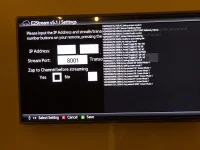
Same result for me - some warnings and you will see the further lines at bottom as I pressed some keys, however I am still unable to enter the IP or other details of the Enigma 2 unit.

IMG_0019.webp
 
hmmm. so the audio is enabled. Can you try just pressing tools on the welcome screen to see if you can show/hide the debug?
 
There's no field highlighted in that screen shot sigpark - has it always been this way? it should start with the first IP field being highlighted, but clearly from the screenshot, the renderer in the D-Series isn't as capable.
 
hmmm. so the audio is enabled. Can you try just pressing tools on the welcome screen to see if you can show/hide the debug?

Hi Pembo, Pressing tools at the welcome screen or in the settings screen does NOT toggle debug. The DEBUG message:

tools - Key pressed 75-Screen mode:4
B - Key pressed 20-Screen mode:4 followed by: Settingscreen mode:1

then pressing 1 2 3 in sequence gives:
Key pressed 101-Screen mode:1
Key pressed 98-Screen mode:1
Key pressed 6-Screen mode:1

then pressing navigation up, down, left and right
Key pressed 29460-Screen mode:1
Key pressed 29461-Screen mode:1
Key pressed 4-Screen mode:1
Key pressed 5-Screen mode:1

and of course nothing as regards input happens. Hope this helps
 
There's no field highlighted in that screen shot sigpark - has it always been this way? it should start with the first IP field being highlighted, but clearly from the screenshot, the renderer in the D-Series isn't as capable.

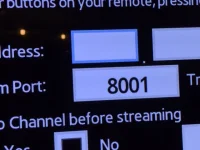
The contrast is not good but I confirm that the first IP field IS HIGHLIGHTED - colour is baby blue

IMG_0020.webp
 
Last edited:
I'm pretty sure this is the audio class... despite it being enabled I think it's missing some methods. I'm putting in one more change and will get another debug build out very shortly to test!
 
ok... try debug build again, same link (same internal version)!
Thanks both for helping me debug this :)
 
Last edited:
Hello

Should I try the debugging version myself? iv got the encrypted channels problem on the H series

Thanks
 
ok... try debug build again, same link (same internal version)!
Thanks both for helping me debug this :)


Hi Pembo,

Tools does indeed toggle debug now, and input works successfully. I have added and saved my e2 box IP

Many thanks:)
 
Excellent - can you try and change to legacy player now - lets hope this works after all this ;)
 
Hello

Should I try the debugging version myself? iv got the encrypted channels problem on the H series

Thanks

I don't think it will help. There's definitely some issue outside of the app here, but I'm not sure what yet and need to add more debugging and/or give you a few tests to run to work out what is going on. For all intents and purposes, an encrypted channel should be no different than a FTA one assuming the settings are right and aren't treated any differently.

Out of interest - you could switch to the 'legacy' player to see what results you get.
 
Excellent - can you try and change to legacy player now - lets hope this works after all this ;)

Hi Pembo,

With default or legacy player all bouquets and channels are downloaded

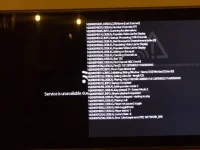
With the legacy player, when I select a channel to play I get a message "Service is unavailable due to network or service interference"; debug gives "Error [deviceapis error(19)]: NETWORK_ERR"

With the default player the screen is stuck on "buffering...please wait" and indebug "Error Player AVPlayer is null"; exiting with debug enabled causes the TV to restart!

Perhaps it is the "debug" mode, but although you can input the config and select B to save, each time you launch the app you have to re-input the config again.

Sorry the news is not better:confused:
 
Last edited:
Hi Pembo,
With the legacy player, when i select a channel to play I get a message "Service is unavailable due to network or service interference"
Hmmm... bugger.

Doing some digging, this might be trying to report home to Samsung and errors as it's an old model, but I'm not sure.
Check menu-->settings--->network---> TURN OFF SWL (Samsung Wireless Link): OFF

And see if this makes any difference.

Perhaps it is the "debug" mode, but although you can input the config and select B to save, each time you launch the app you have to re-input the config again.
This is a feature of the debug build.


Be interested if anyone else has any different experiences?

---- updated

Could you also try with the debug window still on and see if you get anything useful.
 
Last edited:
Doing some digging, this might be trying to report home to Samsung and errors as it's an old model, but I'm not sure.
Check menu-->settings--->network---> TURN OFF SWL (Samsung Wireless Link): OFF

Have done so, no difference I am afraid.

---- updated

Could you also try with the debug window still on and see if you get anything useful.

IMG_0021.webp
 
I don't think it will help. There's definitely some issue outside of the app here, but I'm not sure what yet and need to add more debugging and/or give you a few tests to run to work out what is going on. For all intents and purposes, an encrypted channel should be no different than a FTA one assuming the settings are right and aren't treated any differently.

Out of interest - you could switch to the 'legacy' player to see what results you get.

As i mentioned before, on a pm i think, swapping to legacy is not possible on my TV im afraid.
After the initial setup it is impossible to change any setting on the menu that has a radio button (IP and port its ok i can change).
I can move to and highlight the radio button (blue circle) but i can not select it.
I can click save with the radio button highlighted but when i go back to it it has not saved the setting.
That has happened to me on both v4 and v5

Finally to make matters even weirder, on the advanced settings it is the legacy player that is selected.
 
@sigpark
It's showing a network error but i'm unsure why. When I test the player state goes from 1 to 8 to 1, and it does play a channel even using the legacy player.

Just to confirm you've got the stream authentication option turned off?
 
Last edited:
As i mentioned before, on a pm i think, swapping to legacy is not possible on my TV im afraid.
After the initial setup it is impossible to change any setting on the menu that has a radio button (IP and port its ok i can change).
I can move to and highlight the radio button (blue circle) but i can not select it.
I can click save with the radio button highlighted but when i go back to it it has not saved the setting.
That has happened to me on both v4 and v5

Finally to make matters even weirder, on the advanced settings it is the legacy player that is selected.

try the v5.1 debug build - this resets all settings on loading.
From a radio you have to press the 'enter' key to select, but there has been some weirdness with H series TVs and the enter key!
 
Thanks, will try tomorrow, wife is in the bedroom now and wants to sleep :(
 
@sigpark
It's showing a network error but i'm unsure why. When I test the player state goes from 1 to 8 to 1, and it does play a channel even using the legacy player.

Just to confirm you've got the stream authentication option turned off?

Yes - no authentication on vusolo2

I have changed the setting from stream to "transcode" port 8002 - and this works for channels in any bouquet.Poor picture because big screen, and stalls BUT seems to work

HOWEVER for recordings neither stream or transcode works - i.e. with recordings in stream or transcode I get network error.

My webif settings are default, AND please recall from earlier post that I have an F and H series working on default settings.
 
HOWEVER for recordings neither stream or transcode works - i.e. with recordings in stream or transcode I get network error.

I have installed the release version 5.1 on my 40D7000 and can save settings as expected. The zap setting works in reverse - set to yes DOES NOT ZAP and visa versa!

Existing the app causes my TV to crash about 50% of time I am afraid as I exit, either leaving the app using return, and the exit sub menu OR the exit button on the remote.

I confirm that TRANSCODING does in fact work on port 8002 :) using the legacy player
..however I get the network interference referred to here when I try to stream TV. Streaming or Transcoding recordings gives the same "network interference" error.

Hope this helps a little. If you ping me a link to the earlier version 4, I will test and report
 

OpenViX Feeds Status

Back
Top