Superb quality and spec AB-Com PULSe 4K SE. Crazy offer! Only £129! FREE UK DELIVERY! 4K UHD, Enigma 2, Multiboot 4 images & more!...
Superb quality and spec AB-Com PULSe 4K Rev II Twin Satellite tuner only £179! FREE UK DELIVERY! 4K UHD, Enigma 2, SATA HDD facility, Multiboot 4 images & more!...

Engima 2 - Samsung SMART TV Streaming app

I have also noted that if I prevent Internet access by disconnecting my DSL from my domestic router, but keeping my home network functioning on the LAN side, the Samsung TV confirms network function, but that Internet is not available!

In this scenario the e2stream app will not even open, and you get a message that "network interference has occurred - please tryagain later". This behaviour repeats until you restore and test the internet connection from the Samsung TV; only then will the e2stream app start and connect the the enigma box on the LAN! So, I don't know what is going at start-up, but the e2stream app will not start unless it can see the internet on my 40D7000!!

Hope this helps.
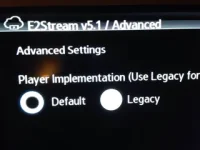
 
I have installed the latest debug version and I have got the same results on H series, legacy player is selected by default and the enter button does not work to select radio buttons in the menu. Enter does work on the initial setup menu but then stops working. I have tried all sorts of presses, long ones, short ones, not working. Tried a remote from an older samsung TV works to navigate but not to select again.
Could the legacy player be the reason encrypted channels don't work? Doubt it as I had the same behaviour on v4 that legacy was not there as an option.
Any suggestions? Thanks in advance
 
I've not tried zapping with the legacy player, but in tests here, zap only functions when set to yes.

E2Stream doesn't use any external communication whatsoever, all only local to the IP specified on startup, so it must be something the TV is doing as the link you posted infers. Is this the behaviour on the D-Series TV only?

I'm wondering if streaming is a problem because of the codec - I've downloaded previous versions of the SDK so I'm going to step back and deploy in each of these to see how it behaves. I can only find codec information back to 2013, which I assume is the F series TVs,
I've got an E and and F series and the default player works on these (and the legacy player).

If I had a d-series I'd route through a proxy (e.g. tcptrace) or use wireshark to try and see whats going on.
 
@gvsb - does the debug log show the legacy player is in use or the default player?
If you see the InfoBar and buffering as you start a stream, it's the default player.

Legacy is never enabled by default, and can't be - the code in the app is set to use default as a starting value

Code:
playerName : "Default",
playerList : ["Default","Legacy"],

So I'm really not sure what is going on with your TV.

Is there anyone else with a H-Series TV that sees this behaviour?
 
This is what I see when I go to advanced settings and I can't change it. It seems it is using the default to play streams though.

Should I reset the TV to factory settings and try again?
Should I return it and get a new one from another shop?
I am desperate to make your app work and it is very demoralising the fact that I seem to be the only one with these weird issues

My TV is ue32h5500 running latest software version 2130

ImageUploadedByTapatalk1420496142.376972.webp
 
I'm wondering if streaming is a problem because of the codec - I've downloaded previous versions of the SDK so I'm going to step back and deploy in each of these to see how it behaves. I can only find codec information back to 2013, which I assume is the F series TVs,
I've got an E and and F series and the default player works on these (and the legacy player).
Agree with years and model versions D is 2011, E is 2012, F is 2013 and H is 2014.

I am pretty sure that you have the Samsung developper SDK archive

This table does privide the SDK and streaming info

and the codecs that I belive are supported: Audio/Video Formats MP3, WMA, MPEG4, Xvid, DivX, MKV, JPEG from here

Sorry I can't be of more help, but let me know any tests you want me to do. Kids watching TV's but will do the "no internet" test later for the F and H models, but all seems good with them, so not sure tha twill yield anything?

Is there a player app that you know of that I could install from the Apps Store that might help with codecs or default / legacy player for the D series?

Thanks again
 
This is what I see when I go to advanced settings and I can't change it. It seems it is using the default to play streams though.

Should I reset the TV to factory settings and try again?
Should I return it and get a new one from another shop?
I am desperate to make your app work and it is very demoralising the fact that I seem to be the only one with these weird issues

My TV is ue32h5500 running latest software version 2130

View attachment 39896

I hope I am not adding confusion, I am running v5.0 e2stream. I did note earlier on my H series that I could not change the "zap" or "channel number prefix" check-box options in support of what you are saying.

On the D series that I have posted about, I have noted that the zap option worked in reverse AND I also noted that the "channel numbering" option that I could select on the D series, made no ddifference i.e. the channel numbers did not display for a Channel like BBC i.e. I could never get "101 BBC" no matter the option that I checked.
 
This must be the annoying enter problem on the H series that doesn't make sense.
Can someone with a H-series press tools on a screen and press enter to see what key code it reports.

In the meantime I've started changing to add the play button in addition to enter.

The number prefix is if you're using bouquets on the box with the number in them and want to strip them from the channel names.
 
On initial setup key pressed 29443
On the menu after initial setup nothing on normal press and key pressed 84 on long press
 
guys - I'm going to build a newer debug build to try something with the enter key.
I'll get this uploaded shortly. If one of you can test this would be great.

@gvsb - this is showing the default player selected.

--- updated ---

Please try the debug build from here
Code:
http://www.pembo.co.uk/e2stream/e2stream-download/

Note - the non-debug version hasn't changed yet.

Can you try enter again - see if you get any keycode returned.
29443 is the enter key.
(84 is channel list key)
 
Last edited:
forgot to mention in the edit above - the play button should work on this build in place of the enter key, but I'd appreciate you testing the enter key.
Again - this is something I can't recreate on my E or F series TVs or the 2014 emulator so it's most irritating!
 
Enter key works, well done!!
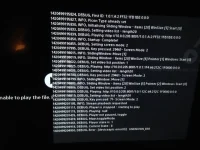
With legacy player I get the attached error on some channels and infinite spinning circle on others, same behaviour on same Channels for default and legacy as I had before.
ImageUploadedByTapatalk1420499716.770717.webp
 
try changing to transcode if your box is capable of this for the legacy player and see what you get then.

Can you try:
Code:
http://10.0.0.205:8001/1:0:1:12C:64:212C:1F0000:0:0:0:
in a browser and see what happens.

I'll whizz out v5.2 full if this fixes the enter key then!
That's progression!
 
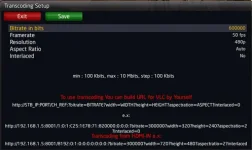
My box uses 8001 port for both normal and transcoded streams so transcoding has not worked for me on e2stream

the url works ok on firefox on my laptop, on ie11 it downloads the stream as it was a file without playing it
 
You don't have a transcoding capable box then I guess?
Can't be on the same port.

No authentication requests/etc when you try and download the stream?
 
E2Stream v5.2 is now available to download from here:
Code:
http://www.pembo.co.uk/e2stream/e2stream-download/

Change log:
Code:
v5.2 – 05/01/2015
* Fixed 'Enter' button on H-Series TVs

v5.1 – 04/01/2015
* Fixed Audio Class issues with C/D Series preventing input of
   IP on startup.
 
Box has the same hardware with duo2, Broadcom 7424. It does hardware transcoding and I use it a lot outside my LAN.
It used to be port 8002 for transcoding and then they have changed both to 8001 as far as I can tell.

Not sure what you mean by authentication requests I'm afraid
 
you can see the transcoding port in the plugin menu.
Re authentication - It doesn't prompt you for a username/password?

Might be worthwhile backing up your image and settings on the e2 box, then updating with the latest stable build, not restoring settings, set up the tuners and ABM, plus your cam settings for your card, and then give it a try again before you setup anything else. If it doesn't work still, just flash your image and settings back again and you've lost nothing by trying.

I've had confirmation from people with a duo2 that they can stream encrypted channels over on the german vu+ forums, and some of those had H-Series TVs.
 
Transcoding menu looks like this and i can verify that my box Golden Interstar Xpeed LX3 and quite a few other E2 boxes use port 8001 for both normal and transcoded streams.
transcoding.webp

There is no authentication for webif.

Will try fresh install although the fact that i have identical behaviour on my secondary E2 box that runs openpli4 tends to suggest that the problem lies with the TV.
 
This is what I see when I go to advanced settings and I can't change it. It seems it is using the default to play streams though.

Should I reset the TV to factory settings and try again?
Should I return it and get a new one from another shop?
I am desperate to make your app work and it is very demoralising the fact that I seem to be the only one with these weird issues

My TV is ue32h5500 running latest software version 2130

View attachment 39896

Hi gvsb,

I've got version 3.8 running just fine on my UE32H5500, TV software is up to date (also running on an UE32H4510) - both work brilliantly.

Maybe see if you can download version 3.8 to see how that works for you?


Cheers,

stilts


Sent from my iPhone using Tapatalk
 

OpenViX Feeds Status

Back
Top