Superb quality and spec AB-Com PULSe 4K SE. Crazy offer! Only £99! FREE UK DELIVERY! 4K UHD, Enigma 2, Multiboot 4 images & more!...
Superb quality and spec AB-Com PULSe 4K Rev II Twin Satellite tuner only £149! FREE UK DELIVERY! 4K UHD, Enigma 2, SATA HDD facility, Multiboot 4 images & more!...

EPG files test: Phase 1. Refactor

Testers for re-written EPG files

[quote name="simonc" post=495804]Yes an easy win. Fix now in the branch[/QUOTE]


Many thanks. Request to address this issue from 2015 marked as completed
 
Last edited:
Ok, just upgraded Test EPG to v4a. Ok so far, thank you :)

I'll try playing with it later to see if I can get it to crash :)
 
I've now added an upgrade mechanism to the config. It deals with all the renaming and any changes to values, only runs when the config.version is absent, or less than 53023. If you want to test it, grab a copy of your settings file from a backup (look in /etc/enigma2/). On startup, the settings will be mapped over and config.version will be set.
 
Been using Test EPG 4a all day without an issue. This is under our normal use. Mostly Grid EPG to flick through channels, playback and record (mostly her soaps, or lack thereof haha).

I'll try either later or tomorrow (if not sunny) and go through various other things we don't normally use receiver for to try and catch any other bugs.

Thank you :)
 
I used it last night without any issues - is the upgrade mechanism mentioned in #63 ready to use yet, I'd like to try a clean install of the new EPG setup?
 
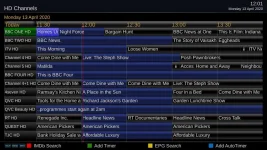
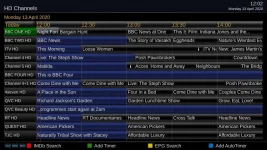
Ok, just noticed that timeline_now marker doesn't show in GridEPG (aka GraphicalEPG) or even smaller EPG (that use get by clicking left or right arrow from main TV) and possibility other EPG screens.

Screenshot of Stock image with red vertical line known as "timeline_now"
timeline_now.webp

Checked Vix's default skin with test EPG and again no timeline. Went back to stock image and timeline present as expected.

The timeline widget is called, "timeline_now". Does this need to be added back in for compatibility with all skins? The widget is obviously present in skins xml file but test EPG doesn't see/display it.

Could this be related to naming changes of EPG (ie GraphicalEPG now known as Grid EPG)?
 
Last edited:
I'm seeing the timeline with Simple_1080....
 

Attachments

  • time_line.webp
    time_line.webp
    57.7 KB · Views: 15
Tried Simple_Ten_Eighty skin and no timeline...
simple_ten_80.webp

The other EPG screen I mentioned earlier and no timeline (confluence 1080 skin this time):
otherEPG.webp

@ccs, what exactly is that skin called in plugins to see if I can see timeline on that?
 
Last edited:
Simple_Ten_Eighty is already available in User interface/Skin setup.
 
Can you post your settings file? I'm seeing the timeline on VixNight, Confluence and Simple 1080 as well
 
The timeline isn't showing at the moment - it was 11:29, it reappeared at 11:30.
 
Anything to do with "Maintain old EPG data for (15 minutes)"?

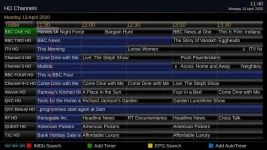
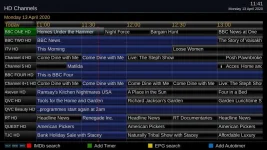
The old and new EPG (on different boxes) have, in theory, the same settings, but the EPG's are clearly different......
 

Attachments

  • new_epg.webp
    new_epg.webp
    57.9 KB · Views: 11
  • old_epg.webp
    old_epg.webp
    59.4 KB · Views: 10
Can you post your settings file? I'm seeing the timeline on VixNight, Confluence and Simple 1080 as well
Ok, attached (renamed as txt file in case forum didn't like it having no extension).

Anything to do with "Maintain old EPG data for (15 minutes)"?
I don't normally touch that setting to be honest.

The settings I use are generally what I have box setup as anyhow.

Could I maybe not have latest file of something for whatever reason then?

I deleted "epg" subfolders before I put test 4a on and overwrote existing files (including the two other xml files not belonging to epg files). Maybe I missed something?
 

Attachments

Last edited:
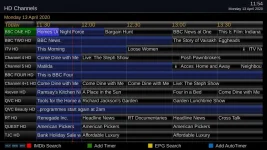
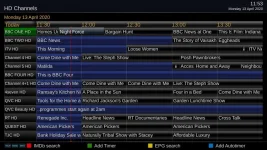
They're back in sync now......
 

Attachments

  • new_later.webp
    new_later.webp
    58.1 KB · Views: 11
  • old_later.webp
    old_later.webp
    58.8 KB · Views: 10
@ccs, what EPG view is that and how do you get that? I normally use Graphical/Grid EPG view which you get from pressing EPG button once.

I'll put box to sleep and re-copy over latest 4a files in post 1 in case a file didn't transfer and post back.....


Update:
Put files 4a overwriting existing files (but did remove epg subfolders first) and same thing.
 
Last edited:
If I exit the new epg, and go back in again, I get two different timelines......

Edit: (this doesn't happen with the "old" version.)
 

Attachments

  • new_1201.webp
    new_1201.webp
    58 KB · Views: 7
  • new_restarted.webp
    new_restarted.webp
    60.5 KB · Views: 6
Last edited:
@ccs, what EPG view is that and how do you get that? I normally use Graphical/Grid EPG view which you get from pressing EPG button once.

I'll put box to sleep and re-copy over latest 4a files in post 1 in case a file didn't transfer and post back.....

I'm using Grid EPG, but with channel preview mode set to "no".
 
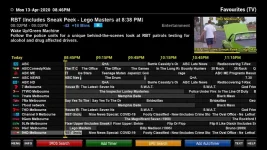
1) GraphicalEPG: MENU > Info icon width. This is set to 0 yet the EPG is filled with broken graphical "i" characters.

2) By the way, why use a big graphical "i"? Why not use a text "i" in the appropriately sized font? Even better use another character glyph so that it is obvious that the event title isn't starting with "i". Maybe something like "»" or "…" or "†" or "⁞". The narrower the better.

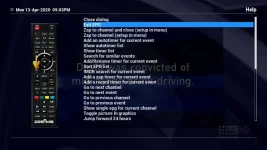
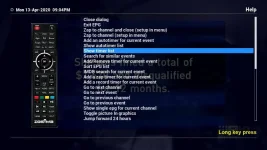
3) The HELP button is not working properly. Most of the help topics are not displayed on the remote control. This was tested on Zgemma H7 on which the remote control map for all Enigma2 users was recently updated so it is unlikely that the fault is with the mapping code.

1.webp

HelpOkay.webp

HelpBroken.webp
 
Last edited:
I didn't notice no timeline but once adding maintain old data from 0 to 15 minutes I see the timeline.
 

OpenViX Feeds Status

Back
Top